Custom Report Templates of Smart PDUs in Telecom Cabinets: Personalized Data Analysis Support


You need fast, reliable information to keep your telecom cabinets running smoothly. Custom report templates in the Smart Power Distribution Unit help you turn raw numbers into clear insights. You can spot trends, track performance, and solve issues before they grow. With these tools, you take control of your data and make smarter choices every day.
Key Takeaways
Custom report templates in Smart Power Distribution Units help you track essential metrics for telecom cabinets, allowing for better decision-making.
Automated reporting saves time and reduces errors, ensuring you always have up-to-date information without manual effort.
Visual tools like charts and tables make complex data easy to understand, helping you spot trends and issues quickly.
Tailoring reports to your specific needs improves operational efficiency and reduces costs, leading to better performance in telecom cabinet management.
Regularly reviewing and updating your report templates ensures they remain relevant and effective for your operational requirements.
Custom Report Templates in Smart Power Distribution Units

Definition and Role
Custom report templates help you track and analyze the most important data from your Smart Power Distribution Unit. These templates let you choose which metrics matter most for your telecom cabinets. You can focus on energy usage, outlet status, or environmental conditions. This flexibility means you always see the information that supports your daily work.
Custom report templates allow you to track essential metrics for telecom cabinets.
They help you monitor data in real time and receive alerts when something changes.
You can detect issues early and schedule maintenance before problems grow.
The templates adapt as your needs change, so your reports stay useful and relevant.
For example, many telecom professionals use custom reports to improve billing accuracy and operational efficiency. Commander, a well-known company, used a branch circuit monitor to create monthly energy usage reports. This approach gave them better insights into power consumption and helped them make smarter decisions. You can use similar strategies with your Smart Power Distribution Unit to optimize performance and reduce costs.
Application in Telecom Cabinets
You use custom report templates in telecom cabinets to turn raw data into clear, actionable insights. The Smart Power Distribution Unit from ESTEL offers features like remote monitoring, real-time alerts, and an LCD display. These features make it easy to collect and organize data for your reports.
You can set up templates to track power distribution across multiple outlets. You can also monitor environmental factors like humidity and temperature. With these tools, you spot trends, identify risks, and plan maintenance before issues affect your network. The Smart Power Distribution Unit supports your need for reliable, efficient, and safe telecom cabinet management.
Key Features and Options
Data Selection and Filtering
You can choose exactly which data points you want to track in your reports. The Smart Power Distribution Unit lets you focus on metrics like voltage, current, outlet status, or environmental readings. You do not need to sift through unnecessary information. You can filter data by time, device, or event type. This approach helps you find patterns and spot unusual activity quickly. For example, you can set up a report to show only power surges during the last month. This targeted view saves you time and helps you act faster.
Tip: Use filters to narrow down large datasets. This makes it easier to identify trends and troubleshoot issues in your telecom cabinets.
Visualization and Output Formats
You can turn raw numbers into easy-to-read charts and tables. The Smart Power Distribution Unit supports different visualization options, such as line graphs for energy usage or bar charts for outlet activity. You can export your reports in formats like PDF, Excel, or CSV. This flexibility means you can share insights with your team or keep records for future analysis. Visual tools help you understand complex data at a glance. You do not need advanced technical skills to interpret these reports.
Line graphs show changes over time.
Bar charts compare different outlets or devices.
Tables give you detailed breakdowns for audits.
Scheduling and Automation
You can automate your reporting process with built-in scheduling tools. The Smart Power Distribution Unit allows you to set up daily, weekly, or monthly reports. You do not have to remember to run reports manually. Automated delivery ensures you always have up-to-date information. You can receive reports by email or store them in a shared folder. This feature supports proactive management and helps you stay ahead of potential problems.
Note: Automated reports reduce manual work and help you maintain consistent records for compliance and performance tracking.
Personalized Data Analysis with ESTEL
Tailoring Reports to Needs
You can shape your data analysis to match your exact operational requirements. With ESTEL, you decide which metrics matter most for your telecom cabinets. You might want to focus on energy consumption, outlet status, or environmental factors like humidity and temperature. The Smart Power Distribution Unit gives you the flexibility to select, filter, and visualize the data that supports your daily decisions.
You can set up custom templates to track trends over time or monitor specific events. For example, you might want to see how energy usage changes during peak hours or check for power surges after storms. You can also automate these reports, so you always have the latest information without extra effort. This approach helps you respond quickly to changes and keep your network running smoothly.
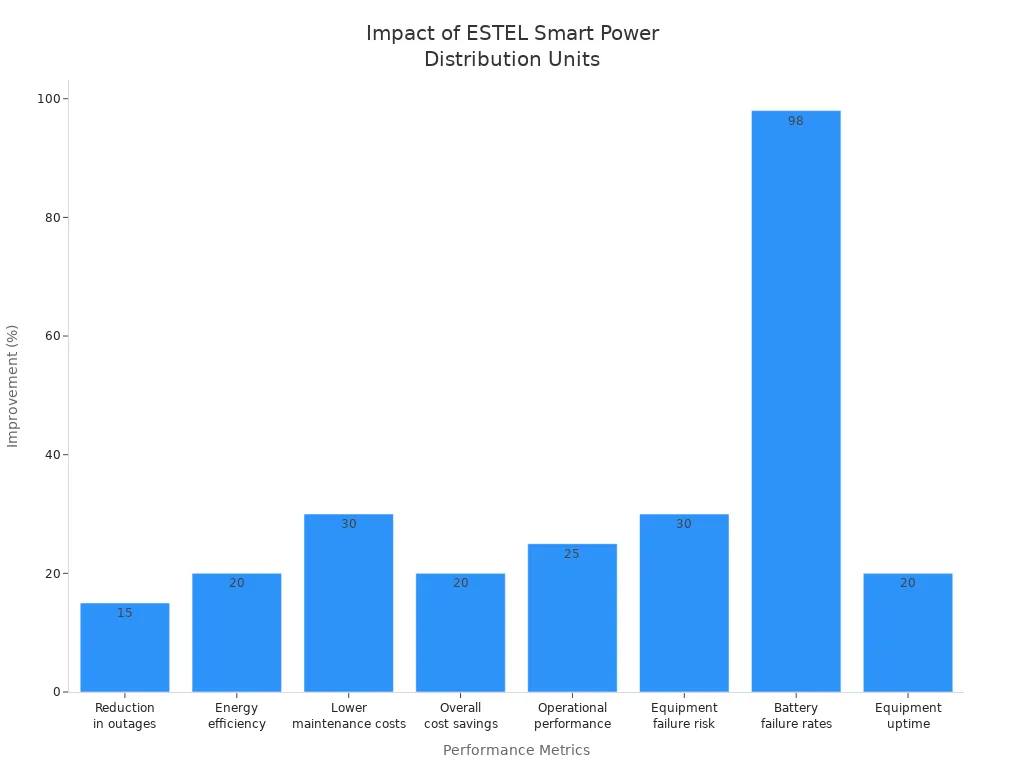
Personalized data analysis leads to real improvements in telecom cabinet performance. The following table shows how tailoring your reports with ESTEL solutions can impact your operations:
Statistic Description | Value |
|---|---|
Reduction in outages | 15% |
Improvement in energy efficiency | Up to 20% |
Lower maintenance costs | 30% |
Overall cost savings | Up to 20% |
Improvement in operational performance | 25% |
Reduction in equipment failure risk | Up to 30% |
Decrease in battery failure rates (2018-2024) | 98% |
Improvement in equipment uptime | 20% |
Tip: When you customize your reports, you gain control over your data. This control helps you spot risks early and make decisions that improve efficiency and reliability.
Use Cases in Telecom Cabinets
You can see the benefits of personalized data analysis in real-world telecom cabinet operations. Many telecom operators use ESTEL Smart Power Distribution Unit to monitor and manage their outdoor cabinets. These solutions help you reduce downtime, lower costs, and protect your equipment.
Consider these common scenarios:
You set up a report to track power changes. Your network stays online even during unexpected outages.
You monitor maintenance needs. You send fewer technicians to remote sites and fix problems faster.
You analyze energy usage. You find ways to cut wasted power and lower your operating costs.
You watch for surges and overloads. Your equipment stays safe from damage.
The table below summarizes these outcomes:
Benefit | Outcome |
|---|---|
Network stayed online during power changes | |
Lower Maintenance Costs | Fewer site visits and faster repairs |
Improved Energy Efficiency | Less wasted power and lower operating costs |
Enhanced Equipment Safety | No damage from surges or overloads |
You can use these strategies to keep your telecom cabinets reliable and efficient. ESTEL gives you the tools to turn data into action, so you stay ahead of problems and support your network’s growth.
User Benefits
Decision-Making Support
You need clear, actionable information to make the right choices for your telecom network. ESTEL’s custom report templates give you direct access to the data that matters most. You see real-time power usage, outlet status, and environmental conditions. This information helps you spot trends and predict potential issues before they become problems.
You can compare energy consumption across different cabinets.
You can identify which sites need immediate attention.
You can prioritize upgrades based on actual performance data.
Tip: Use visual reports to present findings to your team. Clear charts and tables help everyone understand the situation quickly.
With these tools, you make decisions based on facts, not guesswork. You reduce risks and improve the reliability of your network.
Efficiency and Troubleshooting
You want your operations to run smoothly and efficiently. ESTEL’s Smart Power Distribution Unit streamlines your workflow by automating data collection and reporting. You spend less time gathering information and more time solving real problems.
Automated alerts notify you of abnormal conditions, such as power surges or high humidity.
Scheduled reports keep you updated without manual effort.
Custom filters help you focus on the most relevant data for each situation.
When you face an issue, you can quickly pinpoint the cause. For example, if a cabinet experiences frequent outages, you can review historical data to find patterns. You can then take targeted action to fix the root cause.
Efficiency Feature | How It Helps You |
|---|---|
Automated Reporting | Saves time and reduces errors |
Real-Time Monitoring | Enables fast response |
Custom Data Filters | Speeds up troubleshooting |
Note: Fast troubleshooting means less downtime and lower maintenance costs.
Compliance and Reporting
You must meet industry standards and regulatory requirements. ESTEL’s custom report templates help you maintain accurate records for audits and compliance checks. You can generate detailed reports that show power usage, maintenance activities, and environmental conditions.
You can export reports in formats like PDF or Excel for easy sharing.
You can schedule regular compliance reports to ensure you never miss a deadline.
You can keep a digital archive of all reports for future reference.
These features make it easy to prove compliance and demonstrate your commitment to best practices. You avoid penalties and build trust with clients and regulators.
Reminder: Consistent, accurate reporting protects your organization and supports long-term success.
By using ESTEL’s Smart Power Distribution Units with custom report templates, you gain control over your data, improve your decision-making, boost efficiency, and ensure compliance. You set your telecom operations up for reliable performance and growth.
Implementing Custom Report Templates
Accessing Template Tools
You can start by logging into the management interface of your Smart Power Distribution Unit. The dashboard gives you access to all reporting tools. You will find a section labeled “Custom Reports” or “Templates.” Here, you can view existing templates or create new ones. The interface is user-friendly, so you do not need advanced technical skills. If you need help, you can refer to the user manual or contact your IT support team.
Designing and Customizing Reports
You can design a report by selecting the data points that matter most to your telecom cabinet operations. Choose metrics like voltage, current, outlet status, or environmental readings. Use filters to focus on specific time periods or events. You can also pick how you want your data displayed—charts, tables, or graphs. Save your template for future use or schedule it for automatic generation. This process helps you get the exact information you need, when you need it.
Tip: Test your custom report with sample data before using it for daily operations. This step ensures accuracy and helps you catch any setup errors early.
Best Practices
To keep your custom report templates effective and reliable, follow these best practices:
Schedule regular training sessions for your team. This keeps everyone updated on new features and reporting methods.
Review your templates often. Make sure they still match your current operational needs.
Work closely with your IT and network teams. This ensures your templates integrate smoothly with other systems.
Perform periodic audits. These checks help you maintain compliance and system reliability.
By following these steps, you ensure your Smart Power Distribution Unit continues to deliver accurate and actionable insights for your telecom cabinets.
You gain real control over your telecom cabinets with custom report templates in ESTEL Smart Power Distribution Units. These tools help you improve efficiency, meet compliance needs, and make smarter decisions every day. The industry moves toward more intelligent PDUs and advanced reporting. See the trends shaping the future:
Trend | Description |
|---|---|
Integration of Intelligent PDUs | More PDUs monitor and manage power at the rack and device level. |
Use of DCIM Software | Operators use DCIM software for real-time monitoring and alarm management. |
Demand for Custom Reports | Technology drives the need for flexible, custom reporting tools. |
Explore more at ESTEL’s official website and start optimizing your telecom operations today.
FAQ
How do you create a custom report template in the Smart Power Distribution Unit?
You access the management dashboard, select “Custom Reports,” and choose your data points. You can save your template for future use or schedule it for automatic generation.
Can you export reports in different formats?
Yes. You can export your reports as PDF, Excel, or CSV files. This makes sharing and archiving your data easy.
What data can you include in your custom reports?
You can include metrics like voltage, current, outlet status, energy usage, humidity, and temperature. You choose the data that best fits your needs.
How do automated reports help your telecom operations?
Automated reports keep you updated without extra work. You receive regular insights, spot issues early, and maintain accurate records for compliance.
See Also
Exploring How Telecom Cabinets Are Utilized Effectively
New Developments Shaping Outdoor Telecom Cabinet Designs
The Importance of ESTEL PDUs in Data Center Cabinets
Analyzing Telecom Cabinet Structures and Their Associated Costs
CALL US DIRECTLY
86-13752765943
3A-8, SHUIWAN 1979 SQUARE (PHASE II), NO.111, TAIZI ROAD,SHUIWAN COMMUNITY, ZHAOSHANG STREET, NANSHAN DISTRICT, SHENZHEN, GUANGDONG, CHINA
