How Smart Fan Speed Control Extends Fan Lifespan in Telecom Rectifier Stations

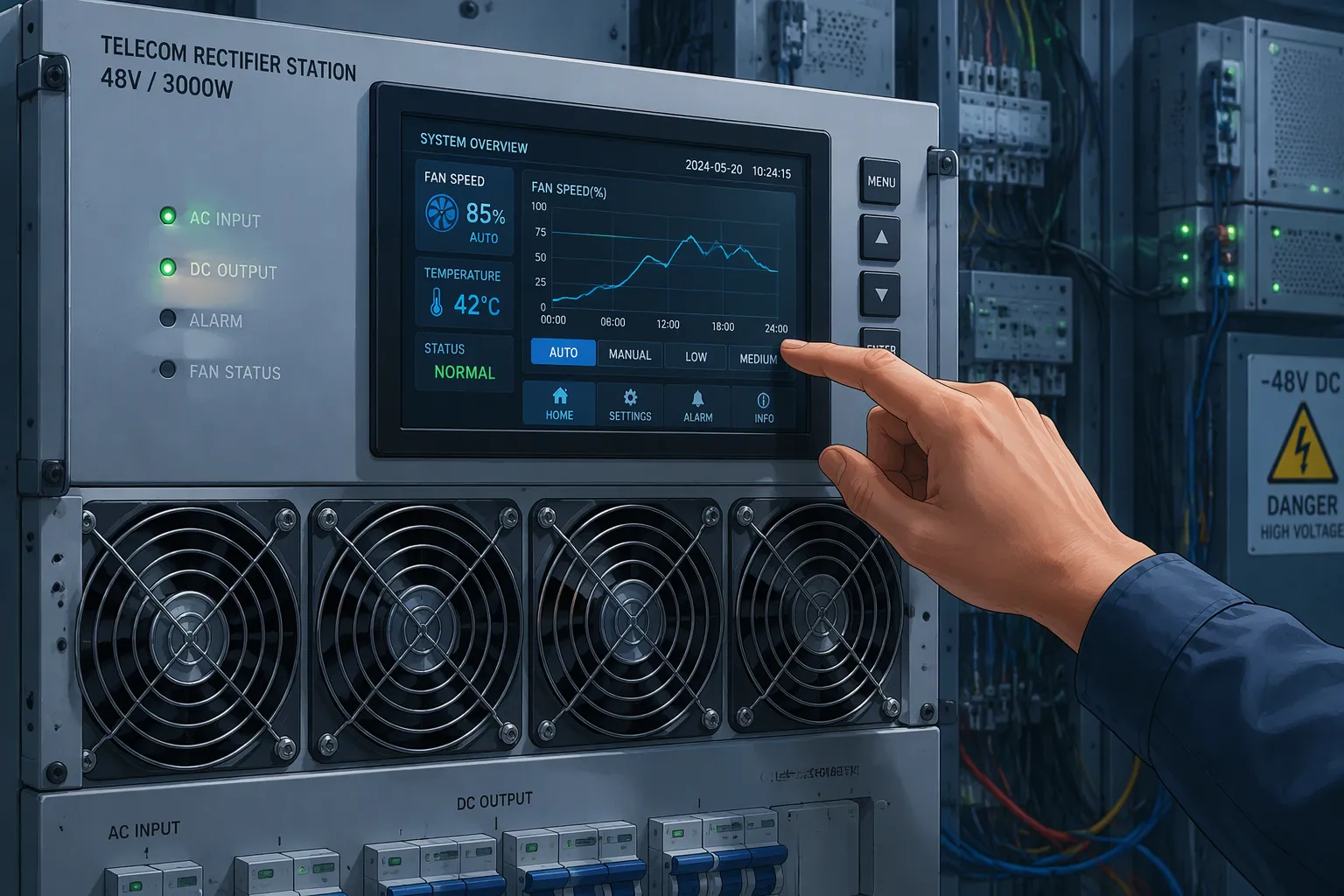
Smart fan speed control extends fan lifespan by matching RPM to real thermal demand. Slower, steadier operation reduces mechanical wear. Early fault warning adds a second layer of protection. It catches degradation before a fan fails.
You gain two practical outcomes: longer fan service life and lower station noise. The mechanisms behind each one are straightforward, and this post walks through them.
The stakes are real for operators. Fans cost money to replace. A failed fan can force downtime at a live site. Nearby residents also notice the hum from Telecom Rectifiers, and acoustic complaints carry their own cost.
ESTEL pairs intelligent speed regulation with environmental monitoring, which makes the company a useful reference point.
Key Takeaways
Smart fan speed control adjusts fan speed to actual cooling needs, reducing wear and extending fan life.
Early fault warning detects fan problems before they cause downtime, allowing planned maintenance.
Combining speed control and early warning creates a feedback loop that maximizes fan lifespan and reduces noise.
Slower fan speeds also lower energy use and noise, benefiting both operators and nearby residents.
Audit your current setup to check if fans follow a thermal curve and if monitoring catches RPM deviations and locked rotors.
Cooling Challenges in Telecom Rectifiers
Telecom Rectifiers generate heat continuously, and the cooling fan must remove it. The way you control that fan shapes both its service life and the sound profile of the site. Two challenges stand out: mechanical wear from constant full-speed operation, and noise that signals degradation.
The Cost of Fixed-Speed Fans
A fixed-speed fan in Telecom Rectifiers runs at full RPM no matter how much heat the load produces. At night or in cool weather, the rectifier may need only a fraction of that airflow. The fan still spins flat out. Every extra hour at full speed adds bearing revolutions and pulls more dust through the enclosure. Bearing wear and dust intake both accelerate, and the fan reaches replacement sooner than its rated life suggests.
This approach still has a place. Low-cost or simple sites with steady loads and infrequent maintenance visits can justify a constant-speed fan on price alone. The trade-off is shorter fan life and more frequent replacement.
Noise as an Early Warning Sign
Acoustic output rises when a fan degrades, and that makes noise a useful diagnostic signal. Dust on the impeller, a loose cover, or a rattling back shutter can cause simple noise, according to mmotors.shop. Increasing mechanical noise can also signal that the bearings or motor are wearing out. sofasco.com notes that dust accumulation on fan blades disturbs the balance of the rotating assembly, and even small deposits disrupt airflow patterns and increase vibration. Worn bearings produce irregular vibration or rattling that worsens over time. Early bearing noise often appears as a faint, high-pitched whine at startup.
You can treat that whine as a free alert. A fan that grows progressively louder, grinds, or struggles to start is telling you something. mmotors.shop advises that replacement may be the more practical solution in those cases. Listening for change costs nothing and buys you planning time.
How Smart Fan Speed Control Works
Matching RPM to Thermal Demand
Smart control replaces a fixed duty cycle with a curve. The controller reads temperature, sometimes load current too, and sets fan speed from that reading. A compatible PWM or other speed-control input lets the equipment adjust fan speed according to temperature or system demand, as fanacdc.com explains. The fan then spends most of its life at partial speed instead of full speed.
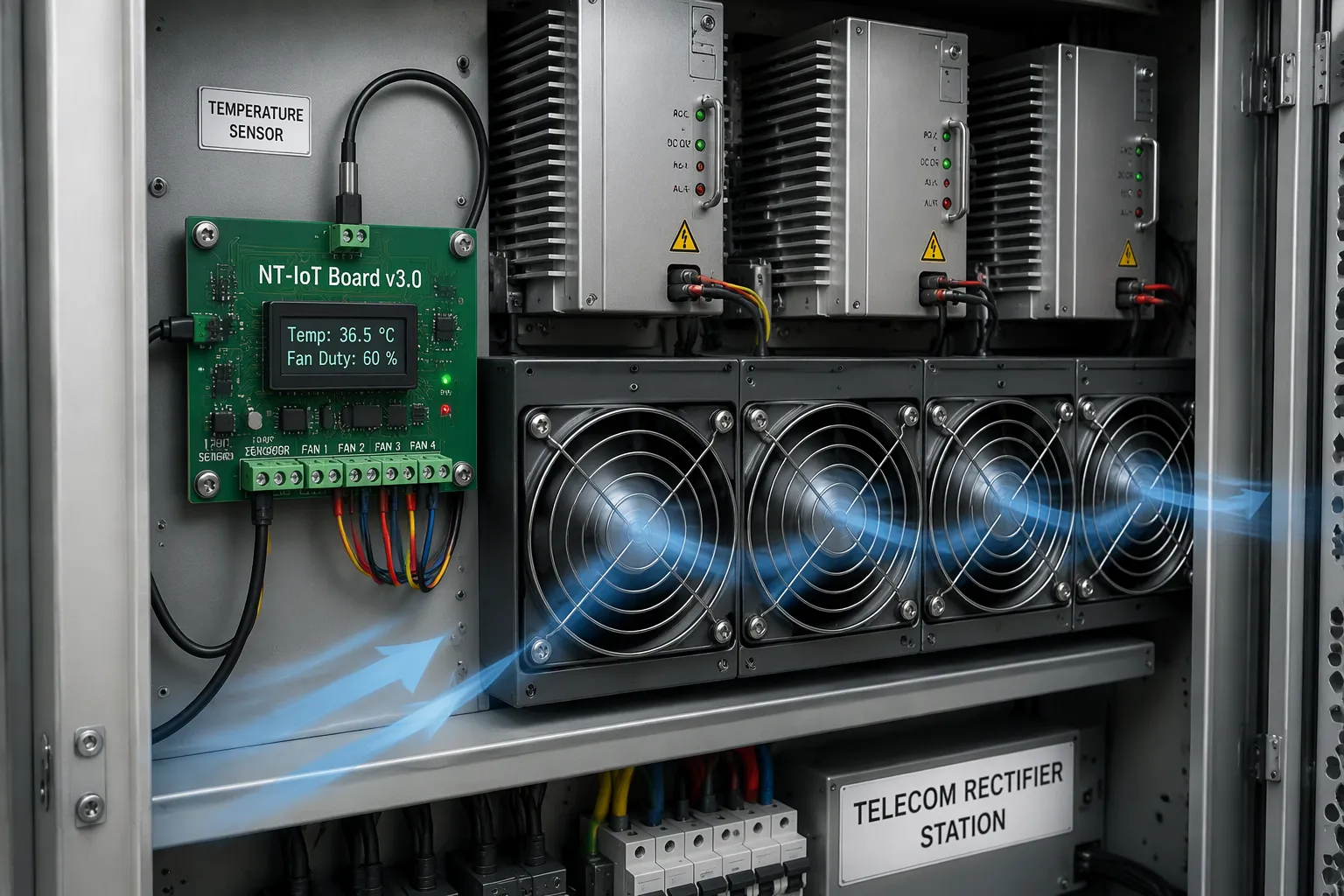
A practical example comes from the NT-IoT Board v3.0, a temperature-driven PWM fan controller for telecom power cabinets with Power ELTEK rectifiers. It defines a low threshold and a high threshold. Between them, fan duty follows a configurable power-law curve. The curve uses a floor value for minimum airflow and an exponent that sets the shape. An exponent of 1 gives a linear ramp. A higher exponent keeps the fan slower for longer and then ramps harder near the top. The board's defaults use a floor of 0.10 and an exponent of 1, which reproduce a classic linear ramp. Above the high threshold, duty goes to 100 percent. Below the low threshold, duty drops to the floor value.
Two details matter for reliability. The controller must still maintain enough minimum airflow for the least-cooled component, and it must handle startup reliably, per fanacdc.com. The NT-IoT board also adds a thermal failsafe. A lost sensor drives the fans to 100 percent rather than leaving the cabinet uncooled.
Lifespan and Noise Benefits
Slower, steadier rotation pays off in four ways. Bearing stress falls because the fan accumulates fewer revolutions. Dust ingestion drops because lower airflow pulls less airborne particulate through the enclosure. Acoustic output falls with speed. Energy consumption falls as well, since a fan running at partial duty draws less power than one running flat out.
The gains compound over a service life. A fan that spends most hours at gentle speed reaches its bearing limit later. It also stays cleaner, and a balanced, clean impeller runs quieter. That quieter operation feeds back into the noise-as-warning logic from the previous section. A slow, steady fan gives you a cleaner baseline, so any new whine or rattle stands out sooner.
ESTEL's speed-control implementation follows this same demand-driven logic inside its outdoor cabinet and rectifier cooling designs. The controller ties fan duty to measured conditions rather than to a fixed setting. You get the wear and noise benefits without adding complexity at the site.
The approach fits best where loads vary and acoustic sensitivity matters. A simple site with a steady load and rare maintenance visits may still do fine with fixed-speed cooling. For Telecom Rectifiers that cycle through daily load swings, a temperature-driven curve is the better match.
Early Fault Warning in Practice
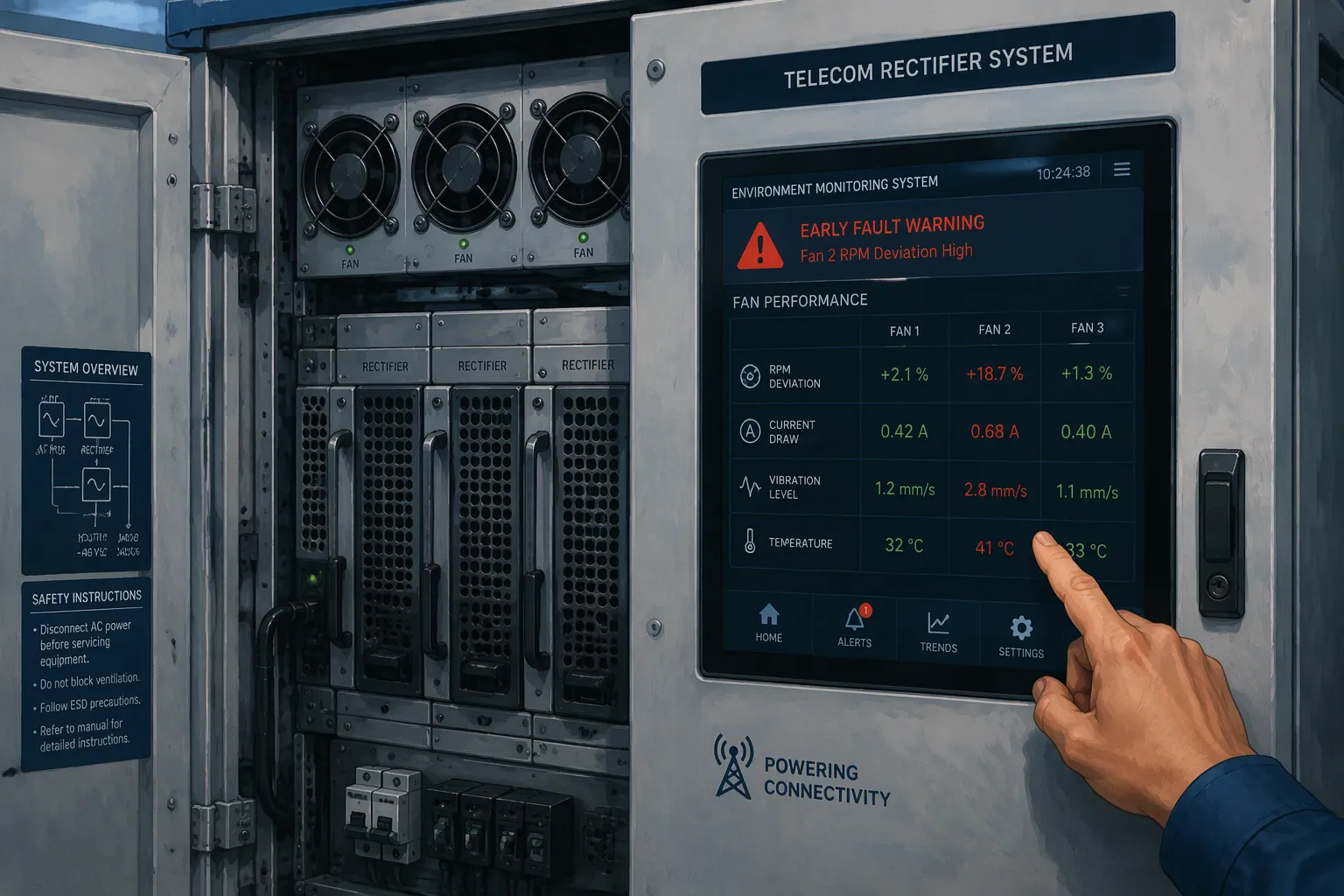
Speed control slows wear, but it cannot stop it. A fan will still degrade over time. Early fault warning gives you the visibility to act before a small problem becomes a site outage.
Detecting Fan Degradation
Several monitoring signals serve as your first line of defense. Each one reveals a different failure mode, and together they cover the common ways a fan declines:
RPM deviation from the commanded speed, which points to bearing drag or a failing motor
Current draw outside the normal band, which suggests winding stress or a blocked rotor
Vibration beyond the baseline, which flags an unbalanced or dust-loaded impeller
Temperature anomalies at the rectifier, which show that airflow no longer meets demand
Locked-rotor and speed-warning detection, which catches a stalled fan immediately
Fan performance sensing catches deviations quickly. A fan that once reached its set speed in a second and now lags tells you something changed. You do not need to wait for a full stop.
Protecting Telecom Rectifiers From Failure
A warning buys you time, and time converts into planned work. Powering the Network describes the workflow that remote monitoring enables: schedule maintenance ahead of time, monitor operation, schedule maintenance again as data accumulates, roll a truck to the schedule, conduct maintenance, and bring the site back online. The same source notes that baselines reveal anomalies before failures occur, and that usage data optimizes preventive maintenance schedules. DPS Telecom adds that rectifier and battery monitoring sends real-time alerts for immediate corrective action and eliminates frequent manual inspections. A planned fan swap costs far less than an emergency call-out at a live Telecom Rectifiers site.
ESTEL's Environment Monitoring System puts this capability into the cabinet. The unit supports RS232 real-time communication and RS485 bus networking, so it integrates with existing site systems. It carries 15-way switching value inputs for smoke, flooding, access control, and door magnetism, plus 4-way analog inputs (0–5V) for temperature, power, and pressure transmitters. Six relay control outputs can switch fans, air conditioners, and other devices. The platform fits a standard 19-inch rack at 423mm×223mm×45mm and runs on 12VDC. Its operating range is 10°C to 55°C and 10 to 85% humidity. Relay output alarms notify you the moment a threshold trips, and the system logs alarms for later analysis.
Combining Speed Control and Early Warning
A Feedback Loop for Longer Fan Life
Speed control and early warning work best as a pair. The fan curve cuts daily wear by keeping RPM low when heat allows. Monitoring then watches the wear that remains. Each mechanism covers the other's blind spot.
Think of it as a loop. The controller holds the fan at gentle speed, so the baseline stays clean. Sensors track RPM, current, vibration, and temperature against that baseline. A drift triggers a warning, and you schedule a fan swap during a routine visit. The replacement fan then runs under the same gentle curve. Over several service cycles, the compounding effect shows up as longer intervals between replacements.
Quieter Stations, Lower Total Cost
The combined effect touches three areas at once. Noise falls because the fan spends most hours at partial speed, and a balanced, clean impeller stays quiet. Maintenance intervals stretch because planned swaps replace emergency call-outs. Reliability rises because a degrading fan announces itself before it stops.
Fixed-speed cooling still fits some sites. A remote cabinet with a steady load and rare service visits may not justify the added control hardware. For Telecom Rectifiers that see daily load swings and sit near homes or offices, the pairing pays for itself in quieter operation and fewer truck rolls.
Audit your current setup against these mechanisms. Check whether your fans follow a thermal curve or run flat out. Confirm that your monitoring catches RPM deviation and locked-rotor events. If either answer is no, you have a clear starting point for improvement.
Dynamic speed control cuts wear and noise at their source. Early fault warning then stops small issues from becoming failures. Together, these two mechanisms protect your rectifier fans far better than either one alone.
The practical results add up. Fans last longer, stations run quieter, and emergency repairs become rare events. ESTEL pairs both capabilities in its cooling and monitoring designs, so you can source them as one system.
Now audit your own setup. Ask whether your fans follow a thermal curve or run flat out. Check whether your monitoring catches RPM deviation and locked-rotor events. A "no" on either question gives you a clear place to start.
FAQ
Does slower fan speed actually shorten cooling capacity?
No. A smart curve keeps a minimum airflow floor for the least-cooled component. The NT-IoT board, for example, uses a floor value of 0.10. The fan still meets thermal demand. It simply stops running faster than the load requires.
How quickly can monitoring catch a failing fan?
Fast enough to plan a repair. Fan performance sensing compares actual RPM against the commanded speed. A lagging fan reveals bearing drag or motor stress right away. Locked-rotor detection flags a stalled fan immediately, so you act before the rectifier overheats.
Can I add monitoring to an existing cabinet?
Often yes. ESTEL's Environment Monitoring System supports RS232 real-time communication and RS485 bus networking. It fits a standard 19-inch rack and runs on 12VDC. That makes retrofitting into many existing site setups practical.
What environmental conditions does the monitoring system handle?
The unit operates from 10°C to 55°C and 10 to 85% humidity. It accepts 15-way switching value inputs for smoke, flooding, access control, and door magnetism. Four analog inputs cover temperature, power, and pressure transmitters. Six relay outputs can switch fans and air conditioners.
Is fixed-speed cooling ever the right choice?
Yes, for some sites. A remote cabinet with a steady load and rare service visits may not justify added control hardware. Where loads swing daily and noise matters, a temperature-driven curve plus early warning is the better fit.
See Also
Selecting the Optimal Cooling Approach for ESTEL Telecom Cabinets
Key Features to Understand in Telecom Power Supplies
Analyzing Applications of Various Cooling Methods for Telecom Cabinets
Ensuring Dependable Power Supply Within Telecom Cabinets
Calculation Methods for Telecom Cabinet Power Systems and Batteries
CALL US DIRECTLY
86-13752765943
3A-8, SHUIWAN 1979 SQUARE (PHASE II), NO.111, TAIZI ROAD,SHUIWAN COMMUNITY, ZHAOSHANG STREET, NANSHAN DISTRICT, SHENZHEN, GUANGDONG, CHINA
