How Smart PDU Auto-Sensor Recognition Optimizes Efficiency and Cost in IT Operations


Smart PDU auto-sensor recognition cuts deployment time and energy waste while lowering total cost of ownership. You plug in a sensor, and the power distribution unit identifies it, maps it, and starts reporting — no manual configuration, no guesswork. So how does automatic sensor detection translate into measurable efficiency and cost gains in your day-to-day IT operations? The answer sits in three places: less labor spent checking racks by hand, fewer site visits for reboots, and smarter use of existing capacity. According to Newsunn, smart PDU systems reduce the hidden costs of running power blindly through better visibility into amperage, voltage, and outlet utilization. That combination of monitoring and optimization is where operational efficiency begins.
Key Takeaways
Smart PDUs automatically recognize sensors, so you skip manual setup and save time.
Real-time monitoring shows where power is wasted, helping you cut energy costs by up to 30%.
Remote outlet control lets you reboot equipment without a site visit, reducing maintenance trips.
Follow best practices like phased rollout and baseline measurement to avoid common pitfalls.
Choose a smart PDU with the right protocols and capacity to future-proof your operations.
How Smart PDU Auto-Sensor Recognition Works
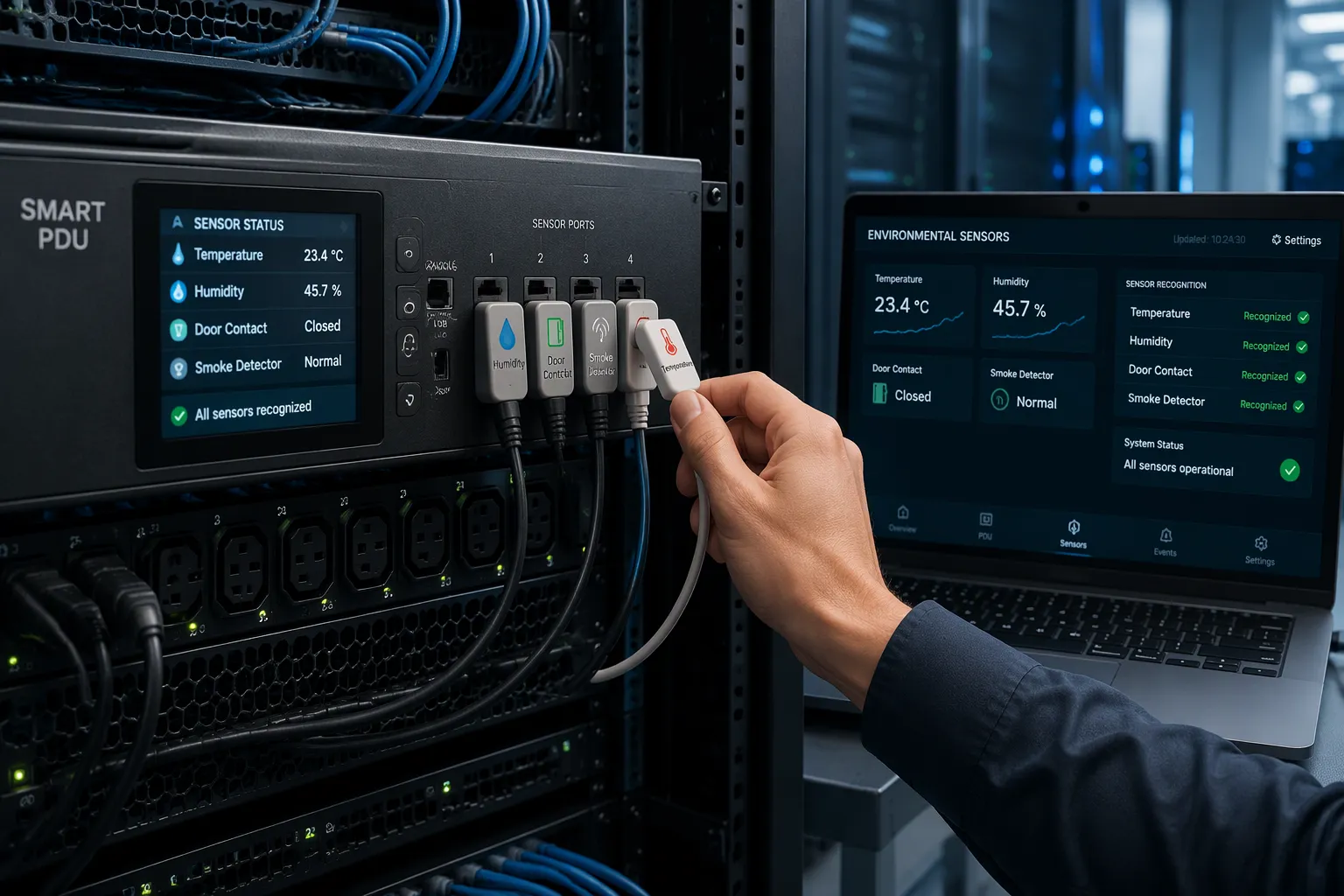
The Technology Behind Automatic Detection
Auto-sensor recognition means the power distribution unit detects a connected sensor, reads its identity, and starts reporting data without manual configuration. You plug a probe into a port, and the device recognizes the type, assigns the right data channel, and publishes readings to your dashboard. No address tables, no profile files, no engineer with a laptop at the rack.
The system supports a defined set of sensor types and management protocols. The table below summarizes what a typical deployment covers, based on ESTEL's published documentation.
Category | Supported Items |
|---|---|
Sensor Types | Temperature sensors; Humidity sensors; Door sensors (contact closure, vibration, and proximity types); Intrusion detection devices combining temperature, humidity, and water leak monitoring; Smoke detection |
Communication / Management Protocols | Industry-standard protocols; TFTP; SSH; Web interfaces; RESTful APIs (for integration with DCIM and BMS applications) |
Sensor Capacity | Up to 32 sensor functions or 12 sensor packages per PDU |
Capacity matters for planning. One unit can host up to 32 sensor functions or 12 sensor packages, per ESTEL's documentation. That headroom lets you cover a full rack or a small telecom cabinet from a single device.
The Smart Power Distribution Unit Advantage
A conventional PDU moves power and nothing more. An intelligent unit adds a digital layer on top of that power distribution role. Attom describes the difference plainly: a smart PDU measures voltage and current, tracks power and energy, shows rack-level load, and sends threshold alarms. It also supports remote outlet control and environmental sensor integration.
ESTEL's Smart Power Distribution Unit shows how these features fit together in practice. The unit accepts a maximum input current of 16A and comes in configurations from 8 to 19 outlets. An LCD display shows live readings at the rack. A dehumidifying function protects equipment in damp enclosures. Surge protection guards connected loads, and the plug system complies with IEC60309.
Some terms deserve plain definitions. Real-time electrical metering means the device samples voltage and current continuously and reports the values as they change. Outlet-level monitoring means each socket reports its own draw, so you see which server wastes power. A threshold alarm is a rule you set, such as a current limit, that triggers a notification when crossed. Environmental sensing means the unit reads temperature, humidity, and similar conditions through the auto-detected probes. Remote outlet control lets you switch a socket on or off over the network.
These capabilities separate smart units from basic ones. ESTEL's comparison table lists remote monitoring, outlet-level control, and real-time data analysis as smart-only features, while traditional PDUs offer only basic energy management. That gap explains why the auto-recognition design pays off: the hardware does the identification work, and your team spends time on decisions instead of wiring checks.
Integrating Smart PDUs into IT Operations
Communication Protocols and Compatibility
Auto-sensor recognition only pays off when the data reaches your existing tools. Most smart PDUs speak the protocols your monitoring stack already understands. Newsunn lists SNMP, web access, and RS-485 as the common paths for integration and remote access, with SNMP support feeding centralized alerts and logging. Wandtung adds detail: SNMP v1/v2c/v3, Modbus RTU/TCP, RS485, a web-based management interface, and HTTP/HTTPS for DCIM compatibility.
Protocol | Purpose |
|---|---|
SNMP (v1/v2c/v3) | Integrates with standard DCIM platforms and building management systems |
Modbus RTU/TCP | Integrates with standard DCIM platforms and building management systems |
RS485 | Integrates with standard DCIM platforms and building management systems |
Web-based management interface | Integrates with standard DCIM platforms and building management systems |
HTTP/HTTPS | DCIM compatibility for monitored and switched units |
Check your integration needs before you buy. A unit with SNMP, a web UI, an alarm relay, or API support fits most environments. Basic metered units suit small racks where you read the LCD display directly. Switched models fit sites that need remote reboots.
Deploying the Smart Power Distribution Unit with ESTEL
Deployment follows four steps. First, plan the rack: confirm the 16A maximum input current and choose an 8 to 19 outlet configuration for your load. Second, map outlets to equipment so each socket has a known owner. Third, pair the sensors; the unit recognizes each probe automatically and assigns its data channel. Fourth, validate readings against a handheld meter and test your alarm thresholds.
The smart power distribution unit from ESTEL measures 600×450×185mm (W × H × D), so confirm rail clearance during rack planning. Its flat plug design simplifies installation in tight enclosures. The IEC60309-compliant plug system keeps power distribution connections standardized. A dehumidifying function and surge protection add value in damp or exposed sites. This smart power distribution unit supports real-time monitoring from day one, and the auto-recognition design keeps sensor setup short. Match the model to your site: a compact cabinet may need fewer outlets, while a dense rack benefits from full outlet-level control. Either way, the smart power distribution unit delivers power distribution you can see and manage.
Driving Efficiency with Real-Time Monitoring and Control

Real-time power usage data turns a rack from a black box into a visible system. A smart PDU samples current, voltage, and power continuously, and you read those values from your desk. Remote power cycling lets you reboot a frozen server without a site visit. Threshold alarms warn you before a circuit trips. Raritan notes that intelligent PDUs send real-time alerts via SNMP, email, and syslog, so you get ahead of a problem before your environment suffers. That shift alone removes hours of manual checking each week.
Outlet-level energy tracking shows where power actually goes. August Condy reports that smart units cut power waste by up to 30%. ENERGY STAR describes how a unit can flag a server running at an average of 35% of peak power, which marks it as a candidate for decommissioning. Digital PDUs expose that waste, and you fix it by rearranging equipment instead of buying capacity.
Live Visibility and Remote Management
Real-time monitoring and remote management cover more than watts. TechPlan lists outlet control, environmental monitoring, and remote connectivity as core functions. You watch cabinet temperature, humidity, airflow, and door position through auto-detected sensors. A switched PDU lets you turn on, turn off, or reboot each outlet remotely. Sunbird DCIM adds that metering at the unit, inlet, or outlet level supports PUE tracking and more accurate provisioning. You set the thresholds yourself, and the unit handles the rest.
Accuracy matters for billing and planning. Raritan states that these units monitor current, voltage, power, and energy to plus or minus 1% accuracy. An integrated smart PDU feeds that data into your DCIM platform through one access point. The PDU reports each reading to your dashboard. Digital PDUs deliver real-time remote monitoring, and they replace manual walkthroughs with continuous visibility into power consumption. Check the accuracy figure against your billing needs before you commit.
Why Digital PDUs Enable Predictive Maintenance
Digital PDUs record every event with a timestamp, and that history answers questions your team asks months later. Those records support predictive maintenance: you spot a failing power supply from a drifting current draw before it fails. Logs also inform capacity planning, so you add circuits on evidence rather than guesswork. ENERGY STAR notes that smart units can alert you to equipment failure and help identify comatose servers.
The financial case builds from several small gains. Lower maintenance costs come from fewer site visits. Cost reduction comes from retiring idle equipment. Energy optimization comes from shutting down inactive outlets automatically, as August Condy describes. Digital PDUs turn real-time energy consumption data into decisions, and those decisions cut costs across the estate. Rising energy costs make this visibility urgent. Together these lift operational efficiency and support energy efficiency management. Pair the smart power distribution unit with a sensor network, and the same data drives energy consumption reporting and PUE optimization. Add a second sensor for humidity and a third for door position, and the smart power distribution unit becomes the data hub for the whole rack. Treat power distribution as a measured system, and every later decision rests on real numbers. Digital PDUs make that discipline practical, and power distribution stops being a blind spot.
Best Practices and Proven Outcomes
Implementation Best Practices and Pitfalls
Start with a phased rollout. Measure a baseline first, so you can prove gains later. Tune alarm thresholds after the first week of data, and train staff on the dashboard before you hand over control. These steps keep a smart pdu deployment calm and predictable.
Legacy compatibility is the most common pitfall. Not every intelligent pdus model works with every management platform, and differences in protocols, plug types, or voltage standards can complicate installation, as nbyosun notes. Follow these checks before you order:
Confirm support for the protocols you run, such as SNMP or HTTP.
Match plug and outlet types to existing equipment.
Check voltage and current ratings against your load.
Review integration options with your current management software.
Sensor placement deserves equal care. Mount probes away from heat exhaust and direct airflow, and use labeled cables to avoid setup mistakes. A plug-and-play design speeds retrofits of older racks. Inspect each unit and sensor for damage before installation.
Use Cases with Measurable Results
A data center gains the clearest returns. Outlet-level data from digital pdus exposes idle servers, and you retire them instead of buying new circuits. Digital pdus also log every event, so predictive maintenance replaces reactive repairs. The result is lower costs and better capacity use.
An edge site benefits from remote control. Digital pdus let you reboot equipment without a truck roll, and that cuts costs on every visit you avoid. A telecom cabinet shows the environmental case. Auto-detected sensors watch temperature and door position, and digital pdus report the readings to your monitoring stack. This supports energy efficiency management and PUE tracking.
Compliance strengthens the business case. Certifications such as ISO9001, CE, and UL validate a unit against international safety and performance standards, per nbyosun. Smart PDUs also provide analytics and reporting that feed energy reporting. Treat these as supporting evidence, not a guarantee. Pair the smart power distribution unit with a sensor network, and the same data serves optimization, cost savings, and daily monitoring. That is how power distribution becomes a measured system.
Auto-sensor recognition turns a technical convenience into measurable results. You deploy faster, you cut energy waste, and you lower costs across the estate. A smart power distribution unit does the identification work, so your team focuses on decisions. Keep the best practices in view: phase the rollout, measure a baseline, tune alarms, and confirm protocol and compliance fit before you buy. Evaluate this capability as part of a wider efficiency strategy, and consider ESTEL's Smart Power Distribution Unit for your racks.
Sensor intelligence will keep advancing. Expect tighter integration between power distribution and data center automation, with monitoring that acts on its own findings. Plan for that future now.
FAQ
How does auto-sensor recognition reduce setup work?
You plug a probe into the unit, and the device identifies it and assigns the right data channel on its own. No address tables or profile files are needed. This design shortens deployment and lets your team skip manual wiring checks.
Which protocols connect a smart PDU to my monitoring stack?
Most units support SNMP, Modbus, RS485, a web interface, and HTTP/HTTPS for DCIM compatibility. Check your platform's needs before you buy. A unit with SNMP and an alarm relay fits most environments, and basic metered models suit small racks.
How much can outlet-level data lower costs?
Outlet-level tracking exposes idle servers and wasted draw. You retire idle equipment instead of adding circuits. Published figures show smart units can cut power waste by up to 30%, and that gain lowers costs across the estate.
What should I check before deploying one?
Confirm the 16A maximum input current and pick an 8 to 19 outlet configuration for your load. Verify rail clearance against the 600×450×185mm dimensions. Pair the sensor probes, then validate readings against a handheld meter before you trust the alarms.
Does sensor capacity cover a full rack?
Yes. One unit can host up to 32 sensor functions or 12 sensor packages, per ESTEL's documentation. That headroom covers a full rack or a small telecom cabinet from a single device, and the second sensor probe adds humidity or door status without extra hardware.
See Also
Understanding ESTEL PDUs and Their Function in Data Center Cabinets
How to Optimize Outdoor Cabinets Using Power, Cooling, and Monitoring
ESTEL Smart Microgrid-Integrated Telecom Cabinet Energy Storage System Explained
Smart and Sustainable Outdoor Communication Cabinets for the Year 2025
Ensuring Optimal Monitoring for Outdoor Telecom Cabinets: A Practical Guide
CALL US DIRECTLY
86-13752765943
3A-8, SHUIWAN 1979 SQUARE (PHASE II), NO.111, TAIZI ROAD,SHUIWAN COMMUNITY, ZHAOSHANG STREET, NANSHAN DISTRICT, SHENZHEN, GUANGDONG, CHINA
