How to Use Smart PDU Custom Reports for Personalized Data Analysis

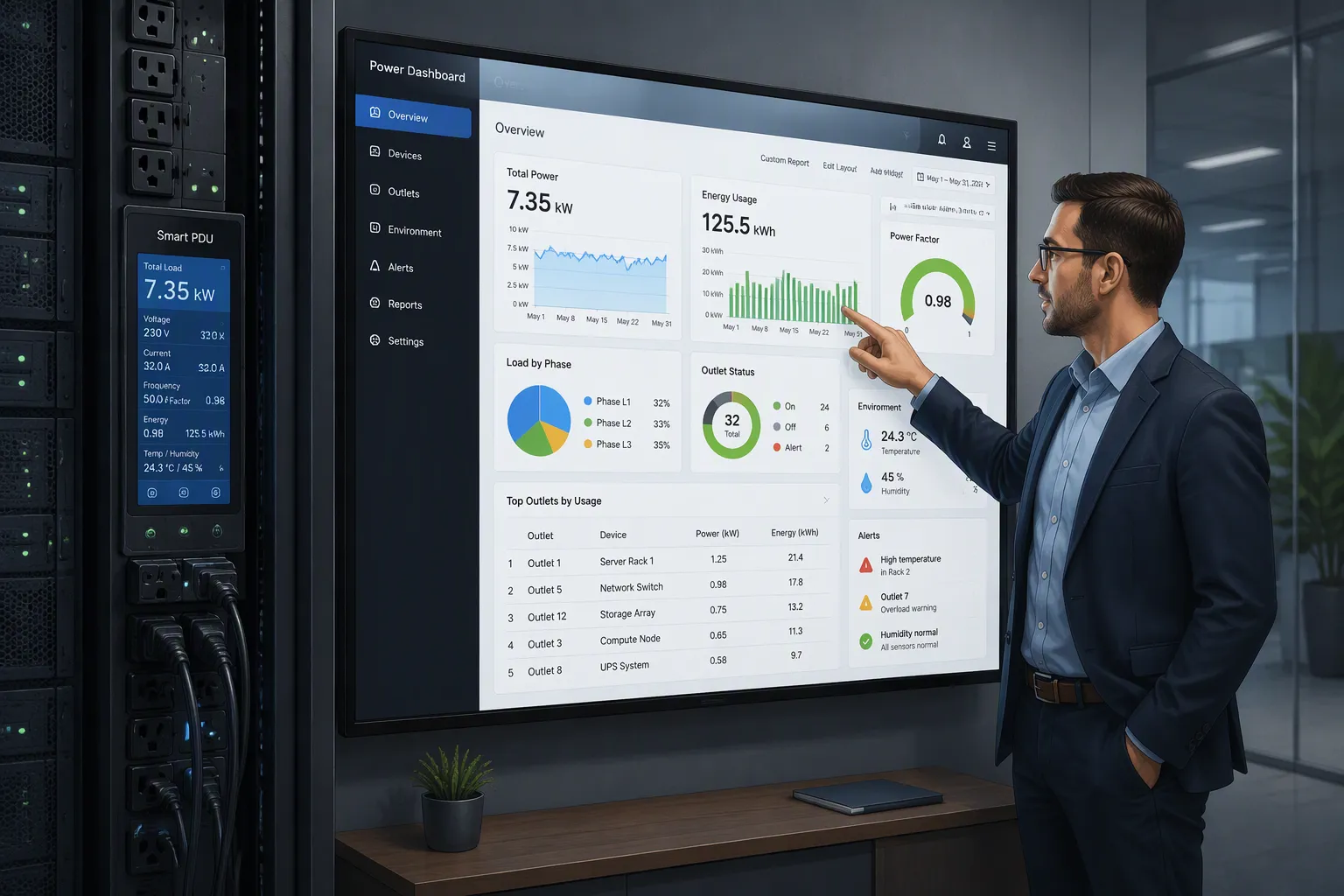
Your smart PDU in a telecom cabinet collects far more data than any default report shows. Default views hide outlet-level detail and environmental trends. Custom templates turn that raw stream into insights that match each site's priorities. You can follow five practical steps to get there: define your analysis goals, select the metrics that matter, customize your report templates, schedule automated delivery, and analyze the results. ESTEL's Smart Power Distribution Unit supports flexible custom reporting, so you can apply each step with real tools. Start with one cabinet and one clear objective. The data is already there — your templates simply decide what you see.
Key Takeaways
Set clear goals for your reports based on what your cabinet needs to protect.
Choose the right metrics, like per-outlet load and environmental data, to get useful insights.
Customize report layouts and time windows to match how different people read data.
Automate report delivery to save time and ensure the right people get alerts.
Analyze report findings to spot trends and make operational improvements.
Define Personalized Data Goals
Map Goals to Cabinet Operations
You start with the operational priorities of the site, not with the report tool. Ask what the cabinet must protect. Uptime usually ranks first for a live base station. Energy cost matters at sites with high cooling demand. Capacity planning matters when you expect new equipment in the rack. Each priority points to a different reporting goal.
Translate each priority into a question the report can answer. For uptime, you want to know which outlet lost power and when. For energy cost, you want per-outlet load trends across the day. For capacity planning, you want headroom data against the PDU's rated limits. Write these questions down. They become the backbone of your template.
Set Clear Success Criteria
A custom report delivers value only when you can measure that value. Write success criteria as simple, checkable statements. For example: "The report flags any outlet load above its normal band within one reporting cycle." Or: "The weekly summary shows humidity drift before condensation risk appears." Each criterion ties back to one goal from the mapping step.
Keep the criteria few and specific. Three to five per cabinet works well at the start. Review them after the first month of automated delivery. Drop any criterion that never triggers action. Tighten any criterion that fires too often to be useful. This review loop keeps your reports aligned with real operations, and it prevents template clutter from building up over time.
Select Smart PDU Metrics That Matter
Core Power and Environmental Metrics
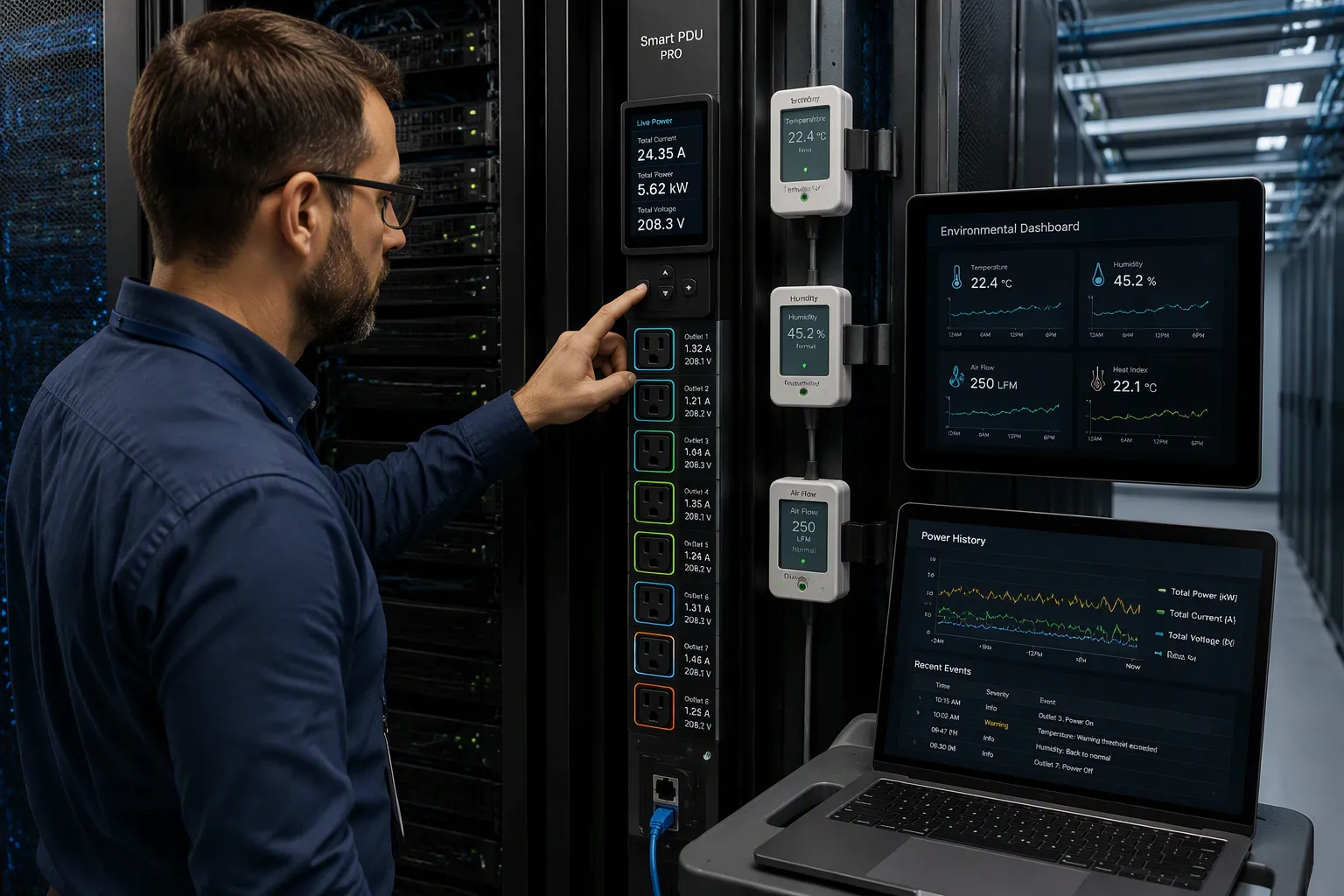
Your template is only as good as the data feeding it. The ESTEL Smart Power Distribution Unit gives you several built-in sources to draw from. Real-time LCD monitoring shows live power conditions at the unit. The dehumidifying function reports on moisture control activity. Surge protection events tell you when the unit absorbed a spike. Outlet configurations from 8 to 19 determine how granular your per-outlet data can be. Treat each of these as a data stream, not just a feature.
Start with the core metrics that every cabinet needs. Per-outlet load monitoring sits at the center. Monitored PDUs expose outlet-level current, voltage, power, apparent power, crest factor, and power factor. This detail separates a useful report from a rack-level summary that hides the problem device. Pair load data with environmental readings. Integrated sensors track temperature and humidity alongside power metrics, and historical data reveals usage trends over time. A humidity reading that climbs slowly across weeks tells a different story than one that jumps in an hour.
Site-Specific and Event-Based Metrics
Core metrics cover the baseline. Site-specific metrics cover what makes one cabinet different from the next. A remote mountain site may care most about humidity drift. A dense urban rack may care about per-outlet load balance. Build your template around the questions from your goal mapping, and let the metrics follow.
Event-based data adds the context that static snapshots miss. Thresholds for amperage, voltage, and power usage can trigger notifications through email, SMS, or push alerts before an overload occurs. SNMP traps can fire on status changes, load shifts, temperature, and humidity. Some systems also capture waveform data automatically when an outlet switches on, a breaker trips, or voltage dips and swells. These captures turn a vague "something happened" alert into a record you can diagnose.
Group related metrics so the report reads clearly. Power information can be organized per device, per group of devices, per PDU, or per cabinet. That grouping choice shapes how quickly you spot an outlier. A per-device view flags one failing power supply. A per-cabinet view shows whether the whole rack is drifting. Choose the grouping that matches the decision you need to make, and keep the Smart PDU data organized around that decision rather than around what is easiest to export.
Customize ESTEL Smart Power Distribution Unit Reports
Choose Layouts and Time Windows
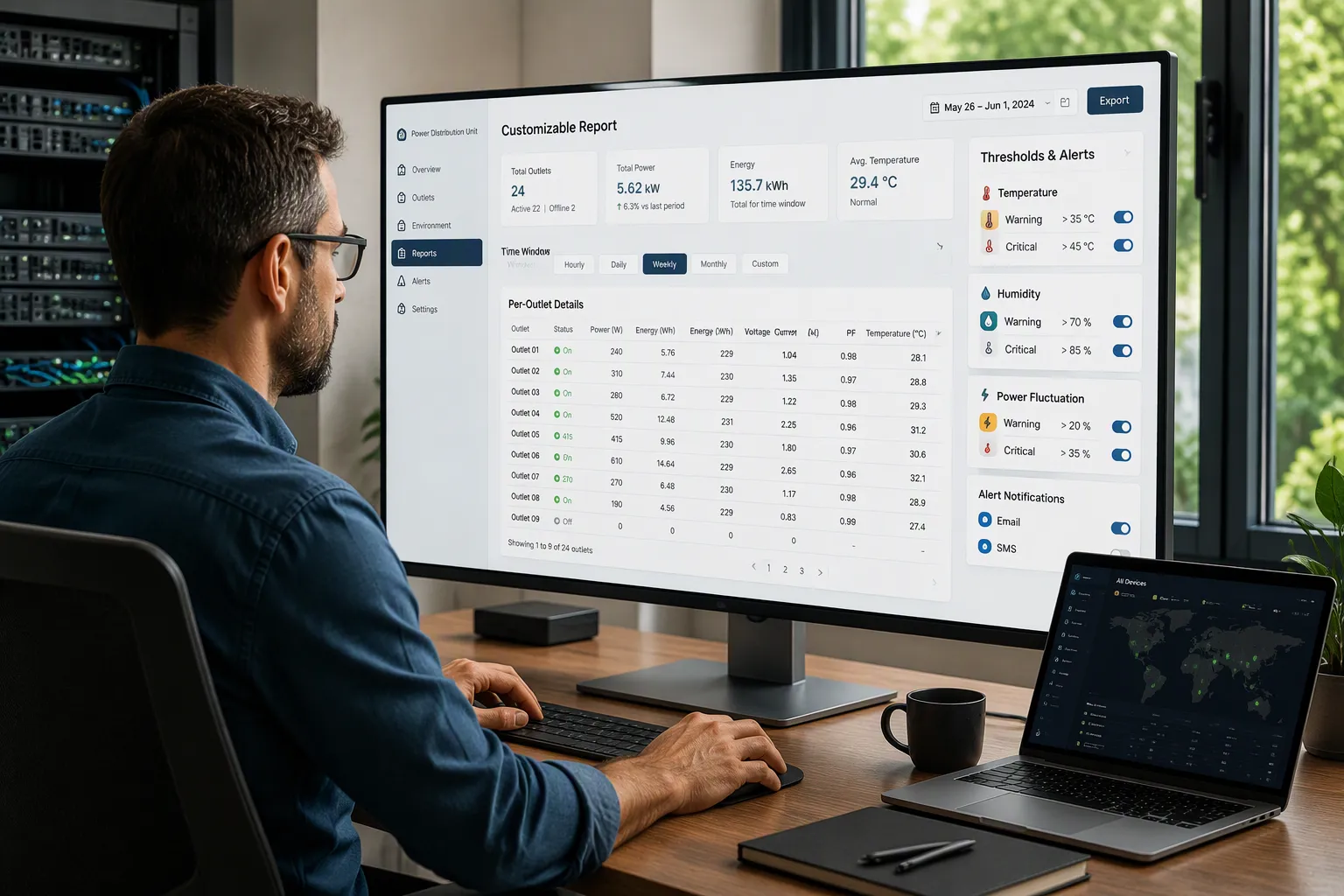
You now have your goals and your metrics. The next step turns them into a working template. Start by picking the metrics you selected in the previous step and placing them in a layout that matches how you read data. A NOC operator scans for exceptions, so a compact summary with the key values at the top works well. A field technician needs outlet-level detail, so a per-outlet table serves that reader better. Build one template per audience rather than one template for everyone.
Time windows shape what the layout reveals. Hourly windows suit live troubleshooting, because they show short load spikes and brief voltage dips. Daily windows suit energy cost tracking, because they smooth out noise and show the shape of the working day. Weekly windows suit capacity planning, because they reveal slow drift that a single day hides. You can combine windows in one template: a daily summary page plus a weekly trend page gives both views without clutter.
ESTEL's Smart Power Distribution Unit supports remote management and intelligent protocols. That flexibility lets you adjust layouts and windows from a distance as site needs change. You do not need to visit the cabinet to reshape a report.
Add Thresholds and Alerts
A template that only displays data still depends on someone watching it. Thresholds and alert rules make the report flag anomalies on its own. Set up the monitoring layer in a clear sequence:
Install the ESTEL software on your central server or cloud platform.
Connect the cabinet sensors and the power distribution unit hardware.
Configure monitoring parameters for temperature, humidity, and power management.
Set up real-time alerts and reporting preferences.
Open the dashboard to begin monitoring all sites.
The alert engine then does the watching for you. Customizable thresholds cover temperature, humidity, power fluctuations, and security breaches, and alerts fire when values cross them. Detection is instant, so a problem does not escalate during a polling window. Each alert supports drill-down, which speeds root cause analysis. Notifications reach your team through email, SMS, Slack, PagerDuty, and other tools, so the right person learns about the anomaly without opening a report.
Tune thresholds after the first weeks of delivery. A rule that never fires may sit too loose. A rule that fires constantly may sit too tight. Adjust both until the alerts match real risk. This tuning keeps your Smart PDU reports trustworthy and keeps your team responsive to the signals that matter.
Schedule and Automate Report Delivery
Set Frequency and Recipients
Match report frequency to the decision each reader makes. A NOC team needs hourly or daily views to catch load spikes and voltage dips while they still matter. Field technicians benefit from daily outlet-level summaries tied to their maintenance rounds. Managers usually need weekly rollups for capacity planning and cost review. Set each template to its own cadence instead of forcing one schedule on every audience.
Route each report to the people who act on it. Send exception alerts to the NOC, detailed outlet tables to field techs, and trend summaries to managers. Keep the recipient list short and current. A report that lands in an unused inbox delivers no value, and it trains your team to ignore future deliveries. Review recipients each quarter as staffing changes.
Reduce Manual Work with Automation
Automation removes the repetitive steps between data collection and action. Scripts can pull data from distributed cabinets through APIs and produce customized Excel or PDF reports, which eliminates manual calculations and repeated compilation. Task schedulers such as cron or Windows Task Scheduler run those reports daily, weekly, or on demand, then email them or upload them to cloud folders. Your staff no longer triggers or distributes anything by hand.
Mechanism | How It Cuts Manual Effort |
|---|---|
Scripted report generation | Pulls data via APIs and builds reports automatically |
Scheduled delivery | Runs on cron or Task Scheduler and distributes itself |
Raises early alerts and automates remediation, cutting downtime by up to ~30% | |
Automated anomaly detection | Flags current, voltage, temperature, and humidity changes for you |
Centralized dashboards | Replaces fragmented manual data gathering |
Predictive features add another layer. AI models analyze historical and environmental data, so your Smart PDU reports surface problems before a failure. Engineers then act on exceptions rather than reviewing every data point. Centralized dashboards consolidate sensor data and replace fragmented manual gathering, which reduces alarm fatigue and consolidation work.
Analyze Results and Take Action
Spot Trends and Anomalies
Reading a custom report starts with pattern recognition. You look for values that leave their normal band. Load spikes appear as sharp current or power excursions at a single outlet. Humidity drift shows as a slow climb across days or weeks. Outlet-level faults surface as repeated trips or reboots on one circuit. Each pattern points to a different root cause, so name the pattern before you act.
Your Smart PDU gives you the granularity to catch these patterns early. Per-second monitoring of power components detects spikes and phase imbalances that minute-based tools miss. Environmental sensors track temperature and humidity alongside power metrics, so drifting values get flagged before they affect equipment. Historical trend data then reveals load patterns, peak versus baseline usage, and phase balance. Use that history to spot circuits approaching their capacity limits.
Anomaly | Detection Method |
|---|---|
Load spikes | |
Humidity drift | Environmental sensor readings over time |
Outlet-level faults | Per-outlet protection and historical fault patterns |
Turn Findings into Operational Changes
A finding only matters when it changes what you do. Convert each anomaly into a concrete action. A load spike on one outlet may call for load redistribution to an underused circuit. A humidity drift may call for a maintenance ticket on the cooling system. A recurring outlet fault may call for a hardware inspection or a threshold adjustment.
Tune your thresholds as you learn. A rule that fires too often needs a wider band. A rule that never fires may sit too loose. Review findings monthly and update the template to match. This loop turns raw data into faster troubleshooting, better capacity planning, and steadier cabinet management.
The five steps work as one system. Goal setting tells you what to look for. Metric selection decides what the report captures. Template customization shapes how you read it. Scheduling keeps the data flowing without manual effort. Analysis turns the numbers into action. Together, they convert raw Smart PDU data into insight built around your site.
The payoff shows up in daily operations. Troubleshooting gets faster, capacity planning gets sharper, and cabinet management gets more efficient. Start with one cabinet and one goal. Expand once the template proves its value. ESTEL's Smart Power Distribution Unit makes custom reporting accessible at that scale.
Review your current report settings today. Then build your first custom template.
FAQ
Do custom reports require extra hardware beyond the PDU?
No. The ESTEL Smart Power Distribution Unit already provides the data sources you need. Real-time LCD monitoring, the dehumidifying function, and surge protection events all feed your templates. You configure reporting through remote management and intelligent protocols. Your existing unit supplies the raw data, and your template decides how to present it.
How many custom templates should you build at first?
Start with one template for one cabinet and one goal. A single focused template proves the concept before you expand. Add a second template only when the first one consistently drives action. This gradual approach keeps your reports readable and prevents your team from drowning in overlapping views.
Can one template cover multiple cabinets?
Yes, but group cabinets by similar role and environment. A remote mountain site and a dense urban rack face different risks, so they deserve different thresholds. Build a shared layout, then adjust thresholds per site group. This balance gives you consistency across the fleet without hiding site-specific behavior.
How do you prevent alert fatigue from custom reports?
Tune your thresholds after the first weeks of delivery. A rule that fires constantly sits too tight, and a rule that never fires sits too loose. Route each alert to the person who acts on it. Review recipients quarterly. These habits keep alerts meaningful and keep your team responsive to real risk.
Can staff without deep technical skills build these templates?
Yes. The workflow follows plain operational questions: what must this cabinet protect, and what would tell you something went wrong? Anyone who knows the site can answer those questions. Remote management lets you adjust layouts and windows without visiting the cabinet, so template changes stay simple.
See Also
Understanding ESTEL PDUs And Their Function In Data Center Cabinets
Improving Outdoor Cabinets Through Power Cooling And Monitoring Solutions
Simple Methods For Organizing Cables In Data Center Cabinets
Examining Amperage Requirements For Communication Cabinet Power Supply Units
Solar Energy Storage Power Systems Designed For Telecom Cabinets
CALL US DIRECTLY
86-13752765943
3A-8, SHUIWAN 1979 SQUARE (PHASE II), NO.111, TAIZI ROAD,SHUIWAN COMMUNITY, ZHAOSHANG STREET, NANSHAN DISTRICT, SHENZHEN, GUANGDONG, CHINA
