How Smart PDU End-Point Sensing Enables Dynamic Environmental Monitoring in Data Centers


Averages hide trouble. A single temperature reading for a whole room can look fine while one rack quietly overheats, and your cooling system keeps running at full tilt for no reason. You need data from the endpoint, not the room.
A smart PDU with built-in sensors captures real-time, rack-level environmental data, so your data center environmental monitoring responds to actual conditions. Vertiv notes that intelligent PDUs can include environmental sensors to monitor conditions within the rack without a separate monitoring solution. These units also flag water, smoke, and open cabinet doors, not just temperature and humidity. The payoff is real: better reliability, lower energy waste, and clear remote visibility.
Key Takeaways
Smart PDUs sense temperature, humidity, airflow, smoke, and water leaks right at the rack.
Real-time alerts warn you within seconds of a threshold breach, so you can act fast.
Rack-level data helps you prevent overheating and overcooling, saving energy and money.
You can monitor and control power remotely, avoiding site visits and speeding recovery.
Place sensors at the top, middle, and bottom of each rack for accurate readings.
How Smart PDU Sensing Works
Built-In Sensors at the Rack
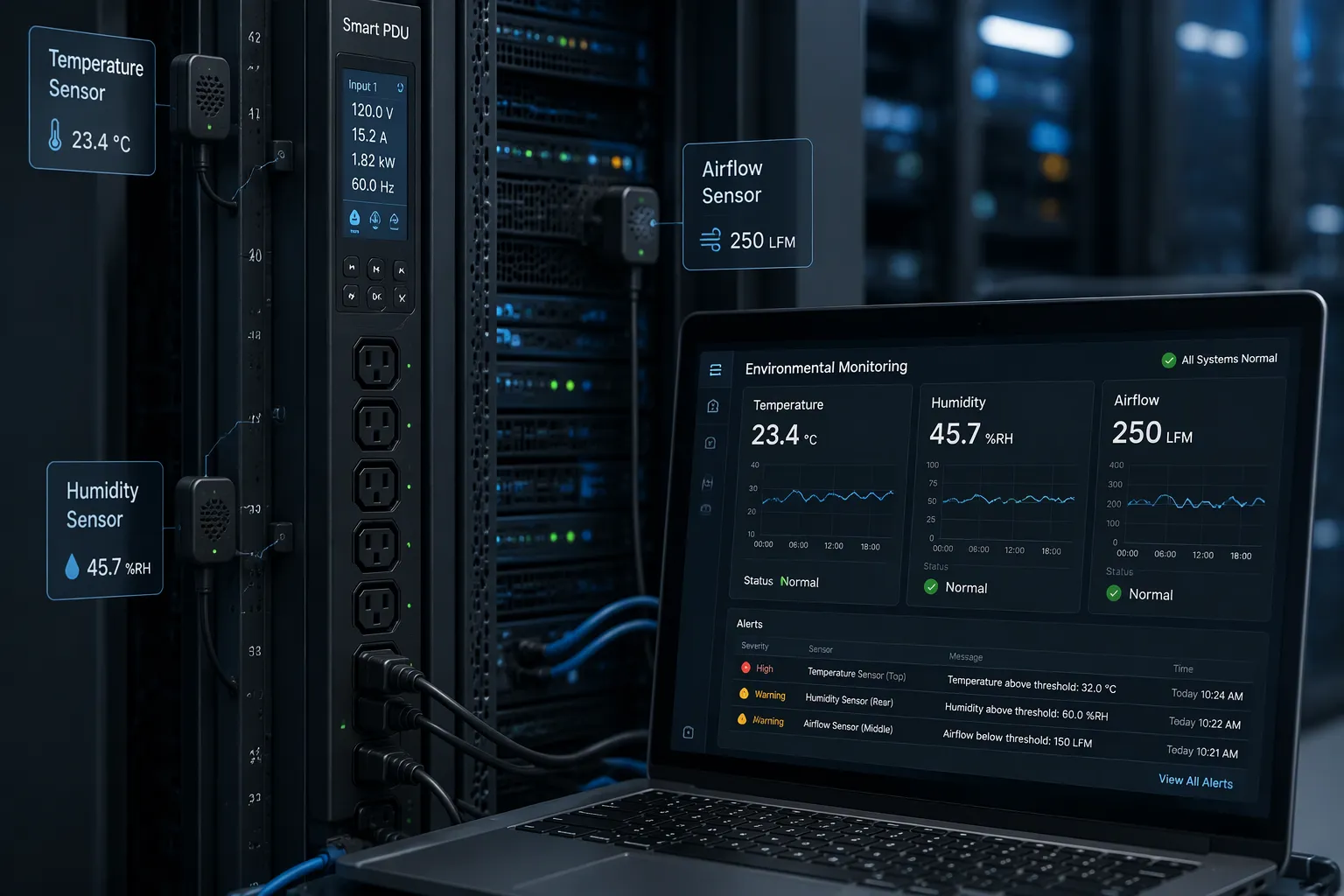
A smart PDU carries its sensing hardware right where the load lives: inside the rack, next to the servers that generate the heat. Attom describes the core set as temperature, humidity, and other rack-level environmental conditions. Yosun adds more detail to that list, and the range matters for real protection:
Temperature and humidity: detect heat buildup and moisture that can damage server components.
Airflow: identify blocked vents or failed fan units before they cause overheating.
Smoke: detect early fire risks at the rack level.
Water leak: spot moisture from broken pipes or cooling system failures before it reaches hardware.
Dgorient notes that environmental-monitoring PDUs connect temperature, humidity, and airflow sensors as a defined product type. You also get door-contact sensing on many units, so an open cabinet door becomes a logged event rather than a surprise. These intelligent environmental sensors turn the rack into a monitored endpoint instead of a blind spot.
From Raw Data to Real-Time Alerts
Sensor data travels over your existing network. Paessler explains how its PRTG tool polls a PDU by SNMP over Ethernet, supporting SNMP v1, v2c, and v3. You point the platform at the device IP address, enter credentials, and polling starts. Scan intervals are configurable per sensor, with a 10-second minimum for most types and a 60-second floor for some. Many teams poll critical metrics every 30 to 60 seconds. PRTG evaluates each result as soon as the scan finishes and fires a notification within seconds of a threshold breach; the same source suggests a warning at 70% load and an error at 85%.
Raritan describes its SmartSensors as plug-and-play devices that connect directly to enabled rack PDUs or a sensor controller, cascaded on a single bus with Cat5/6 cables. Real-time alerts let you respond to potential hazards before they cause downtime, and you stay alerted around the clock in onsite, remote, and lights-out facilities. That flow of sensor data closes the gap between a physical event and your response.
ESTEL's Smart Power Distribution Unit shows how built-in environmental control works in practice. An LCD display gives you clear, real-time information about system status, and a dehumidifying function keeps humidity low to protect sensitive electronics. Remote management lets you monitor and control power distribution from anywhere.
Key Benefits of Environmental Monitoring
Preventing Overheating and Overcooling
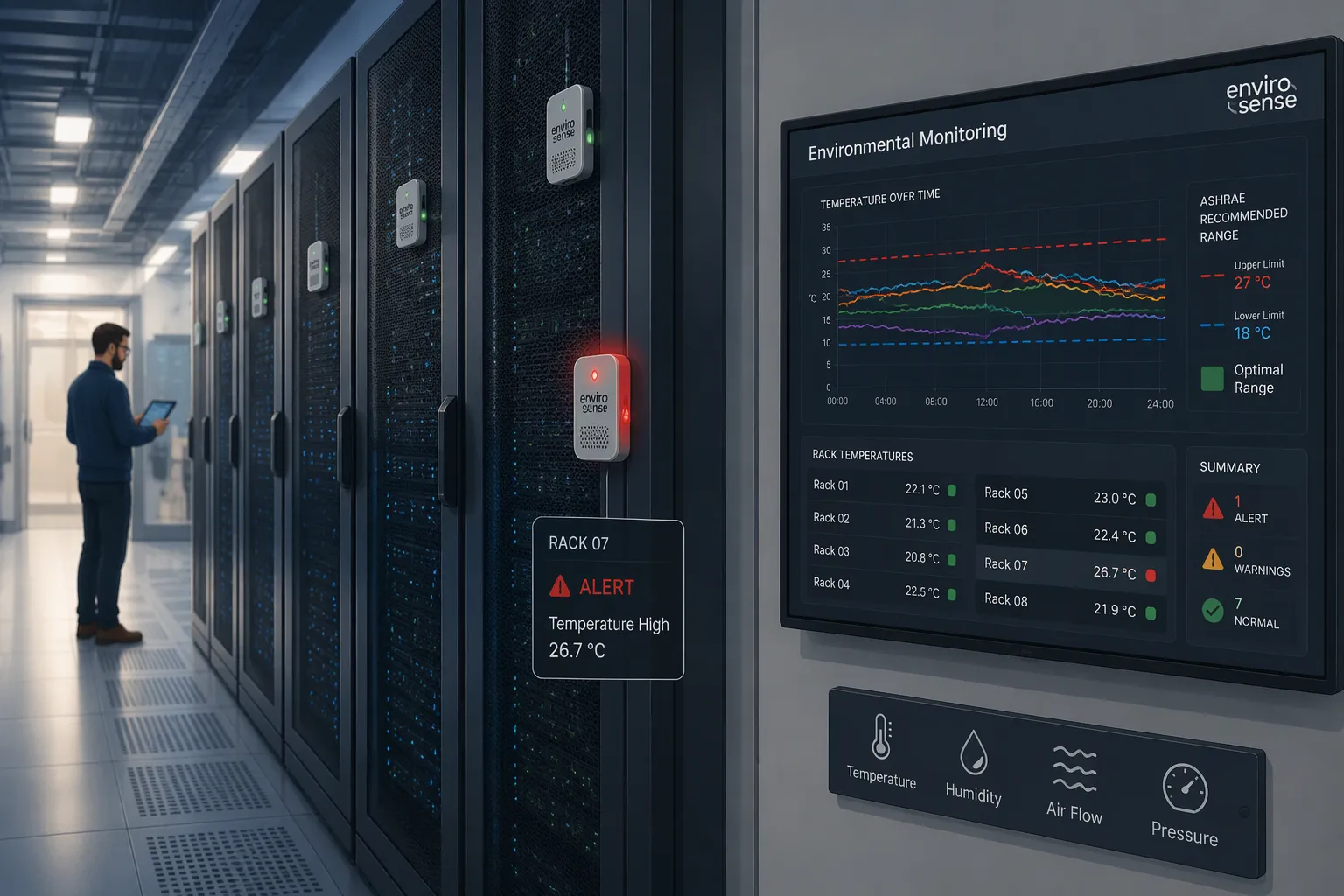
Heat damage rarely announces itself. It builds quietly in one rack while the room average looks healthy. Real-time readings from rack sensors expose that gap, and the consequences of missing it are well documented. Delta T Systems lists the outcomes of inadequate cooling: hardware failure and ultimately potential data loss, significantly shortened hardware lifespan with premature replacement or repair costs, thermal throttling that slows processing speeds, and unnecessary energy use from inefficient cooling.
Condition | Consequence |
|---|---|
Overheating (inadequate cooling) | Hardware failure and ultimately potential data loss |
Overheating (inadequate cooling) | Significantly shortened hardware lifespan, leading to premature replacement costs or repairs |
Excessive temperatures | Thermal throttling, slowing processing speeds |
Inefficient cooling | Unnecessary energy use and inflated expenses |
Overcooling carries its own cost. AKCP explains the trade-off plainly: the closer you run to upper temperature limits, the more energy you save but the higher your risk of thermal overload. One healthcare provider discovered it was overcooling servers throughout its data center and cut energy use by 18% while keeping servers within safe operating conditions. Nlyte notes that matching power and cooling to IT workloads has been shown to reduce energy costs by as much as 30%. Your environmental data turns both risks into visible, manageable numbers.
Optimizing Energy and Remote Visibility
Thermal analytics close the loop. Raritan's case study of AOL describes iPDU readings gathered by Power IQ software, which plots rack temperatures on a chart against ASHRAE ranges. The tool calculates how much energy you could save by raising ambient temperature slightly while staying within ASHRAE recommendations, and it emails alerts when any rack crosses a threshold. That is real-time, accurate monitoring with a financial return, not just a compliance record.
Remote capability changes daily operations. Intelligent PDUs offer granular control over individual outlets and outlet groups, so operators can toggle power to specific devices remotely, according to CC Tech Group. Data Center Post notes that outlet-level power monitoring with trend analysis lets teams reboot crashed systems without the cost of site visits. Raritan adds that remote power cycling from a web browser saves money by avoiding those visits entirely. Vertiv describes switched PDUs as giving a full view of critical IT equipment power usage at the rack and through remote access, with per-outlet on, off, and reboot control.
Combine these functions and one smart PDU becomes both a sensor platform and a remote hands tool. Your team sees real-time environment data and acts on it from anywhere. Fewer truck rolls, faster recovery, and lower energy bills follow. The sensor data also feeds your broader data center monitoring strategy, where environmental thresholds and power trends sit side by side. That combination supports real-time remote power metering alongside temperature tracking, so capacity decisions rest on measured conditions rather than estimates.
Best Practices for Intelligent Power Distribution Units
Placing Sensors for Accurate Rack Data
Good placement decides whether your readings tell the truth. Dataspan recommends mounting sensors at the top, middle, and bottom of each rack. Heat rises, so the top sensor gives you the worst-case reading, while the center sensor sits closer to the room average. This vertical spread maps the airflow through your cabinet.
Keep sensors away from direct airflow entering and leaving your equipment. A probe next to a vent or fan reports artificially cool or hot values, and those false readings trigger alarms or hide real problems. Dataspan also suggests placing probes at the front of racks for inlet temperatures and at the back for exhaust temperatures. Industry guidelines typically call for at least one sensor per rack, with extra units for ambient conditions. Raritan notes that you can deploy sensors without disrupting operations by plugging them into an intelligent rack PDU or smart rack controller.
Selecting the Right Smart PDU
Start with the monitoring level you need. Attom separates basic, metered, monitored, switched, and intelligent tiers. A monitored or intelligent model fits teams that want real-time visibility, capacity planning, and remote management. Yosun stresses compatibility with your existing infrastructure, including DCIM integration, because a mismatch raises costs and disrupts operations.
Then weigh the hardware itself: outlet count, remote management, surge protection, and dehumidifying capability. ESTEL's Smart Power Distribution Unit fits this checklist well. It offers configurations from 8 to 19 outlets with remote control, surge protection, an LCD display, and a dehumidifying function. That combination supports reliable power distribution in data centers while adding environmental control at the rack.
Integrating Environment Monitoring With DCIM
Turning PDU Data Into Dashboards and Alerts
A smart PDU produces a steady stream of readings, and that stream only pays off when it reaches a platform built to interpret it. Data center infrastructure management software is that platform. You connect your intelligent PDUs to the DCIM layer, and the software pulls sensor data on a schedule you set. Each reading lands in a central database alongside power draw, capacity records, and asset details. The result is one view of the rack instead of scattered device pages.
Visualization turns those numbers into something your team can act on. A dashboard maps temperature and humidity against rack position, so a warm cabinet stands out at a glance. Trending shows how conditions shift across hours and days, which reveals slow drift that a single snapshot would miss. Automated alerts then close the loop. You define thresholds once, and the environmental monitoring platform notifies the right people when a reading crosses a limit. Pair this with your existing data center monitoring tools, and environmental alarms sit beside network and power events in a single queue.
The integration also strengthens your wider strategy. Rack and device-level monitoring systems feed the same DCIM database, so smart sensor data from PDUs enriches capacity planning and reporting. Teams that build data center monitoring solutions around DCIM gain a shared record of environment monitoring history. That record supports audits, trend reviews, and smarter cooling decisions. Your sensors become part of a living model of the facility, not an isolated alarm box.
Future Trends in Rack-Level Monitoring
Smarter, Automated Environmental Control
Rack-level monitoring is moving from reporting to acting. Today you read a dashboard and decide what to do. Tomorrow the system will make many of those calls for you. Automation sits at the center of this shift. A smart PDU can already switch outlets and trigger alerts. Future controllers will link those actions to live readings, so a rack that drifts warm can trigger a fan speed change or a workload shift without a human in the loop. You set the policy once, and the infrastructure enforces it continuously.
IoT sensors push this further. Cheap, networked probes let you blanket a hall with measurement points instead of sampling a few cabinets. Each device reports on its own, and the platform stitches the readings into one picture. That density matters, because hot spots form in small pockets. More sensors mean fewer blind corners. The same trend extends beyond the rack. Water, smoke, and door contacts join the temperature stream, and your environmental picture becomes complete rather than partial.
Predictive control is the next step. Instead of reacting to a threshold breach, the system learns your normal patterns and flags drift before it becomes a fault. Sensor data feeds models that forecast rising inlet temperatures as load grows. You get a warning while there is still time to act. Intelligent PDUs will sit at the heart of this loop, because they already combine power control with environmental sensing in one device. The result is a data center that tunes itself, and your team spends its time on planning rather than firefighting.
You now have a clear picture of how end-point sensing works. A smart PDU captures granular rack data in real time, and that data drives dynamic environmental monitoring instead of room averages. You gain reliability through early alerts, efficiency through right-sized cooling, remote management without site visits, and capacity planning built on measured conditions.
Your next step is practical. Review sensor placement at the top, middle, and bottom of each rack, then connect your intelligent PDUs to a DCIM platform for dashboards and automated alerts. ESTEL's Smart Power Distribution Unit offers a workable starting point, with built-in environmental control and remote visibility in one device.
FAQ
What can a smart PDU sensor detect beyond temperature?
You get humidity, airflow, water leaks, smoke, and open cabinet doors. Many units also support door-contact sensing. This range turns the rack into a fully monitored endpoint, so you catch moisture and fire risks early, not just heat.
How fast will you receive an alert after conditions change?
It depends on your polling interval. SNMP platforms let you set scan intervals, and many teams poll critical metrics every 30 to 60 seconds. The platform evaluates each result as the scan finishes and notifies you within seconds of a threshold breach.
Where should you mount sensors inside a rack?
Mount probes at the top, middle, and bottom of each rack. Heat rises, so the top sensor shows the worst case. Keep probes away from direct airflow at vents and fans. Place front probes for inlet temperatures and rear probes for exhaust readings.
How many outlets should you choose for your rack?
Match outlet count to your actual device load. ESTEL's Smart Power Distribution Unit comes in configurations from 8 to 19 outlets. That spread covers small network setups through denser server racks.
Can you monitor rack conditions without visiting the site?
Yes. Sensor data travels over your existing network to a management platform or DCIM system. You view dashboards, trends, and alerts remotely. Remote power cycling also lets you reboot crashed systems from a browser, which avoids site visits entirely.
See Also
Understanding ESTEL PDUs And Their Function In Data Center Cabinets
Ensuring Best Monitoring Practices For Outdoor Telecom Cabinet Systems
Improving Outdoor Cabinets Through Integrated Power Cooling And Monitoring Solutions
Explaining Supervision System Integration Within ESTEL Outdoor Cabinet Deployments
ESTEL Smart Microgrid Integrated Telecom Cabinet Energy Storage Solution Overview
CALL US DIRECTLY
86-13752765943
3A-8, SHUIWAN 1979 SQUARE (PHASE II), NO.111, TAIZI ROAD,SHUIWAN COMMUNITY, ZHAOSHANG STREET, NANSHAN DISTRICT, SHENZHEN, GUANGDONG, CHINA
