Low-Power Standby Mode Smart PDU Implementation Solution for Green Energy Saving Retrofit in Telecom Cabinets

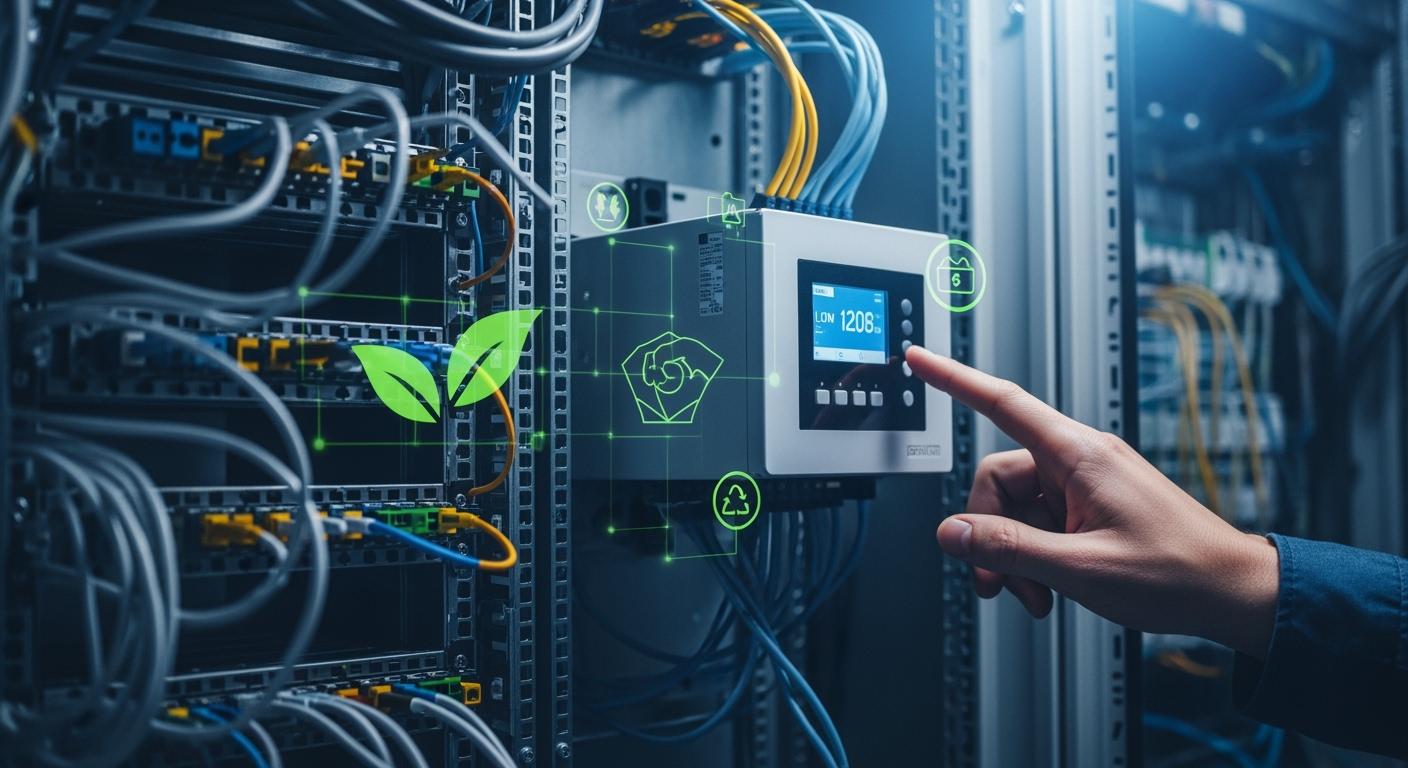
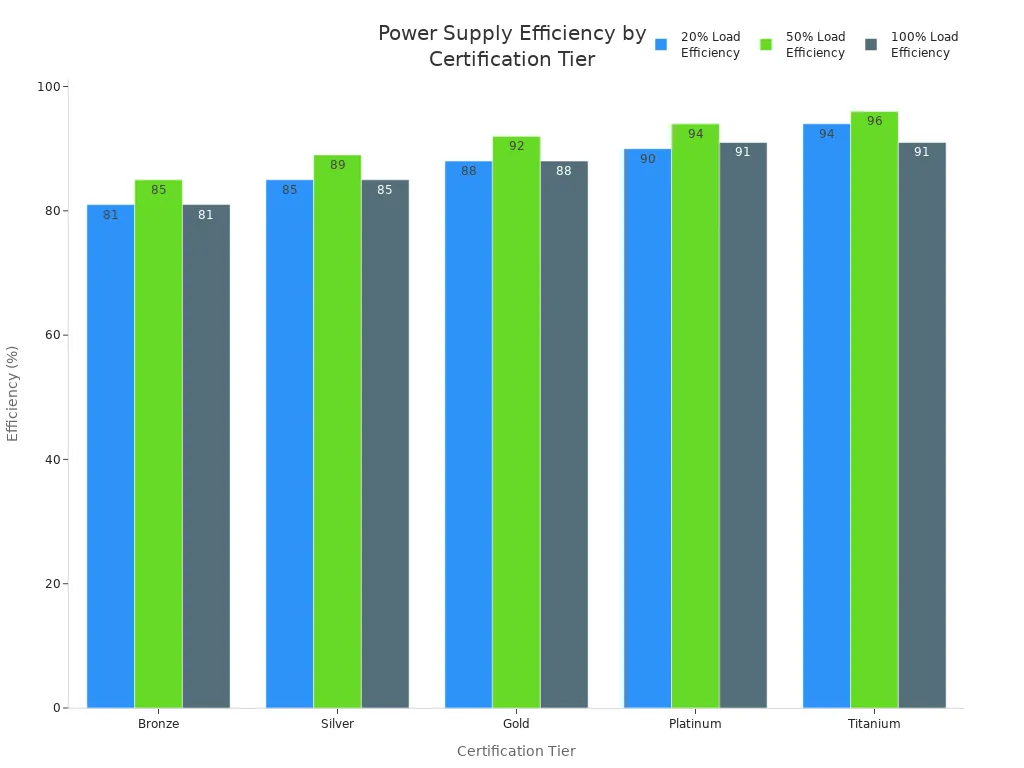
You can achieve significant energy savings in telecom cabinets by using a low-power standby mode Smart Power Distribution Unit. Energy efficiency matters in telecom infrastructure, where global standards demand higher performance. The chart below shows how power supply efficiency improves with certification tiers:
ESTEL leads the industry with integrated outdoor telecom solutions. You can focus on practical steps, measure real benefits, and see positive outcomes. Consider retrofitting your cabinet for a greener future.
Key Takeaways
Retrofitting telecom cabinets with Smart Power Distribution Units can significantly reduce energy waste and lower electricity bills.
Smart PDUs offer real-time monitoring and remote control, allowing you to manage power usage efficiently from anywhere.
Using low-power standby mode in Smart PDUs helps save energy by powering down non-essential components during low demand.
Implementing a unified sensor network enhances equipment protection and maintains optimal conditions in telecom cabinets.
Choosing ESTEL’s Smart PDUs ensures compliance with safety standards and provides advanced features for better operational efficiency.
Smart Power Distribution Unit Basics
What Is a Smart Power Distribution Unit
You need reliable power management in telecom cabinets. A Smart Power Distribution Unit gives you advanced control over how electricity flows to your equipment. Unlike basic power strips, this unit tracks power use, protects devices, and lets you manage everything remotely. You can see real-time data, switch outlets on or off from anywhere, and monitor the environment inside your cabinet. These features help you prevent overloads and keep your network running smoothly.
Tip: Always check that your Smart Power Distribution Unit meets safety standards like UL and CE marks. This ensures your equipment stays protected from electric shock and fire.
Here is a quick look at the main operational principles:
Feature | Description |
|---|---|
Real-time power consumption monitoring | Enables tracking of power metrics and prevents overloads. |
Remote switching capabilities | Allows control of power outlets from anywhere. |
Monitors heat and humidity to protect equipment. |
How Standby Mode Saves Energy
You can cut energy waste by using the low-power standby mode in your Smart Power Distribution Unit. This mode reduces power use when your equipment does not need full operation. The unit powers down non-essential parts but keeps critical functions active. It also uses burst mode and advanced power management to lower energy use during light loads. Dynamic voltage and frequency scaling adjust power based on demand, so you only use what you need.
Mechanism | Description |
|---|---|
Powers down non-essential components while keeping critical functions active. | |
Burst Mode Operation | Reduces power consumption during periods of low load. |
Advanced Power Management | Minimizes standby energy consumption through techniques like clock gating and memory retention. |
Dynamic Voltage and Frequency Scaling | Adjusts power based on workload to optimize energy use. |
ESTEL’s Smart PDU Technology
ESTEL brings innovation to Smart Power Distribution Units. You get intelligent monitoring and remote access, which means you can manage your power system from anywhere. The unit helps you track Power Usage Effectiveness (PUE) and can lower energy use by up to 20%. Rigorous testing ensures the unit works well even in tough conditions. The modular design lets you upgrade or expand as your needs grow. ESTEL’s technology also protects your equipment from power surges and keeps the environment inside your cabinet stable.
UL Listed Mark: Protects against electric shock and fire.
CE Mark: Meets EU safety regulations.
IEC 60950-1 and IEC 62368-1: Ensures safety for IT and communication equipment.
You can trust ESTEL’s Smart Power Distribution Unit to deliver reliable, efficient, and safe power management for your telecom cabinets.
Features and Integration
Unified Data and Sensor Networks
You can improve the reliability of your telecom cabinet by using a unified sensor network. Sensors collect real-time data and help you monitor environmental conditions. ESTEL’s Smart Power Distribution Unit integrates several types of sensors. These sensors detect changes and alert you to potential risks. You can find the following sensors in advanced telecom cabinets:
Temperature sensors
Humidity sensors
Water leak sensors
Vibration sensors
Dust sensors
Security sensors
These sensors work together to protect your equipment and maintain optimal conditions. You gain better control and can respond quickly to any issues.
Remote Monitoring and Control
Remote monitoring and control give you the ability to manage your telecom cabinet from anywhere. You can track power usage, adjust settings, and troubleshoot problems without visiting the site. ESTEL’s solutions, including the Telecom Power System and Telecom Rectifier System, offer these features. The table below shows how remote monitoring and control enhance efficiency:
Feature | Benefit |
|---|---|
Remote monitoring | Enables early detection of problems and proactive adjustments. |
Automated power management | Reduces the need for frequent on-site visits, enhancing operational efficiency. |
Environmental tracking | Monitors conditions like temperature and humidity to prevent outages. |
Remote troubleshooting | Allows quick fixes from anywhere, cutting maintenance costs. |
Centralized control | Manage multiple sites efficiently, reducing operational costs. |
Automated alerts | Notifies of potential problems, enabling quick responses to prevent outages. |
Modular design | Provides flexibility to increase capacity without major downtime. |
You save time and resources by using these features. You also reduce maintenance costs and improve system reliability.
Communication Protocols
Communication protocols connect your devices and allow them to share information. ESTEL’s products support a range of protocols for easy integration. You can use these protocols to link sensors, controllers, and monitoring systems. The table below lists common protocols used in telecom applications:
Protocol | Description |
|---|---|
Modbus | Connects industrial electronic devices, widely used for automation. |
PROFIBUS | Offers reliable communication in noisy environments. |
EtherNet/IP | Combines Ethernet hardware with manufacturing-specific functions. |
OPC UA | Provides platform independence and strong security for integration. |
RS485 | Allows many devices to communicate over long distances. |
RS232 | Used for short-distance serial communication. |
Ethernet | Provides high-speed data transfer for local networks. |
You can choose the protocol that fits your needs. This flexibility helps you build a robust and scalable telecom cabinet.
Traditional vs. Smart PDUs

Limitations of Conventional PDUs
You may notice several challenges when using conventional PDUs in telecom cabinets. These older units often lack the features needed for modern network demands. Here are some common limitations:
Conventional PDUs do not support remote management, so you must be on-site to make changes.
They provide limited insights into power consumption, making it hard to track energy use.
Identifying and resolving issues quickly is not feasible, which can lead to longer downtimes.
Inefficient space utilization becomes a problem, especially in high-density telecom cabinets.
Basic designs limit operational flexibility and adaptability.
Note: These limitations can increase operational costs and make it harder to maintain reliable service.
Efficiency and Cost Benefits
Switching to advanced solutions brings clear advantages. Smart PDUs offer real-time monitoring, remote management, and better adaptability. You can see the differences in the table below:
Feature | Smart PDUs | Traditional PDUs |
|---|---|---|
Energy Efficiency | Real-time monitoring reduces energy waste | Basic power distribution only |
Operational Cost | Lower costs due to optimized power usage | Higher costs from inefficiencies |
Management Capabilities | Remote management and outlet-level metering | Manual control |
Adaptability | Supports high-density setups | Less efficient for large-scale operations |
Intelligent PDUs provide advanced features such as automated power management. You can reduce maintenance costs by up to 30% and achieve up to 20% cost savings. Many operators report energy efficiency improvements of up to 20% and downtime reductions of 15%. For example, Equinix invested $77.5 million in energy efficiency and saw an annual energy reduction of 66,862 MWh.
ESTEL’s Competitive Edge
When you choose ESTEL, you gain several advantages over other market solutions. The Smart Power Distribution Unit from ESTEL includes:
Feature | Benefit |
|---|---|
Real-time monitoring | Detailed insights into power usage for efficient operations |
Environmental monitoring | Tracks temperature and humidity to prevent equipment damage and downtime |
Modular design | Scalability as your network grows |
Hot-swappable components | Maintenance without operational downtime |
Remote connectivity | Monitoring and control from anywhere |
Outlet control | Power management at the individual outlet level for improved safety |
You can rely on ESTEL to deliver a solution that improves efficiency, reduces costs, and supports your sustainability goals.
Implementation Steps
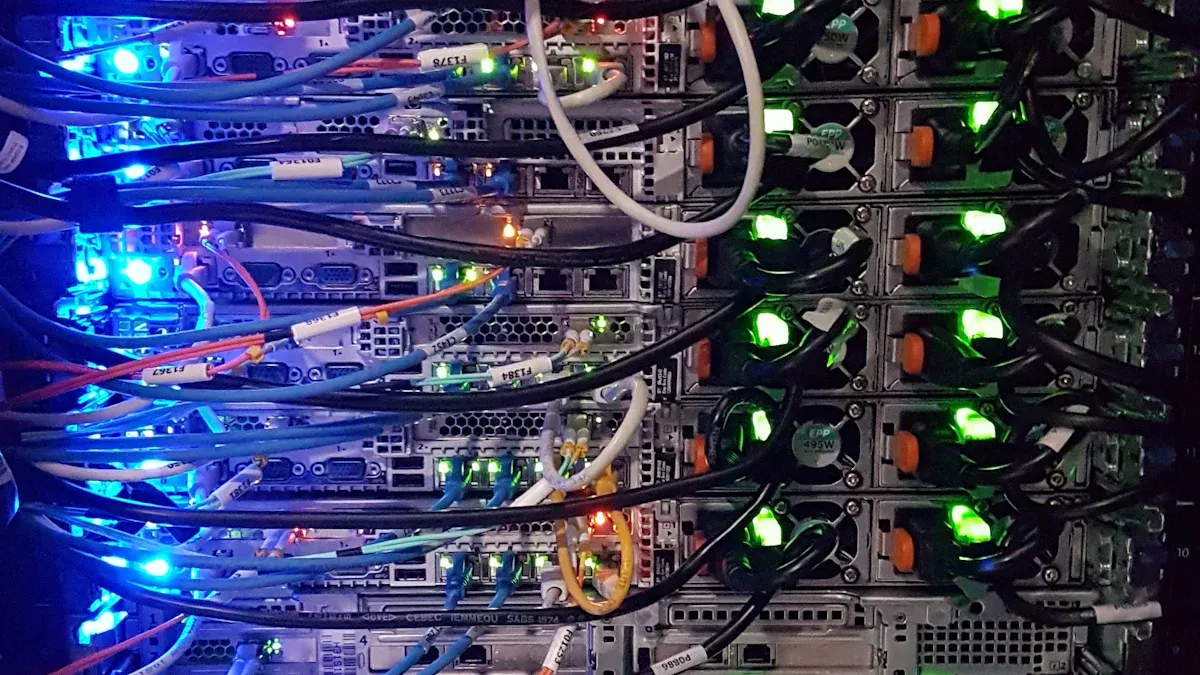
Retrofit Planning
You need a clear plan before you retrofit your telecom cabinet with a Smart Power Distribution Unit. Start by assessing your operational needs. Decide if you require advanced monitoring, remote control, or just basic power management. Calculate the total power capacity by adding up the maximum requirements of all your equipment. Add a safety margin of 20–30% to handle future growth or unexpected loads.
Next, choose a retrofit kit that matches your cabinet’s voltage and current specifications. Make sure the plug types are compatible with your facility’s outlets and your equipment cords. Consider the form factor of the Smart PDU. Check if it fits your rack space and supports your cable management preferences. Plan for scalability by selecting units with spare outlets and advanced features like outlet-level monitoring.
Here is a step-by-step outline for planning your retrofit:
Assess your power, monitoring, and control needs.
Calculate total power capacity and add a safety margin.
Select a retrofit kit that matches your cabinet’s specifications.
Confirm plug types and form factor compatibility.
Plan for future expansion with scalable units.
Gather all necessary tools and clear the cabinet of dust and debris.
Tip: Always plan for future needs. Choose a Smart PDU that supports extra outlets and advanced monitoring to avoid frequent upgrades.
Installation Best Practices
Proper installation ensures safety and reliable operation. Begin by determining if your rack requires single-phase or three-phase power. Check the site voltage and decide on the best distribution scheme. Plan your cable routes before you install the PDU. Use cable ties for permanent bundles and Velcro straps for cables you may need to adjust later. Label each cable with heat-resistant tags that show its purpose and destination.
Keep cables away from vents and fans to maintain good airflow. Invest in cable management accessories to keep your rack organized. Inspect all incoming and outgoing wires for secure connections and no visible damage. Pay special attention to the grounding wire. Make sure it connects securely to the rack’s grounding point.
Perform a no-load test by turning on the PDU without connecting any equipment. Check that the indicator lights and circuit breakers work. Connect your devices one at a time, monitoring the load to keep it within 80% of the PDU’s rated capacity.
Safety Alert: Never power up the PDU near flammable liquids or hazardous materials. Always follow electrical safety rules and use insulated tools.
Follow these five safety rules during installation:
Disconnect all power before starting work.
Prohibit re-connection until installation is complete.
Secure the PDU firmly in place.
Earth and short the system to prevent shocks.
Shroud nearby live components to protect against accidental contact.
You must also comply with international safety and environmental standards. The table below lists key compliance requirements:
Compliance Standard | Specific Criteria |
|---|---|
Safety | EN IEC 62368-1 (TUVR certified, T-mark) |
EMC | EN 55032 / CISPR 32, EN 55035 / CISPR 35, EN 61000-3-2 / IEC 61000-3-2, EN 61000-3-3 / IEC 61000-3-3 |
CE Mark | 2011/65/EU (RoHS Directive), 2014/35/EU (Low Voltage Directive), 2014/30/EU (EMC Directive) |
UKCA Mark | RoHS, Electrical Equipment (Safety), Electromagnetic Compatibility |
You should also meet RoHS requirements to avoid hazardous substances. In Europe, follow the EU Green Deal and Energy Efficiency Directive. In the US, certifications like LEED and BREEAM are important for energy efficiency.
System Configuration
Configuring your Smart Power Distribution Unit is the final step. Connect the PDU to your monitoring system for remote access. Set up the software to display real-time data and configure alerts for abnormal readings. Enable outlet-level monitoring and control. This lets you shut down individual outlets remotely during emergencies.
Allocate power efficiently by monitoring consumption data. Use the web interface for easy access to information about remote sites and alarms. Make sure you test the system after configuration. Check for steady power delivery and perform electrical tests to confirm reliability.
Here is a table showing key configuration aspects and their benefits:
Configuration Aspect | Benefit |
|---|---|
Remote Monitoring | Connects to monitoring systems and allows remote access. |
Power Control | Enables outlet-level monitoring and emergency shutdown. |
Energy Efficiency | Allocates power efficiently and tracks consumption. |
Uptime Consistency | Maintains consistent uptime through effective monitoring. |
Intuitive Interface | Provides easy access to site information and alarms. |
You may face some integration challenges. Data security is critical. Protect your power and environmental data from both physical and digital threats. If you have older systems, plan carefully to ensure compatibility. Engage expert support if you need help with complex integrations.
Challenge | Description |
|---|---|
Data Security | Protects power and environmental data from threats. |
Legacy System Compatibility | Requires careful planning for integration with older systems. |
Expert Support | Helps navigate complex integration processes. |
Note: Careful planning, proper installation, and thorough configuration ensure your Smart Power Distribution Unit delivers reliable, efficient, and safe power management for your telecom cabinet.
Measurable Outcomes and Business Value
Real-Time Monitoring and Predictive Maintenance
You gain powerful tools with real-time monitoring in your telecom cabinet. Smart Power Distribution Units let you spot problems before they cause failures. You can track power usage, temperature, and humidity. This data helps you make smart decisions about maintenance. You avoid emergency repairs and reduce downtime by up to 25%. Predictive maintenance means you fix issues before they become serious. You also lower operational costs because you only perform maintenance when needed.
Real-time data helps you detect and resolve issues early.
You can optimize maintenance schedules and avoid unnecessary site visits.
Advanced analytics show which devices use the most energy, so you can plan upgrades.
Tip: Use automated alerts to respond quickly to changes in your cabinet’s environment.
Case Study Results
Many telecom operators have seen big improvements after switching to Smart PDUs. You can see the results in the table below:
Client / Case Study | Performance Metrics and Cost Savings Reported |
|---|---|
Leading Telecom Provider | Energy efficiency up to 97.8%; early issue detection; seamless network expansion |
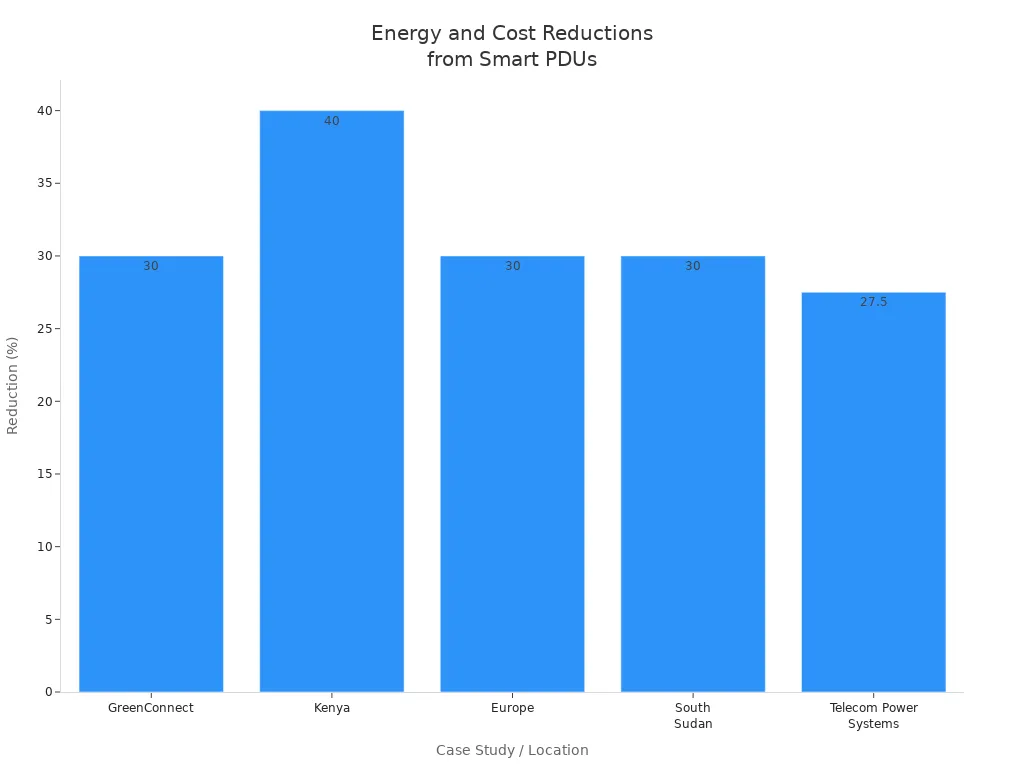
GreenConnect | 30% reduction in energy use; 25% reduction in downtime; 40% reduction in CO2 emissions |
Southeast Asia Mobile Operator | 38% fewer site visits; repair time dropped from 12 to 4 hours; $500,000 saved annually |
European Tower Company | 22% better uptime; half as many emergency maintenance trips |
Telecom Power Systems | 25-30% less energy use; lower bills and less cooling needed |
You can also see the impact in different regions:
Location | Outcome |
|---|---|
Kenya | 40% lower energy expenses with solar-powered towers |
Europe | 30% smaller carbon footprint after modular solar plants |
South Sudan | 30% less fuel cost with solar energy solutions |
ROI and Sustainability
You see strong returns on investment when you retrofit with Smart PDUs. The table below shows the measurable outcomes:
Outcome | Measurement |
|---|---|
Cost savings | Significant |
Maintenance cost reduction | Up to 40% |
Energy use reduction | 30% |
CO2 emissions reduction | 40% |
Downtime reduction | 25% |
Energy efficiency | Up to 97.8% |
You help your company meet sustainability goals. Smart PDUs can save up to 1,342 gigawatt hours of electricity each year and cut greenhouse gas emissions by over 596,000 metric tons. You also reduce annual costs by $163 million. These improvements support a greener future for telecom infrastructure.
Note: Smart PDUs improve Power Usage Effectiveness (PUE) and help you manage energy use more efficiently.
You can achieve significant energy and cost savings by retrofitting your telecom cabinets with low-power standby mode Smart Power Distribution Units. These units use intelligent sensors to cut energy waste, lower electricity bills, and reduce greenhouse gas emissions. ESTEL’s solutions also offer surge protection, easy maintenance, and remote monitoring:
Advantage | Description |
|---|---|
Surge Protection | Enhanced reliability and safety |
Cost Efficiency | Long-term savings on equipment and labor |
Maintenance Ease | Reduced downtime with easy access |
Remote Monitoring | Proactive power management |
Looking ahead, smart power management will grow with IoT and edge computing. Start by upgrading to high-efficiency equipment and using energy-saving features for a greener future.
FAQ
How does a Smart Power Distribution Unit help you save energy?
You use a Smart PDU to monitor and control power in real time. The unit reduces waste by shutting down unused outlets and adjusting power based on demand. This approach lowers your energy bills and supports your sustainability goals.
Can you install a Smart PDU in existing telecom cabinets?
Yes, you can retrofit most telecom cabinets with a Smart PDU. Check your cabinet’s size, voltage, and outlet requirements before installation. ESTEL’s modular design makes integration simple and efficient.
What maintenance does a Smart PDU require?
You need to perform regular inspections. Clean dust from vents, check connections, and update firmware when needed. Most Smart PDUs send alerts for issues, so you can act quickly.
Tip: Schedule monthly checks to keep your system running smoothly.
What support does ESTEL provide after installation?
ESTEL offers technical support, product documentation, and remote troubleshooting. You can contact their team by phone or email for help with setup, configuration, or maintenance.
Support Type | How You Access It |
|---|---|
Technical Support | Phone, Email |
Documentation | Online Resources |
Remote Troubleshooting | Remote Access Tools |
See Also
Telecom Cabinets Powered By Photovoltaic Energy Storage Systems
Ensuring Consistent Power Supply For Telecom Cabinets
Telecom Cabinet Energy Storage System With ESTEL Microgrid Integration
Telecom Cabinets With Grid-Connected Inverter And Battery Systems
Understanding ESTEL PDUs And Their Importance In Data Centers
CALL US DIRECTLY
86-13752765943
3A-8, SHUIWAN 1979 SQUARE (PHASE II), NO.111, TAIZI ROAD,SHUIWAN COMMUNITY, ZHAOSHANG STREET, NANSHAN DISTRICT, SHENZHEN, GUANGDONG, CHINA
