Quick-Install Bracket Design of Smart PDUs: Single-Person 10-Minute Side-Mount Deployment


You can deploy an ESTEL Smart Power Distribution Unit in just 10 minutes using the quick-install bracket and side-mount method. ESTEL’s innovative bracket design lets you complete installation efficiently, even in demanding telecom or data center environments. You benefit from advanced features such as modular flexibility, intelligent monitoring that can reduce energy waste by 20%, and energy management tools that improve maintenance response by 40%. These advantages help you optimize your power distribution setup with confidence.
Key Takeaways
Install the ESTEL Smart Power Distribution Unit in just 10 minutes using the quick-install bracket. This saves time and reduces installation errors.
Deploy the unit alone with the lightweight bracket design. This eliminates the need for extra help and cuts labor costs.
Prepare your tools and materials before starting. A checklist ensures a smooth installation process and avoids delays.
Follow safety protocols during installation. Disconnect power sources and use personal protective equipment to prevent accidents.
Maintain your Smart Power Distribution Unit regularly. Inspect cables and monitor power usage to ensure reliability and efficiency.
Bracket Concept & Benefits
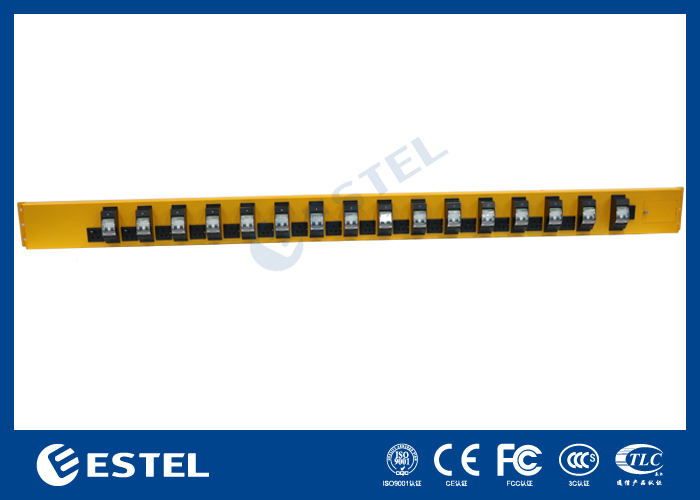
Quick-Install Bracket Overview
You want to save time and effort when installing equipment in your data center or telecom site. The quick-install bracket makes this possible. This bracket uses a simple yet strong design. You can attach it to the rack or cabinet side without special tools. The bracket holds the Smart Power Distribution Unit securely in place. You do not need to struggle with complex mounting systems. The quick-install bracket reduces setup time and helps you avoid installation errors.
Tip: Always check the bracket for any visible damage before starting your installation. This ensures safety and reliability.
Single-Person Deployment Advantages
You can complete the installation by yourself. The bracket design supports single-person deployment. You do not need a second person to hold the unit or pass you tools. This saves labor costs and speeds up your workflow. You can also work in tight spaces where only one person fits. The bracket’s lightweight structure makes it easy to handle. You stay in control of the process from start to finish.
Save time on each deployment
Reduce the risk of injury from heavy lifting
Increase productivity in busy environments
ESTEL Innovation in Bracket Design
ESTEL focuses on making your job easier. The company uses high-quality materials and precise engineering for every bracket. You get a product that meets international standards and lasts for years. ESTEL’s bracket design supports the Smart Power Distribution Unit in harsh environments. The bracket resists corrosion and keeps the unit stable, even in outdoor telecom cabinets. You benefit from a solution that combines strength, safety, and ease of use.
ESTEL’s commitment to innovation means you always have access to the latest technology for your power distribution needs.
Smart Power Distribution Unit Preparation
Tools & Materials Checklist
You need to gather the right tools and materials before you start installing your ESTEL Smart Power Distribution Unit. Preparation helps you avoid delays and ensures a smooth installation process. Here is a checklist to guide you:
Insulated screwdriver set
Adjustable wrench
Voltage tester
Personal protective equipment (PPE) such as gloves and safety glasses
Quick-install bracket kit (included with your ESTEL unit)
Mounting screws and hardware
Cleaning cloth for the mounting area
Tip: Always use insulated tools when working with electrical equipment. This reduces the risk of electric shock and keeps you safe.
Compatibility & Safety Checks
You should confirm that your Smart Power Distribution Unit matches your rack or cabinet specifications. Check the dimensions and mounting points to ensure a proper fit. Review the technical requirements, such as input voltage and current ratings, to match your site’s power supply.
Safety is your top priority. Only certified workers should install and maintain data center PDUs. Use a pre-start checklist to test that circuits are not live and to create safety clearances. Follow these five safety rules:
Disconnect all power sources before installation.
Prohibit re-connection during the process.
Secure the installation area.
Earth and short the unit as needed.
Shroud any nearby live components.
Never power up the unit near flammable liquids or hazardous materials. Always follow electrical safety rules and wear PPE.
ESTEL’s Smart Power Distribution Unit meets strict industry standards for safety and performance. You can see the certifications in the table below:
Certification | Description |
|---|---|
ISO9001 | Ensures consistent manufacturing processes for quality assurance. |
UL | Guarantees compliance with electrical safety standards. |
RoHS | Addresses environmental impact and safety. |
CE | Ensures compliance with health, safety, and environmental protection standards. |
VDE | Validates electrical safety and performance standards. |
When you deploy a Smart Power Distribution Unit in a data center, you also support energy efficiency and environmental monitoring. Intelligent rack PDUs allow you to use plug-and-play sensors for temperature and humidity. This helps you maintain optimal conditions and follow best practices for energy management.
Side-Mount Deployment Steps
Positioning the ESTEL PDU
You start by choosing the best spot for your Smart Power Distribution Unit. Look at your rack and decide where the unit will fit without blocking airflow or interfering with other equipment. Make sure the outlets are easy to reach so you can connect and disconnect devices quickly. Use the mounting brackets and screws that come with your ESTEL unit to secure it. Align the unit vertically. You can use a level or check visually. Confirm that the unit does not block access to other devices in the rack.
Tip: Place the Smart Power Distribution Unit near the back of the rack. This gives you easy access and keeps cables organized.
Attaching the Bracket
You need to attach the quick-install bracket to the rack. Align the brackets with the slots on the rack. Make sure the brackets are level. Use the screws provided with your unit. Tighten the screws evenly. This prevents damage and keeps the pressure balanced. After you secure the brackets, check the stability of the unit. Gently push or pull the unit. It should stay firmly in place.
If you work alone, you can use one hand to hold the bracket and the other to tighten the screws. The lightweight design makes this step easier.
The main assembly challenge that you face is installing all the brackets and fittings needed to mount metal boxes and control cabinets. Each hole for fasteners can create a potential leak when equipment is deployed outdoors. Moisture can affect performance. Always check for proper sealing after installation.
Securing & Cable Management
You secure the unit and manage cables next. Proper cable management helps you avoid confusion and makes maintenance easier. Use labels for power and data cables. Label both ends of each cable. Write the source unit and circuit on the label. This helps you identify cables quickly. Consistent labeling lets you know which load each cable supports.
Label all cables clearly.
Use cable ties to keep cables neat.
Avoid crossing power and data cables.
Check that cables do not block airflow.
Note: Good cable management reduces troubleshooting time and prevents accidental disconnections.
Testing & Power-Up
You test and power up the unit after installation. Plug the unit into the power source. Make sure the plug fits the outlet. Use a voltage tester to check the power source before turning on the unit. Connect your devices to the unit. Distribute the power load evenly. Turn on the unit. Check that all connected devices receive power. Follow the grounding instructions in the manual. This ensures safety.
Always verify that the Smart Power Distribution Unit works as expected before leaving the site. If you notice any issues, review your installation steps and check cable connections.
Efficiency & Safety Tips
Time-Saving Techniques
You can speed up your Smart Power Distribution Unit installation by following a few proven strategies. Prepare all your tools and materials before you start. Lay out the quick-install bracket, screws, and your insulated screwdriver within arm’s reach. Clean the mounting area so you do not waste time dealing with dust or debris. Use cable ties and labels as you go, not after you finish. This keeps your workspace organized and reduces confusion later.
Tip: Double-check the mounting points and bracket alignment before tightening any screws. This prevents you from having to redo steps.
If you work alone, plan your moves. Place the PDU on a stable surface at the right height. This reduces lifting and reaching. You can also pre-label cables before connecting them, which saves time during future maintenance.
Common Mistakes to Avoid
Many installers make the same errors when setting up a Smart Power Distribution Unit. You can avoid these mistakes by following best practices. The table below lists frequent mistakes and their solutions:
Mistake | Solution |
|---|---|
Overloading Circuits | Provision your PDU to only 50% of its maximum load. |
Ignoring Capacity for Spikes | Reserve at least 20% of your PDU’s capacity for power spikes. |
Connecting Without Checking Load | Always check the actual power usage before plugging in devices. |
Missing Current and Voltage Warnings | Monitor current and voltage warnings to prevent failures. |
Ignoring Voltage Drops | Use step-up transformers and plan for voltage regulation. |
Skipping Load Calculations | Calculate total load and add a 20% buffer for growth. |
Poor Grounding Systems | Install proper ground grids and test resistance twice a year. |
Neglecting Protection Coordination | Map protection zones and set relay timing to isolate faults. |
Weak Maintenance Schedules | Inspect equipment every three months and keep detailed logs. |
Note: Careful planning and regular checks help you avoid costly downtime and equipment damage.
Troubleshooting Advice
If your Smart Power Distribution Unit does not power up after installation, you can follow these steps to find the problem:
Check the power input. Make sure the outlet works and the power cable is not damaged.
Verify the input voltage with a voltmeter. Confirm it matches the PDU’s specifications.
Inspect the current load. Make sure connected devices do not exceed the rated load.
Monitor for high temperatures. Overheating can cause the unit to shut down.
Diagnose internal hardware. If the problem continues, check the control board and other components.
You can solve most issues by following these steps. If you still have problems, contact a qualified technician for support.
You gain speed and confidence with ESTEL’s quick-install bracket design. Single-person deployment lets you work efficiently and safely. Smart Power Distribution Units improve your data center operations in several ways:
Centralized power management prevents overloads and balances loads.
Remote monitoring and reporting help you spot issues early.
Strategic placement boosts airflow and cooling for sensitive equipment.
Safety standards protect your equipment and your team.
You find compelling reasons to choose ESTEL for future deployments:
Feature | Benefit |
|---|---|
Real-time monitoring | Better management of power, temperature, and humidity |
Energy efficiency | Cost savings and reduced waste |
Surge protection | Safeguards equipment from power abnormalities |
Modular design | Flexible power distribution for your needs |
Reliable power backup | Uninterrupted power supply |
You ensure reliability by following simple maintenance steps. Inspect cables, clean components, and monitor power usage regularly. If you have questions or need expert advice, reach out to ESTEL for support. Your next installation can be faster, safer, and smarter.
FAQ
How long does it take to install the ESTEL Smart Power Distribution Unit?
You can complete the installation in about 10 minutes. The quick-install bracket and side-mount design make the process fast and simple for one person.
What tools do you need for installation?
You need an insulated screwdriver, an adjustable wrench, a voltage tester, and personal protective equipment. The quick-install bracket kit and mounting hardware come with your ESTEL unit.
Can you install the Smart Power Distribution Unit by yourself?
Yes. The bracket design supports single-person deployment. You do not need extra help. The lightweight structure and simple steps make solo installation safe and efficient.
Does the Smart Power Distribution Unit support remote monitoring?
Yes. You can monitor and control power distribution remotely. The unit features intelligent protocols and an LCD display for real-time updates.
What should you do if the unit does not power up after installation?
First, check the power source and cable connections. Use a voltage tester to confirm input. Make sure you do not exceed the rated load. If issues continue, contact ESTEL support for help.
See Also
Simplifying Your Choices for Rackmount Enclosure Depth
Finding the Ideal Rackmount Enclosure Depth for You
Guide to Selecting and Installing Telecom Cabinets Safely
Understanding ESTEL PDUs and Their Importance in Data Centers
Innovative Outdoor Communication Cabinets for a Sustainable Future
CALL US DIRECTLY
86-13752765943
3A-8, SHUIWAN 1979 SQUARE (PHASE II), NO.111, TAIZI ROAD,SHUIWAN COMMUNITY, ZHAOSHANG STREET, NANSHAN DISTRICT, SHENZHEN, GUANGDONG, CHINA
