Plug-and-Play Design of Smart Power Distribution Units in Telecom Cabinets: Rapid Access Solution for Legacy Equipment Retrofitting

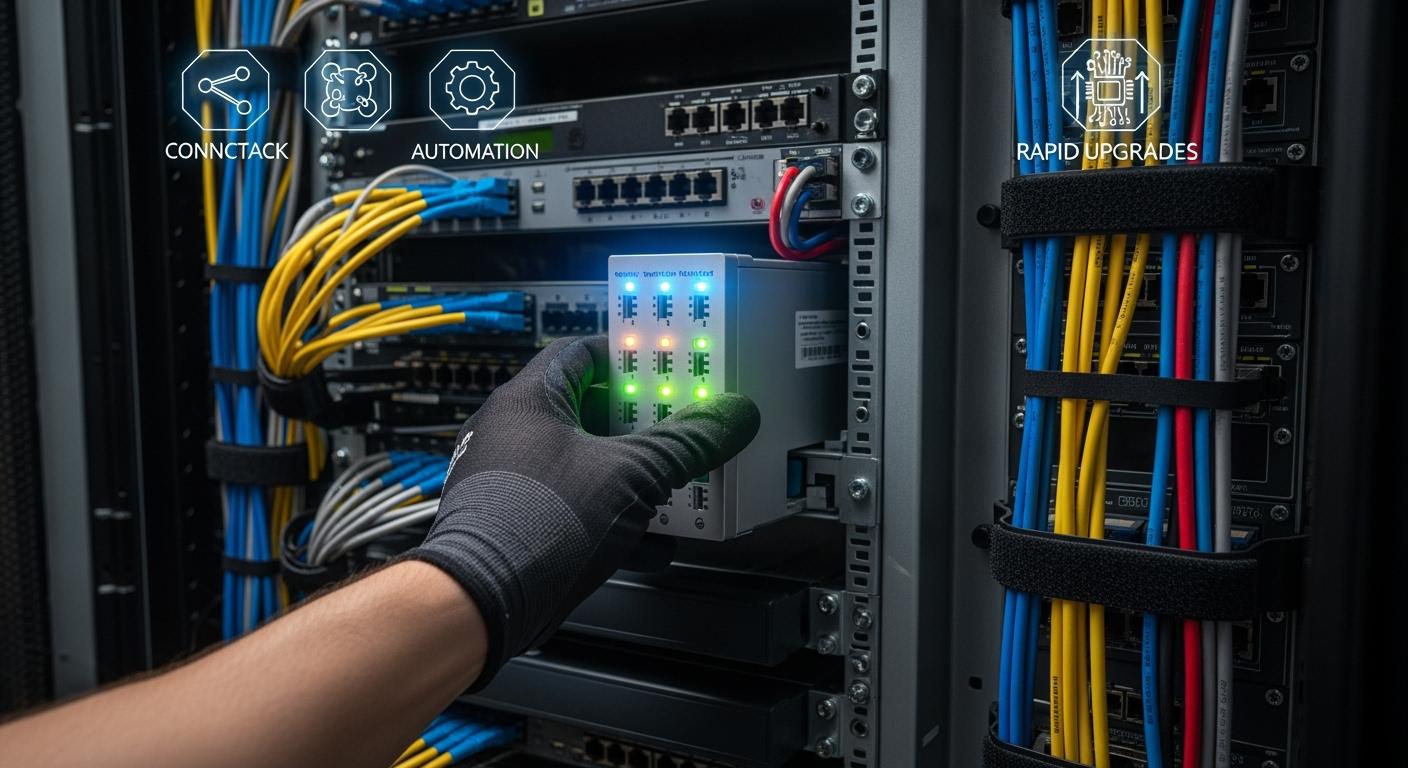
You face real challenges when dealing with outdated telecom cabinets. Nearly 48% of data centers worldwide still use legacy equipment that needs upgrading. ESTEL’s Smart Power Distribution Unit gives you a fast way to modernize these cabinets. You benefit from quick installation, minimal downtime, and advanced remote management. Plug-and-play solutions like this are crucial for keeping your network reliable and efficient.
Key Takeaways
Upgrade legacy telecom cabinets quickly with ESTEL's Smart Power Distribution Unit, which offers plug-and-play installation.
Reduce downtime by up to 25% during upgrades, keeping your network operational and your customers satisfied.
Utilize remote monitoring features to troubleshoot issues faster and minimize on-site visits, saving time and resources.
Enhance energy efficiency and lower costs with advanced monitoring and predictive maintenance capabilities.
Follow best practices for installation and maintenance to ensure reliability and performance of your telecom systems.
Retrofitting Challenges in Telecom Cabinets
Issues with Legacy Equipment
You often encounter several obstacles when working with legacy telecom equipment. Many older cabinets use technology that cannot keep up with modern network demands. These systems may be several generations behind, which can cause performance bottlenecks. Over time, repeated repairs and patches can make the network less stable. This instability increases the risk of packet loss and disrupts efficient data transmission.
Here are some common problems you might face with legacy equipment:
Legacy networks are often outdated and cannot support modern technological needs without significant investment.
Equipment in legacy networks may be several generations behind current technology, leading to performance issues.
Repairs and patches over time can increase the risk of packet loss, disrupting efficient data transmission.
You may notice that these issues not only affect network reliability but also make maintenance more difficult. As a result, you spend more time and resources trying to keep the system running smoothly.
Traditional Retrofit Limitations
When you try to upgrade legacy cabinets using traditional methods, you face several limitations. Standard retrofitting often requires complex rewiring and extended downtime. This process can disrupt your network operations and increase costs. You may also need specialized technicians, which adds to the expense and delays.
Let’s compare traditional retrofit approaches with modern plug-and-play solutions:
Approach | Cost Implications | Time Implications |
|---|---|---|
Modular Systems | Reduced downtime due to plug-and-play design | |
Integrated Systems | Lower upfront costs, but higher long-term | Longer downtimes for upgrades and repairs |
You can see that modular, plug-and-play systems offer clear advantages. They help you save time and reduce costs, making them a better choice for rapid retrofitting. By choosing a plug-and-play solution, you minimize disruption and keep your network running efficiently.
Plug-and-Play Smart Power Distribution Unit Solutions
Plug-and-Play Design Explained
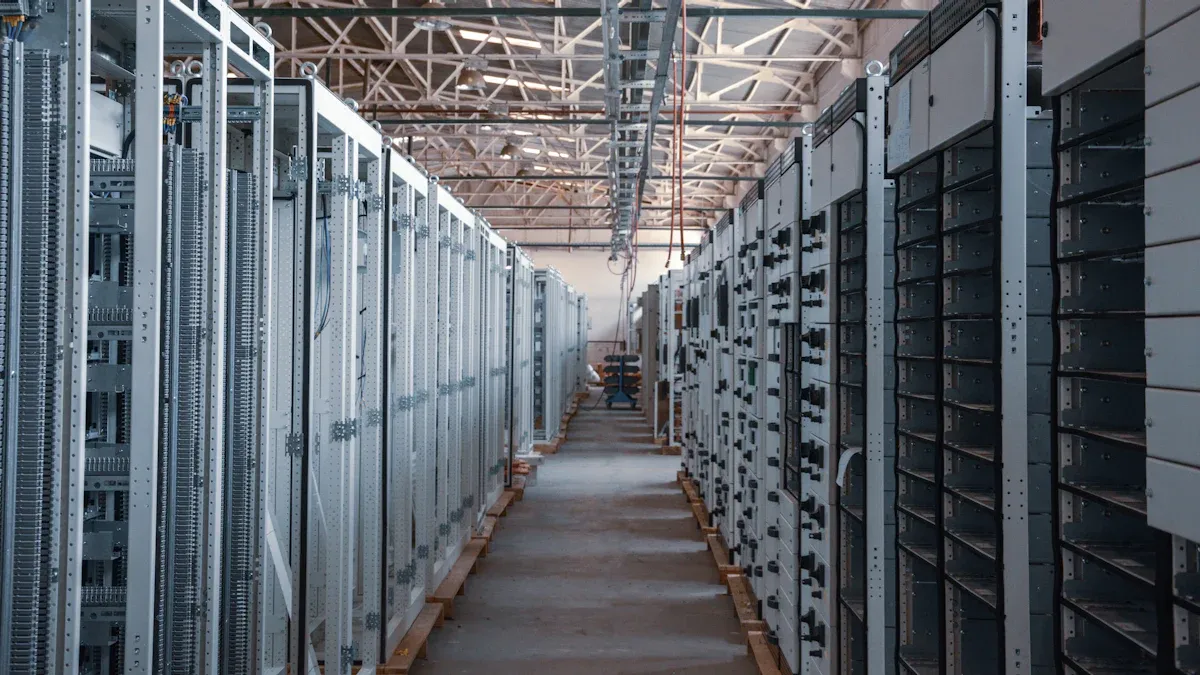
You want to upgrade your telecom cabinets without facing complicated installations or long downtimes. Plug-and-play technology makes this possible. When you use a Smart Power Distribution Unit with plug-and-play design, you do not need advanced technical skills or specialized tools. The system comes ready to install, so you can connect it quickly and start using it right away.
Plug-and-play technology reduces the need for skilled labor. You can complete the installation with basic training.
You avoid complex wiring and technical steps, which lowers costs and speeds up deployment.
Pre-terminated cables let you skip fusion splicing and other time-consuming tasks.
You can store extra cable easily, which helps you handle unexpected issues without extra expense.
This approach means you spend less time on setup and more time keeping your network running smoothly. You also reduce the risk of errors during installation, which helps protect your equipment.
Key Features for Rapid Access
A Smart Power Distribution Unit offers several features that help you access and manage your telecom cabinets quickly. These features make your job easier and improve the reliability of your network.
Feature | Description |
|---|---|
Lets you troubleshoot problems quickly, so you can fix issues before they cause downtime. | |
Environmental Monitoring | Tracks temperature, humidity, and power use in real time to prevent problems. |
Outlet-Level Control | Gives you precise control over each device, making power management simple and effective. |
Hot-Swappable Components | Allows you to replace or upgrade parts without shutting down the system. |
Remote Connectivity | Lets you manage and control your cabinet from anywhere, so you can respond to issues fast. |
You also benefit from remote management and surge protection. Remote monitoring can cut down on site visits. For example, one telecom operator reduced site visits from four to one per year by using remote monitoring. This saves time and money. Real-time alerts help you act quickly when something goes wrong, which keeps your equipment safe and your network reliable. Surge protection prevents failures, so you avoid costly repairs and keep your service running.
ESTEL Integration Benefits
When you choose ESTEL’s Smart Power Distribution Unit, you get more than just easy installation. You gain access to advanced features that protect your equipment and help you save money over time.
Feature | Description |
|---|---|
Modular design lets you add more units as your power needs grow. | |
Cost Savings Through Efficiency | Optimizes energy use, which lowers your operating costs and supports your sustainability goals. |
Improved Equipment Protection | Surge protection and power filtering keep your devices safe from power problems. |
Advanced Monitoring | Outlet-level monitoring helps you spot and fix energy waste quickly. |
ESTEL’s Smart Power Distribution Unit stands out in the market. You get real-time monitoring without needing extra software. The unit offers advanced monitoring and energy efficiency, which means you get more value for your investment. The modular design makes it easy to expand as your needs change. You also benefit from a robust build that handles tough conditions, so you can trust your equipment to last.
Tip: By choosing a Smart Power Distribution Unit from ESTEL, you make your telecom cabinets smarter, safer, and easier to manage. You also set yourself up for future growth without major upgrades.
Rapid Retrofit Process Steps
Preparation and Requirements
You need to prepare carefully before you retrofit a telecom cabinet. Start by checking the system specifications. Look at voltage, current, efficiency, and operating temperature. Gather all the tools and equipment you need, such as DC distribution panels, circuit breakers, and monitoring devices. Always follow safety precautions. Isolate the power, wear personal protective equipment, and make sure the cabinet is properly grounded. Choose a clean, dry location for installation. The temperature should stay between -40°C and +65°C. Secure the module in a rack or cabinet with good airflow. Connect the input power supply only when the power is off, and use insulated wiring. Label all output connections for easy maintenance. If you use battery backup systems, test voltage compatibility. Configure system settings, set output limits, and enable monitoring features. Finally, test the configuration under load conditions.
Installation Workflow
You can install a Smart Power Distribution Unit quickly if you follow a clear workflow:
Clear the cabinet of debris and unused equipment. Check that the cabinet size matches the unit’s specifications.
Mount the unit securely in the chosen spot. Align rackmount units with the rack’s holes for stability.
Attach the unit to the main power source. Make sure voltage and current ratings match.
Connect your telecom equipment to the unit’s outlets. Use labeled cables for easy identification.
Power on the unit and check that all devices receive steady power. Watch for overheating or irregularities.
Tip: Using labeled cables and matching specifications helps you avoid mistakes during installation.
Integration and Testing
After installation, you must integrate and test the system to ensure reliable operation. Inspect each unit and sensor for damage or loose connections. Perform electrical tests on circuit breakers and bus connections. Check insulation resistance and contact resistance. Test the grounding system with a continuity check. Verify metering accuracy by injecting known voltages and currents. Run operational checks to confirm that sensors, controllers, and alarms work together. Always de-energize equipment before testing, and use certified technicians for safety.
You can measure the success of integration and testing with several metrics:
Metric Type | Description |
|---|---|
Accuracy | Measures the correctness of the data provided by the unit. |
Reliability | Assesses performance consistency, including failure rates and uptime. |
Robustness | Evaluates operation under tough conditions like temperature and moisture. |
Efficiency of Data Transmission | Analyzes latency, packet loss, and bandwidth use. |
Adaptability to Dynamic Pricing | Tests how quickly the system responds to changes in pricing models. |
A careful approach to preparation, installation, and testing ensures your retrofit project succeeds and your network remains reliable.
Operator Benefits with Smart Power Distribution Unit
Downtime Reduction
You want your network to stay online as much as possible. When you install a Smart Power Distribution Unit, you can see a clear drop in downtime. The advanced design allows you to swap components and troubleshoot issues without shutting down the entire system. This means your network keeps running, even during upgrades or repairs.
Key Metric | Outcome |
|---|---|
Downtime Reduction |
A 25% reduction in downtime can make a big difference for your operations. You avoid service interruptions and keep your customers satisfied. Many operators report higher uptime after switching to smart power solutions.
Enhanced Monitoring and Control
You gain powerful tools for monitoring and controlling your telecom cabinets. Real-time tracking lets you spot problems before they grow. Remote access means you can manage your equipment from anywhere, which speeds up your response to issues.
Real-time monitoring improves reliability by 25%.
Maintenance response times improve by up to 40% with remote monitoring.
Load-balancing features reduce unintentional outages by 15%.
Energy efficiency increases, cutting energy use by 20%.
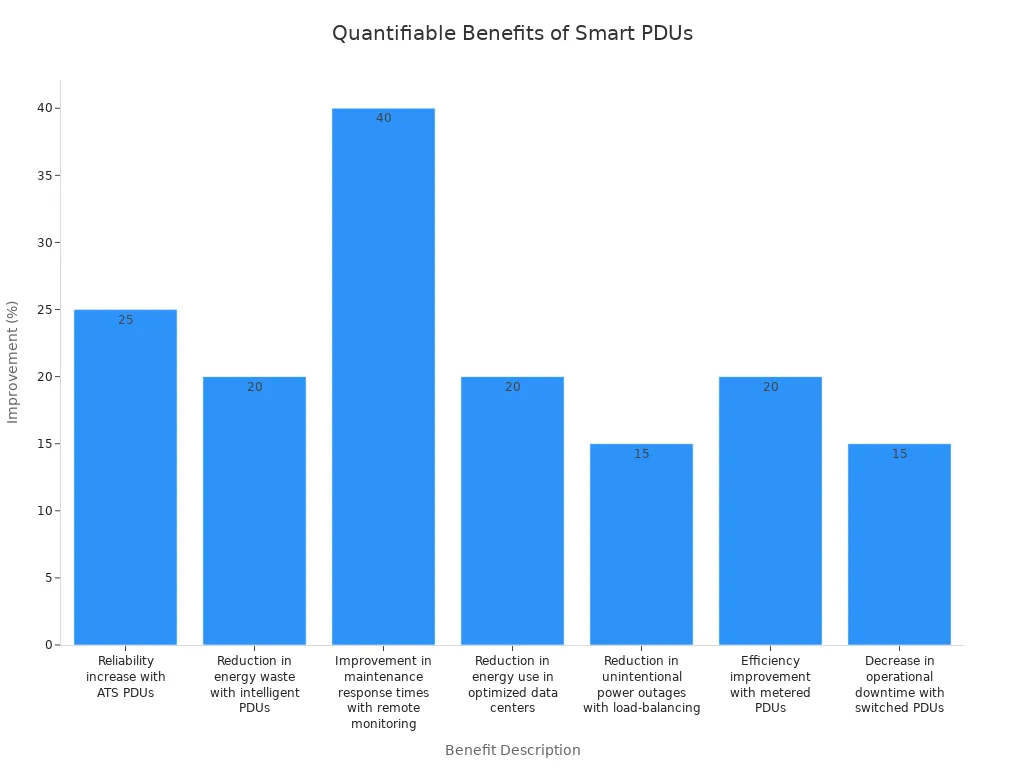
Modern power controllers can boost efficiency up to 98.6%. You also benefit from AI-driven predictive maintenance, which helps you avoid unexpected failures. Many telecom operators see a 15% reduction in energy consumption and a 20% improvement in equipment uptime after upgrading.
Cost and Resource Savings
You save money and resources when you use smart power technology. The system helps you cut energy costs and reduce the need for on-site visits. Predictive maintenance lowers repair expenses, and remote management saves time.
Aspect | Description |
|---|---|
Smart PDUs enhance energy efficiency, leading to significant cost savings. | |
Maintenance Costs | Predictive maintenance can lower maintenance costs by up to 40%. |
Remote Management | Reduces the need for on-site interventions, saving time and resources. |
You also support your sustainability goals by using less energy. As 5G and IoT devices become more common, these savings will help you stay competitive and efficient.
Real-World Applications
ESTEL Retrofit Success Story
You can see the impact of ESTEL’s Smart Power Distribution Unit in real-world telecom cabinet retrofits across the globe. Operators in different regions have achieved impressive results by upgrading their legacy systems with ESTEL solutions. The table below highlights some key outcomes:
Location | Outcome |
|---|---|
Kenya | 40% reduction in energy expenses after switching to solar-powered towers. |
India | Addressed energy challenges in rural areas, ensuring uninterrupted connectivity. |
Europe | 30% reduction in carbon footprint after implementing ESTEL’s modular solar plants. |
Southeast Asia | Improved network reliability in off-grid areas using ESTEL’s hybrid systems. |
South Sudan | 30% reduction in fuel costs after implementing solar energy solutions. |
You can also visualize these savings with the following chart:
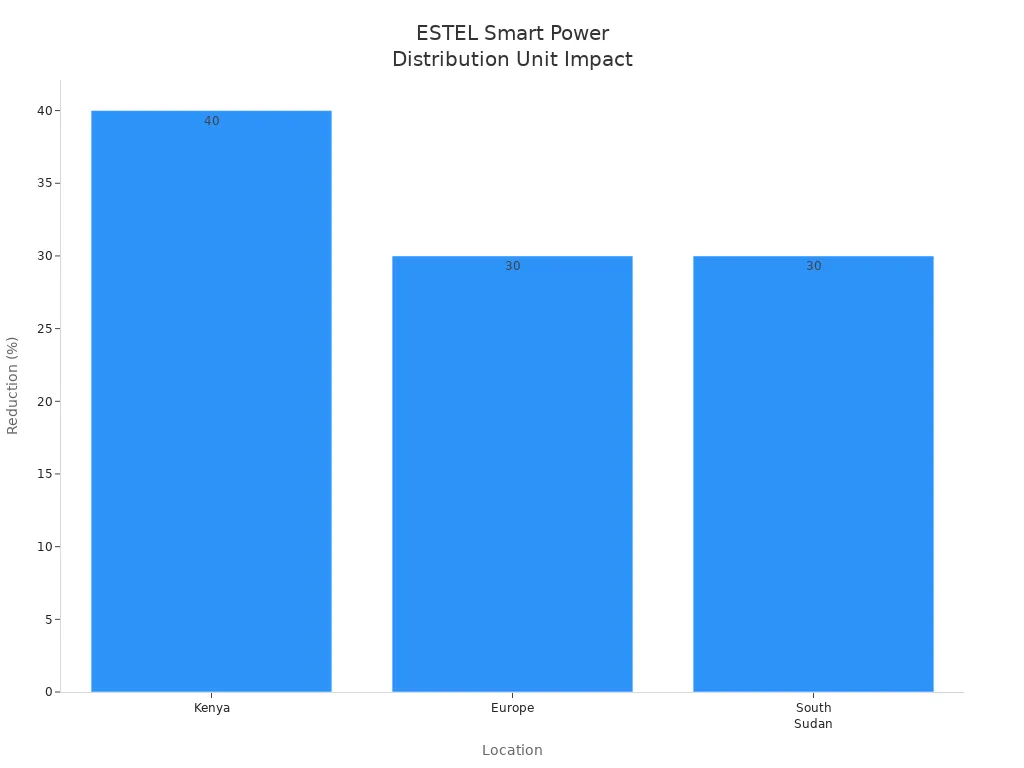
These results show that you can achieve lower energy costs, better reliability, and a smaller carbon footprint by choosing ESTEL’s Smart Power Distribution Unit for your retrofit projects.
Best Practices
You can maximize the benefits of your retrofit by following proven best practices. The table below summarizes important steps:
Best Practice | Description |
|---|---|
Proactive Measures | Ensure safety by avoiding installation near flammable materials. |
Regular Inspections | Schedule routine checks to maintain performance and reliability. |
Load Monitoring | Use tools to track power usage and prevent overloads. |
Component Replacement | Promptly replace worn or damaged parts to maintain efficiency. |
Cable Management | Organize cables to improve airflow and reduce interference. |
You should also keep these tips in mind:
Wear insulated gloves and safety goggles during installation.
Ensure compliance with local electrical codes.
Regularly review safety guidelines.
Engage stakeholders and consult experts throughout the project.
Use data analysis to guide decisions and address challenges quickly.
Note: Involving experienced contractors and delivery teams can help you overcome complex retrofit challenges and achieve the best results.
You can transform your legacy telecom cabinets quickly and effectively with ESTEL’s solutions. Upgrading to high-efficiency rectifier modules saves energy and reduces costs. Advanced designs improve reliability and minimize power loss. Modular systems make maintenance simple and fast.
Real-time monitoring helps you spot inefficiencies.
Intelligent systems lower electricity costs.
Load balancing and environmental monitoring reduce equipment failure.
Choose ESTEL to future-proof your network and achieve better operational results.
FAQ
What makes ESTEL’s Smart Power Distribution Unit plug-and-play?
You receive a unit that comes pre-configured. You only need to connect the power and outlets. You do not need advanced tools or special training. This design lets you upgrade your cabinet quickly.
Can you manage the Smart Power Distribution Unit remotely?
Yes, you can. The unit supports remote monitoring and control. You access real-time data and manage power settings from any location. This feature helps you reduce site visits and respond faster to issues.
How does the Smart Power Distribution Unit protect your equipment?
The unit includes surge protection and a dehumidifying function. These features help prevent electrical damage and moisture-related failures. You keep your equipment safe and extend its lifespan.
What are the installation requirements for the Smart Power Distribution Unit?
Requirement | Details |
|---|---|
Cabinet Size | 600×450×185mm minimum |
Power Input | 16A/2P×1, 230VAC 32A |
Environment | -40°C to +65°C, dry location |
You should follow safety guidelines during installation.
See Also
Ensuring Consistent Power Supply for Telecom Equipment
Solar Energy Storage Solutions for Telecom Infrastructure
Integrated Solar Inverter and Battery Systems for Telecom
CALL US DIRECTLY
86-13752765943
3A-8, SHUIWAN 1979 SQUARE (PHASE II), NO.111, TAIZI ROAD,SHUIWAN COMMUNITY, ZHAOSHANG STREET, NANSHAN DISTRICT, SHENZHEN, GUANGDONG, CHINA
