Remote Bulk Configuration of Smart PDUs: Unified Parameter Deployment for 100+ Telecom Cabinets


You can deploy unified parameters across more than 100 telecom cabinets with remote bulk configuration. This approach uses a centralized, automated process through the Smart Power Distribution Unit, which ensures every site receives the same settings. You benefit from consistent operations, fewer errors, and less manual work. The solution scales easily as your network grows. ESTEL’s commitment to quality shows in industry certifications like IEC60309, ISO9001, and GB/T 4706.1-2024. See how performance improves in large deployments:
Benefit | |
|---|---|
Reduction in outages | 15% |
Improvement in equipment uptime | 20% |
Improvement in energy efficiency | 20% |
Lower maintenance costs | 30% |
Overall cost savings | 20% |
Improvement in operational performance | 25% |
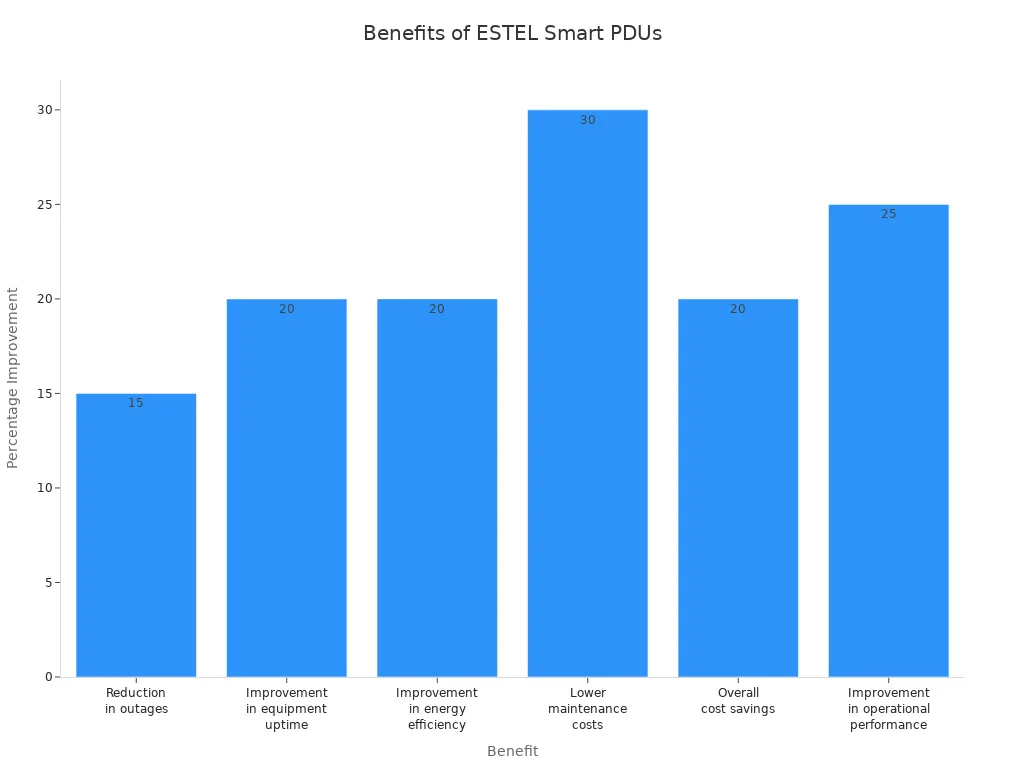
ESTEL leads the way in innovation for telecom infrastructure, making your network reliable and future-ready.
Certification | Description |
|---|---|
IEC60309 | Plug and socket safety |
ISO9001 | Quality management |
GB/T 4706.1-2024 | Electrical safety |
Key Takeaways
Remote bulk configuration allows you to manage over 100 telecom cabinets from one central location, saving time and reducing errors.
Using unified parameter templates ensures every cabinet receives the same settings, improving consistency and reliability across your network.
Automation minimizes human error, helping you avoid costly mistakes and downtime while enhancing overall operational performance.
Real-time monitoring and environmental data collection help you maintain optimal conditions, preventing issues before they arise.
ESTEL's Smart Power Distribution Units support scalability, allowing your network to grow without compromising performance or reliability.
Manual Configuration Challenges
Inefficiency in Large Deployments
You face significant obstacles when you configure each telecom cabinet manually. Large-scale deployments demand time and resources. Manual setup for over 100 cabinets means you repeat the same steps many times. This process slows down your project and increases operational costs. You must track every change, which becomes difficult as the number of cabinets grows. Consistency suffers because you cannot guarantee that every cabinet receives identical settings. You spend more time troubleshooting and less time improving your network. Automation solves these problems by streamlining configuration and ensuring uniformity.
Human Error Risks
Manual configuration exposes your network to mistakes. You may enter a wrong value or miss a step. Small typos can cause outages or create security vulnerabilities. Errors often happen when you work under pressure or during late-night maintenance. You lose visibility into device states without real-time monitoring. Devices may drift from documented baselines, leading to inconsistencies across your network. The table below shows common obstacles you encounter during manual configuration:
Challenge | Description |
|---|---|
Misconfiguration | Small typos can lead to outages or security vulnerabilities. |
Manual errors | Errors often happen under pressure or during late-night changes. |
Lack of visibility | Without real-time knowledge of device states, stability cannot be ensured. |
Configuration drift | Devices may deviate from documented baselines over time, causing inconsistencies. |
Remote Site Limitations
Remote telecom sites add another layer of complexity. You deal with unreliable connections and limited access. Firmware upgrade failures can disrupt operations and cause downtime. Loss of control over power distribution may leave your Smart Power Distribution Unit unresponsive. Risks include data loss and interrupted services due to power management failures. You may encounter these issues:
Firmware updates may fail if the unit loses power during the process.
The device may enter Recovery Mode, making manual configuration more difficult.
Rebooting after an upgrade may not change the firmware version if the new version is older.
You need a solution that overcomes these challenges and delivers consistent results across all sites.
Remote Bulk Configuration with ESTEL
What Is Remote Bulk Configuration?
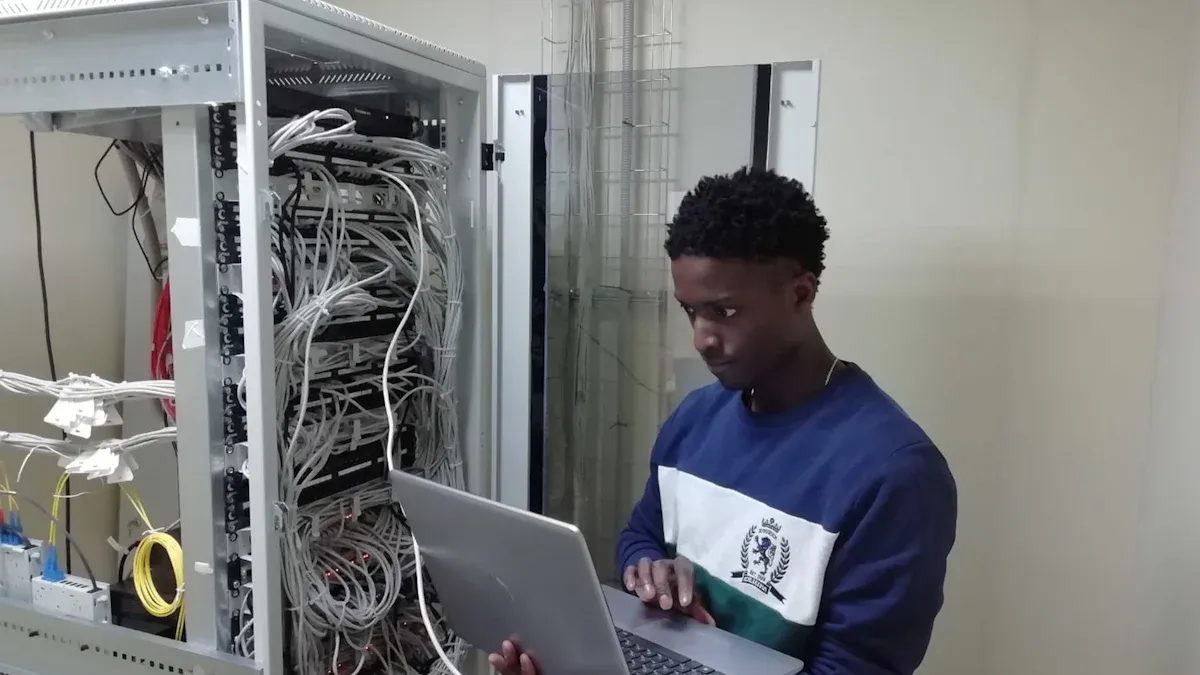
Remote bulk configuration lets you set up and manage many devices at once from a central location. You do not need to visit each telecom cabinet in person. You can push updates, change settings, and monitor performance for over 100 cabinets with just a few clicks. This process uses network connections and intelligent protocols to reach every Smart Power Distribution Unit in your system.
You gain several advantages with remote bulk configuration. You save time because you do not repeat the same steps for each cabinet. You reduce mistakes because you use the same parameter templates for every device. You also improve network reliability because every cabinet receives the correct settings. If you need to update firmware or adjust power limits, you can do it for all cabinets at once. This approach helps you keep your telecom network running smoothly and efficiently.
Why ESTEL for Telecom Cabinets?
You need a solution that works in real-world telecom environments. ESTEL’s Smart Power Distribution Unit gives you the tools to manage power and settings across all your cabinets. The unit supports remote monitoring, so you can track power consumption in real time. You see problems before they cause downtime. Multi-level power metering lets you check power usage at different points, which helps you find and fix inefficiencies.
You can use customized configuration solutions to update settings quickly. This feature saves you time and lowers the risk of errors. Environmental monitoring collects data on temperature and humidity, so you can keep your equipment safe. The Smart Power Distribution Unit also helps you plan for future growth. You can spot underused resources and make better decisions about upgrades.
Here is a summary of the key features and benefits you get with ESTEL’s Smart Power Distribution Unit:
Feature | Benefit Description |
|---|---|
Remote Monitoring | Enables real-time tracking of power consumption, reducing the risk of unexpected downtime. |
Multi-Level Power Metering | Provides accurate monitoring at various levels, helping to identify inefficiencies in power usage. |
Customized Configuration Solutions | Streamlines updates and configurations, saving time and reducing the potential for errors. |
Environmental Monitoring | Gathers critical data points to maintain optimal conditions, preventing downtime due to environmental factors. |
Future Growth Planning | Helps identify underutilized resources, allowing for better planning and resource allocation. |
You can trust ESTEL to deliver reliable performance in harsh outdoor conditions. The Smart Power Distribution Unit meets international standards and offers robust protection for your telecom infrastructure. You get a unified, scalable solution that grows with your network and keeps your operations consistent.
Smart Power Distribution Unit Deployment
Unified Parameter Templates
You start by creating unified parameter templates. These templates hold all the settings you want to apply to your telecom cabinets. You can include power limits, alarm thresholds, environmental monitoring rules, and access permissions. You do not need to set each cabinet by hand. Instead, you build a master template that matches your network’s needs.
To manage these templates, you use a centralized management platform. This platform lets you edit, save, and review your templates before deployment. You can test your settings on a single cabinet first. If everything works, you roll out the template to all cabinets. This process saves time and reduces mistakes. You always know which settings you have applied to each site.
Tip: Always document your templates. Good records help you track changes and troubleshoot issues later.
Simultaneous Multi-Cabinet Rollout
Once you finish your template, you can deploy it to many cabinets at the same time. The Smart Power Distribution Unit supports remote bulk configuration, so you do not need to visit each site. You select the cabinets you want to update, then push the template through the management platform.
This rollout happens over secure network connections. The system checks each cabinet’s status before applying changes. If a cabinet is offline, the system tries again later. You can monitor progress in real time. You see which cabinets have finished updating and which ones need attention.
Here is a simple step-by-step process for a multi-cabinet rollout:
Select the unified parameter template.
Choose the cabinets for deployment.
Start the rollout from the management platform.
Monitor the update status for each cabinet.
Review logs to confirm successful deployment.
You finish the rollout quickly, even for more than 100 cabinets. You do not need to repeat the same steps for each site. This method keeps your network consistent and efficient.
Ensuring Consistency
Consistency matters in telecom networks. You want every cabinet to follow the same rules and settings. The Smart Power Distribution Unit uses advanced tools to make sure each cabinet matches your template.
You can use sensors and monitoring devices to check cabinet status. For example, dry contact closure sensing monitors door positions for security. USB cameras verify who accesses the enclosure. Temperature and humidity sensors keep equipment safe by tracking environmental conditions. Remote power measurement lets you see power usage and status from anywhere.
You also get support for both AC and DC power needs. The unit connects to UPS and generator outputs, so you always know your critical systems have power. Data from all cabinets is available through a web interface and API. This setup lets you monitor and manage many locations from one place.
Here is a table showing the main methods and tools for ensuring parameter consistency:
Method/Tool | Purpose/Function |
|---|---|
Dry contact closure sensing | Monitors outer door position for security |
USB camera | Verifies personnel accessing the enclosure |
Temperature and humidity sensors | Ensures equipment operates within specified environmental parameters |
Remote power measurement and management | Monitors power usage and status remotely |
Flexible power sourcing | Supports both AC and DC power needs |
API and SNMP support | Facilitates data collection and alarm management |
Floor moisture sensor | Detects leaks, flooding, or condensation issues |
Ties to UPS and generator output | Provides uptime status for critical systems |
Data accessible through web interface and API | Allows for centralized monitoring of multiple locations |
You keep your network reliable by using these tools. You spot problems early and fix them before they cause downtime. You make sure every cabinet stays up to date with your latest settings.
Note: Regular monitoring and audits help you maintain consistency across all sites.
Key Technologies and Best Practices
Centralized Management Platforms
You need a strong platform to manage smart PDUs across many telecom cabinets. Centralized management platforms like Data Center Infrastructure Management (DCIM) software give you a single interface for all your devices. These platforms let you perform remote management, bulk firmware updates, and configuration cloning. You can control and monitor every cabinet from one dashboard, which saves time and reduces mistakes.
Platform Type | Description |
|---|---|
DCIM Integration | Enhances smart PDU features with remote management, bulk updates, and unified configuration. |
Cloud-based Management | Offers centralized control for multiple sites and mobile access for distributed networks. |
Many organizations use these platforms to improve efficiency and reliability. For example, companies like eBay and MacStadium use DCIM tools to automate power data collection and device provisioning, which helps them save money and meet service goals.
Automation and Security
Automation makes your job easier and your network safer. ESTEL Smart Power Distribution Units use AI to predict power needs and optimize energy use. This reduces downtime and keeps your equipment running smoothly. You also get automated load balancing and activity tracking, which help with compliance and troubleshooting.
Security is critical in remote management. ESTEL units use encrypted communication protocols and multi-factor authentication to protect your network. You can set permissions for each user, so only authorized people can change settings.
Feature | Description |
|---|---|
AI Integration | Predicts power needs and optimizes energy allocation. |
Enhanced Security | Uses encryption and multi-factor authentication for safe remote access. |
Remote Management Capabilities | Automates load balancing and tracks activities for compliance and troubleshooting. |
Monitoring and Rollback
You must monitor your network to keep it reliable. ESTEL’s Smart Power Distribution Units support real-time monitoring through web interfaces and APIs. You can track power usage, environmental data, and device status from anywhere. If you spot a problem, you can roll back to previous settings quickly.
Use role-based access control (RBAC) to assign permissions.
Protect data with encrypted protocols like HTTPS and SSH.
Set up IP-based access control lists to block unauthorized devices.
Test configuration changes on a small group before full rollout.
Keep detailed logs for audits and troubleshooting.
Tip: Regular monitoring and quick rollback options help you maintain stability and respond fast to any issues.
Results and Benefits
Time and Cost Savings
You can see major savings when you use remote bulk configuration with the Smart Power Distribution Unit. You do not need to send technicians to each site, which lowers travel and labor costs. Automated updates and monitoring reduce the time spent on routine tasks. Over five years, you save even more on energy and maintenance. The table below shows how these savings compare to traditional manual methods:
Metric | ESTEL Smart Power Distribution Units | Traditional Manual Configuration Methods |
|---|---|---|
N/A | ||
Maintenance Cost | 7% of traditional systems' costs | N/A |
Return on Investment | As little as 18 months | N/A |
You get a fast return on investment. Lower maintenance costs and energy savings help your budget go further.
Error Reduction
You reduce mistakes when you use unified parameter templates and centralized management. You do not have to repeat the same steps for each cabinet. This process cuts down on human errors like typos or missed settings. Real-time monitoring lets you catch problems early. You can roll back changes if something goes wrong. This keeps your network stable and secure. You spend less time fixing errors and more time improving your system.
Tip: Automated logs and alerts help you track every change and respond quickly to issues.
Scalability and Reliability
You can grow your network without worry. The Smart Power Distribution Unit uses a modular design, so you add more cabinets as your needs change. You do not have to replace the whole system. You get advanced features like outlet-level metering and switching, which give you more control over power distribution. Real-time monitoring shows you power and environmental data for every cabinet. High-quality materials keep your equipment running, even in tough conditions.
Modular design supports easy expansion.
Branch circuit metering helps balance loads as your setup grows.
Outlet-level control improves power management.
Real-time monitoring keeps you informed.
Durable construction ensures long-term reliability.
You keep your operations consistent and ready for the future. This approach makes your telecom network strong and flexible.
You solve major telecom challenges with remote bulk configuration using ESTEL Smart Power Distribution Units. Unified parameter deployment boosts efficiency and keeps your network reliable. You minimize errors and save time by managing all cabinets from one platform.
Ready to upgrade your telecom infrastructure?
Visit ESTEL’s official website or contact the team for expert advice.
Get consistent results across every site.
Scale your network with confidence.
FAQ
How do you start remote bulk configuration with ESTEL Smart Power Distribution Units?
You log in to the centralized management platform. You select your cabinets and upload your unified parameter template. The system pushes settings to all selected units. You monitor progress in real time.
Can you update firmware on multiple cabinets at once?
Yes. You use the remote bulk configuration feature to deploy firmware updates to many cabinets. This process saves time and ensures every unit runs the latest version.
What happens if a cabinet loses connection during deployment?
The system detects offline cabinets. It retries the update when the connection restores. You can check logs to see which cabinets need attention.
Is remote configuration secure?
You get strong security with encrypted communication and multi-factor authentication. Only authorized users can access and change settings. This keeps your network safe.
See Also
Exploring ESTEL PDUs and Their Importance in Data Centers
Ensuring Consistent Power Supply for Telecom Cabinet Operations
Solar Energy Storage Solutions for Telecom Cabinet Power Needs
Understanding the ESTEL Power System for Telecom Cabinets
Exploring Various Applications of Telecom Cabinet Technology
CALL US DIRECTLY
86-13752765943
3A-8, SHUIWAN 1979 SQUARE (PHASE II), NO.111, TAIZI ROAD,SHUIWAN COMMUNITY, ZHAOSHANG STREET, NANSHAN DISTRICT, SHENZHEN, GUANGDONG, CHINA
