How to Configure Mixed Sockets for Smart PDUs in Telecom Cabinets to Support Both New and Old Devices


One telecom cabinet often holds two device generations: legacy transmission gear beside modern routers. You need one power distribution unit to feed both safely. A methodical path gets you there: assess device needs, select socket types, wire circuits, set up monitoring, test under load, then document and maintain. Safety, load balance, and compliance all remain achievable with mixed sockets when you configure them methodically.
User-customizable mixed-socket smart PDUs make this practical without custom fabrication. The ESTEL Smart Power Distribution Unit lets you mix outlets in one chassis, so legacy plugs and modern connectors share the same intelligent PDUs. That flexibility suits any data center, server rack, or remote site where old and new equipment must coexist.
Key Takeaways
List every device's voltage, current, and plug type to plan your mixed-socket PDU.
Choose a smart PDU with configurable outlets to fit both old and new plugs without adapters.
Wire circuits carefully and follow the 80% rule to prevent overloads and keep devices safe.
Set up outlet-level monitoring and alerts to catch problems before they cause downtime.
Test under load and document everything so future upgrades are easy and compliant.
Assess Device Requirements
Inventory Voltage, Current, and Plugs
Start with a written inventory before you touch a socket. Build a table with one row per device: nameplate voltage, current draw, and connector type. Cover legacy transmission gear, modern routers, servers, and broadcast equipment. Record the types of plugs you find on each unit, including power inlets and signal connectors. Telecom gear carries RF coaxial, fiber optic, and twisted-pair interfaces alongside its power inlet, so note those too. BNC and ST connectors still appear on older installs, while N-type, SMA, 7-16 DIN, LC, SC, and MPO/MTP serve modern equipment. Coaxial runs use 50 ohms for most RF and 75 ohms for video.
Count the number of plugs per device and mark which ones share a power inlet. This count tells you how many outlets one chassis must supply. Devices that sit in the same cabinets or rack often arrive with different inlet standards, and that mix drives your socket selection. Walk the rack with the table in hand and confirm every entry against the label. A data center with dense legacy gear needs this record more than a greenfield site, because undocumented swaps happen quietly over the years.
Map Load Profiles and Redundancy
Next, map how each device draws power over time. Note steady-state current, startup surge, and duty cycle. Group devices by branch so no single circuit carries more than its share. Identify dual-corded units and plan A/B feeds for them. Redundancy matters most for it equipment in the rack or cabinet that cannot drop offline during a feed transfer.
Mark every device that needs a dedicated outlet versus one that can share a branch. Reserve capacity for growth at this stage. A second data center build-out or a future device addition should not force a rewire. Finish the map with a simple diagram of feeds, branches, and spare positions. This diagram becomes your wiring guide and your compliance record.
Select Smart PDU Socket Types
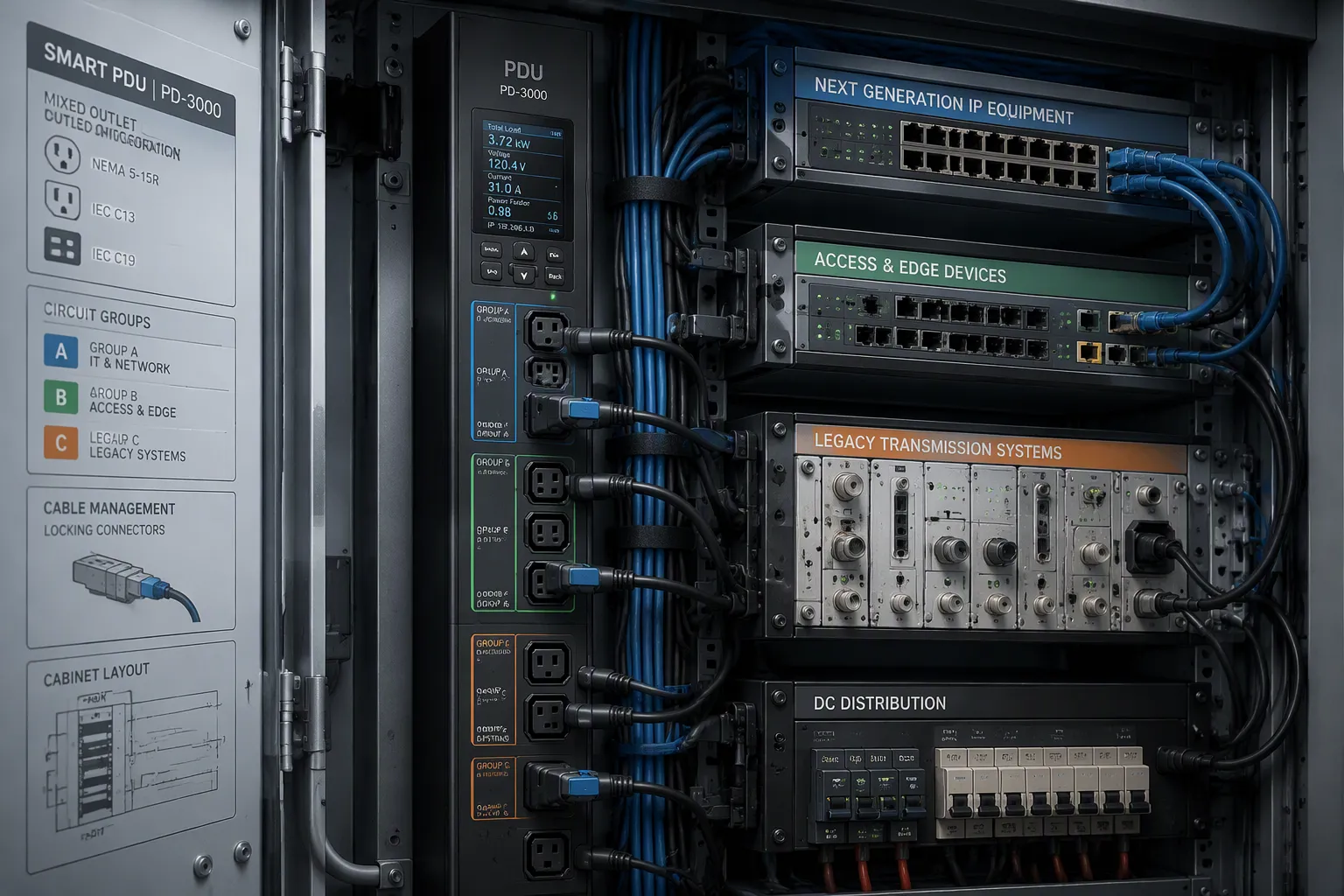
Match NEMA, IEC, and Configurable Outlets
Your inventory now tells you which plugs must fit. The next step is choosing the type of outlet that serves each device group. Three families cover most telecom cabinets, and each one fits a different role.
Connector | Voltage | Current | Max Power | Typical Applications |
|---|---|---|---|---|
NEMA (general) | 125V–250V | 15A–50A | — | Residential, office, and industrial equipment (e.g., 5-15P for PCs/monitors; L6-30P for data center PDUs) |
IEC C13/C14 | up to 250V | 10A | 2,500W | PCs, monitors, switches, routers, UPS, workstations |
IEC C19/C20 | up to 250V | 16A | 4,000W | Servers, PDUs, blade chassis, UPS systems, high-density compute nodes |
NEMA outlets suit North American gear and heavier branch loads. IEC320 C13 and C19 outlets serve the standard international equipment found in most racks. Configurable outlets handle everything else, including legacy plugs that match neither family. A smart PDU with a mixture of plugs in one chassis removes the need for adapters and extra power strips.
The ESTEL Smart Power Distribution Unit shows how this works in practice. You can order it with 8 to 19 outlets in a mixed configuration, and its cable plugs comply with IEC60309. That combination covers modern routers and older transmission gear in the same cabinet. Add locking connectors wherever vibration or cable weight threatens a firm seat. A locked plug stays put during maintenance, and that reliability matters in a live data center.
Plan Layout and Circuit Grouping
Outlet selection and physical layout belong together. Group outlets by device generation and by branch, so a fault on one circuit never takes down both feeds of a dual-corded unit. Place high-draw modern equipment near the input side and give legacy gear its own labeled group. This arrangement simplifies troubleshooting and keeps the number and type of outlets easy to audit.
Balance single-phase loads across L1, L2, and L3 during breaker assignment. Spread devices evenly rather than filling one phase first. Measure phase currents with a true-RMS clamp meter after wiring, then compute unbalance as the maximum deviation from average divided by average, times 100. Keep unbalance below 10% per the NEMA MG-1 and IEEE 141 guideline, and aim below 2% for best performance. Remember that triplen harmonics add in the neutral of four-wire wye circuits, so size that conductor generously.
Locking connectors, grouped circuits, and a documented layout turn a pile of mixed plugs into a managed system. The same discipline applies whether you run one smart rack PDU or a room full of intelligent PDUs and power distribution units.
Configure the ESTEL Smart Power Distribution Unit
Wire Circuits and Size Protection
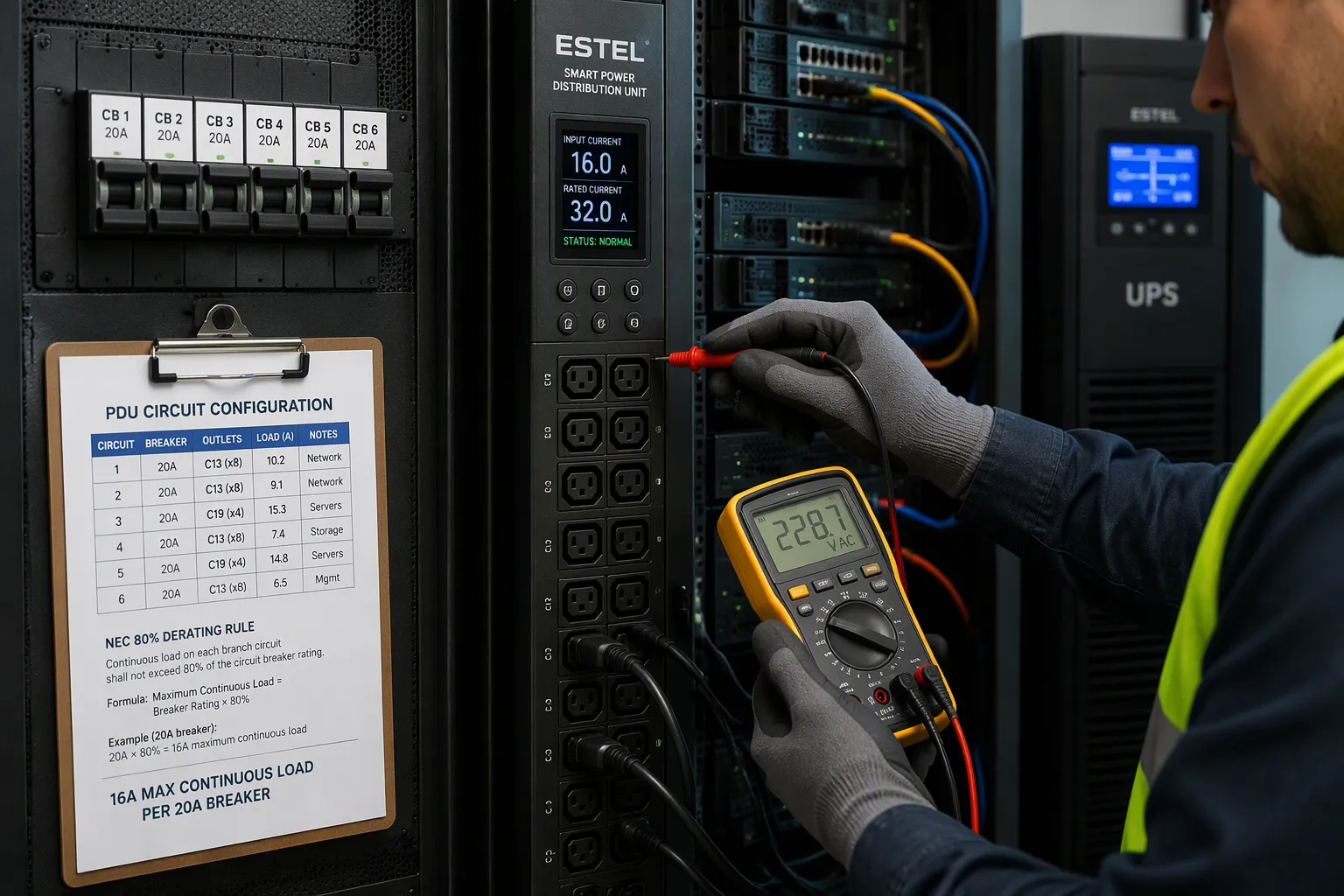
The ESTEL Smart Power Distribution Unit gives you a concrete starting point. Its maximum input current is 16A, its rated voltage and current are 230VAC 32A, and its internal copper wiring comes in 16, 14, and 12 AWG. It also includes surge protection and a dehumidifying function. Treat these ratings as the ceiling for everything you connect, and confirm the smart PDU matches the load before mounting.
Many PDUs are designed to accommodate a combination of standard rack plug types, such as C13 and C19, enabling both compact devices and larger servers to draw power from a single unit. The key best practice is to verify that the PDU's internal wiring and total power capacity can safely support every connected device.
Branch protection sizing follows the load, not the outlet count. Apply the NEC 80% derating rule as a hard ceiling for continuous loads in any data center.
Circuit Configuration | Rated Capacity | Max Continuous Draw (80% NEC rule) | Usable Power (unity PF) |
|---|---|---|---|
20A, 120V single-phase | 20A | 16A | ~1.92 kW |
30A, 208V single-phase | 30A | 24A | ~4.99 kW |
30A, 208V three-phase (L21-30 / IEC 60309) | 30A | 24A | ~8.6 kW |
"Branch circuit sizing for continuous loads in data centers must account for the NEC 80% derating rule as a hard ceiling, not a design suggestion. Facilities that treat rated ampacity as usable ampacity are creating latent fire and tripping hazards that compound as rack densities grow."
— Data Center Infrastructure Engineer, BICSI RCDD-credentialed practitioner, consistent with BICSI TDMM 15th Edition guidance
Before commissioning in a data center, confirm the upstream UPS or transfer switch, the branch circuit wiring gauge (NEC Table 310.16 requires 10 AWG minimum for 30A circuits), and the PDU input connector all match.
Higher-current power distribution units often split outlets into protected banks. Check the bank layout against your device plan, since a bank is typically 16–20A. Two C19 devices on one bank can trip it while the unit as a whole sits far from full. Distribute mixed loads across banks to avoid that trap. This discipline applies to intelligent PDUs as well as basic units.
Verify Grounding and Labeling
Grounding verification comes next. Confirm a continuous equipment grounding conductor from the PDU chassis to the cabinet frame and the building ground. Measure continuity with a low-resistance ohmmeter and record the reading. Mixed loads share that path, so a loose bond endangers every device on the branch.
Labeling separates generations at a glance. Tag each group by device type and feed: legacy plugs on one color, modern routers and servers on another, A and B feeds marked separately. Record the connector type and rating beside each label.
Outlet Type | Rating | Typical Use |
|---|---|---|
IEC C13 | 10A (15A NA) | Servers, switches, most 1U/2U gear |
IEC C19 | 16A (20A NA) | Blade chassis, large storage, GPU nodes, core switches |
Locking C13 / C19 | Same as above | Racks that get serviced; prevents accidental disconnect |
NEMA 5-15R / 5-20R | 120V, 15/20A | Legacy 120V equipment with molded cords |
NEMA L6-30R | 208V, 30A | Feeding a downstream PDU or a single high-draw device |
A clear label turns a mixed cabinet into a documented system.
Set Up Smart PDU Monitoring
Configure Outlet-Level Metering and Alerts
Metering turns a mixed cabinet into a visible system. A monitored PDU measures current, voltage, power, and energy at the unit, circuit, or individual outlet level. You can then track each legacy device and each modern router separately. Outlet level monitoring gives you a granular view of power usage down to the device. That view supports energy trend analysis and fault detection without a site visit.
Set thresholds that warn you before a breaker trips. Use historical baselines to pick values, and combine static thresholds for critical alerts with dynamic ones for warnings. In a standard non-redundant branch, the NEC 80% rule sets capacity, so a 70% warning alert leaves headroom. In a redundant setup, halve the thresholds so the surviving feed can absorb the full load.
Configuration | Capacity Reference | Alert Threshold | Limit |
|---|---|---|---|
Standard (non-redundant) | 80% per NEC | 70% (warning alerts) | — |
Redundant configuration | Thresholds divided by 2 | 35% warning | 40% limit |
The Max Group Amps (MGA) feature provides an extra layer of protection against circuit overload by allowing users to define the threshold for the maximum number of amps.
Deliver alerts by SMS, SNMP trap, or e-mail. A smart PDU with these channels notifies you of overload conditions before they trip the breaker and drop connected loads.
Balance Loads and Enable Remote Control
Balance mixed branches before you enable remote control. Spread device power supplies across the three phases, aiming for an equal number of loads on each. A staggered outlet grouping helps here. Alternate the phase per receptacle so cords stay short and the rack rear stays clean.
Plug the first device into an L1/L2 outlet, the next into L2/L3, the next into L3/L1, then repeat.
Choose a PDU with staggered banks so each group of outlets rotates through the phases.
Draw similar current on each branch to avoid heat, higher cooling costs, and tripped breakers.
Remote management completes the setup. Intelligent PDUs support SNMP, web interfaces, and APIs, so you can monitor and switch individual outlets from a central station. The LCD display shows real-time readings at the cabinet. For rapid rollout across many racks, use DHCP-based mass configuration to assign addresses in bulk. Monitored and switched models let you power-cycle unused equipment remotely and cap power at the outlet. That control cuts waste and protects the data center during maintenance. Standardize on one intelligent PDU platform, and every future data center expansion becomes a repeatable task.
Test, Verify, and Plan Growth
Run Load, Thermal, and Fault Tests
Commissioning starts with a load test. Energize the cabinet with every legacy and modern device connected, then raise the load in steps toward the branch limit. Watch current on each phase and confirm the balance you planned during wiring. Record readings at each step so you have a baseline for later comparison.
Thermal testing follows. Run the full load for a sustained period and check outlet temperatures, plug bodies, and cable entry points with an infrared thermometer. Warm spots at a connector usually signal a loose seat or an undersized branch. Fault injection completes the picture. Trip a branch breaker deliberately and confirm the other feed keeps its dual-corded devices alive. Pull one plug and verify the alert reaches your monitoring platform.
Document, Maintain, and Scale
A tested cabinet needs a paper trail. Assemble the compliance file for each project submission, including test reports, wiring diagrams, part-level information for plugs, sockets, and protection devices, electrical ratings, compliance evidence, and installation guidance. Add packaging, labeling, and customs documentation for international shipments. Keep the datasheet, socket layout reference, and product labels together for future orders.
Document | Purpose |
|---|---|
Datasheet or specification sheet | RFQ and approval |
Socket layout reference | Custom layout review |
Product label and packing details | Order confirmation and distributor sales |
Compliance documents | Project submission |
Set a maintenance schedule: inspect connections, re-torque terminals, and re-run thermal checks at fixed intervals. Reserve spare configurable outlets for future device additions. That spare capacity lets you add equipment without rewiring, and it keeps your smart PDUs ready for the next generation of gear. Monitored PDUs with outlet-level remote monitoring make this easy, and monitored and switched models let you verify each outlet from a distance. Whether you manage one rack or a full data center, an intelligent PDU platform keeps growth predictable. Standardize on an intelligent pdu with documented layouts, and every data center expansion becomes a repeatable task.
You now have a complete workflow. Assess each device, select the right sockets, wire every branch safely, configure smart monitoring, then test and document the result. Follow these steps in order, and one cabinet can serve both generations without compromise.
Mixed-socket smart PDUs let legacy and modern telecom equipment share a rack without sacrificing safety or compliance. Standardize on a configurable, well-documented platform such as the ESTEL Smart Power Distribution Unit. That choice simplifies expansion in any data center, keeps every outlet accountable, and makes the next data center upgrade a repeatable task for your team.
FAQ
How many outlets can one mixed-socket PDU provide?
The ESTEL Smart Power Distribution Unit comes in configurations from 8 to 19 outlets. You choose the mix of NEMA, IEC C13/C19, and configurable outlets when you order. That range covers a small telecom cabinet and a dense rack in a data center.
Can I connect legacy gear with non-standard plugs?
Yes. Configurable outlets accept plugs that match neither NEMA nor IEC families. Order the outlet mix to fit your inventory table. You avoid adapters and extra power strips, and every legacy device gets a proper seat in the same chassis.
How do I keep mixed loads balanced across phases?
Spread devices evenly across L1, L2, and L3 during breaker assignment. Measure phase currents with a true-RMS clamp meter after wiring. Keep unbalance below 10% per the NEMA MG-1 and IEEE 141 guideline. A data center with dual-corded gear needs this discipline most.
What monitoring does a smart PDU offer?
Outlet-level metering tracks each legacy and modern device separately. Set threshold alerts by SMS, SNMP trap, or e-mail. The LCD display shows real-time readings at the cabinet. Use DHCP-based mass configuration to assign addresses in bulk across a large data center.
Which safety features should I verify before commissioning?
Confirm surge protection, a continuous ground path, and branch protection sized to the load. Apply the NEC 80% derating rule as a hard ceiling for continuous loads. The dehumidifying function helps maintain stable conditions inside the cabinet. Document every reading for your compliance file.
See Also
Ways to Guarantee Consistent Power for Telecom Cabinet Operations
Understanding ESTEL PDUs and Their Function in Data Center Cabinets
Complete Guide for Telecom Cabinet Wiring and Choosing Proper Cables
Reasons Why 2025 Requires Improved Telecom Cabinet Solutions
CALL US DIRECTLY
86-13752765943
3A-8, SHUIWAN 1979 SQUARE (PHASE II), NO.111, TAIZI ROAD,SHUIWAN COMMUNITY, ZHAOSHANG STREET, NANSHAN DISTRICT, SHENZHEN, GUANGDONG, CHINA
