How Hot-Swappable Modular Design of Smart PDUs Enables Replacing Core Control Units Without Downtime


A hot-swappable modular design separates the control unit from the power path. The smart PDU keeps feeding your racks while you pull the controller and slide in a replacement. Outlet power never stops.
That separation matters when every maintenance window feels tight. You face pressure to service equipment without interrupting workloads. A power distribution unit that supports in-place swaps removes that trade-off. You service the management brain, and the PDU keeps running.
Hot-swap capability changes how you plan service on your PDUs. You can replace a control unit during business hours, not just in a quiet window. Downtime risk drops, and uptime stops depending on scheduling luck.
Key Takeaways
Hot-swappable smart PDUs let you replace the control unit without cutting power to your servers.
Modular design separates the management brain from the power path for safe servicing.
Bypass circuits and latches keep power flowing and protect the physical connection during a swap.
Follow a simple step-by-step process to swap the control unit safely and quickly.
Check compatibility and train your team to make every swap smooth and risk-free.
Modular Architecture of a Smart PDU
Control Unit vs. Power Modules
A smart PDU splits two jobs that older designs fused together. The control unit acts as the management brain. It handles monitoring, remote commands, and network communication. The power modules do the heavy work. They carry electricity from the input feed to the outlets.
This separation defines the modular layout. You can service the brain without touching the electrical path. The power modules keep feeding your servers the whole time. ESTEL's Smart Power Distribution Unit shows this approach in practice. It pairs remote management with surge protection and a dehumidifying function, and each function lives in a serviceable block.
Redundant Paths and Hot-Swap Circuitry
Redundancy keeps outlet power alive during a swap. Power supplies share or back up the load, and automatic failover prevents service disruption. A hot-swap controller circuit adds inrush current limiting, voltage regulation during insertion and removal, and fault detection. Backplane connectors use isolation and staggered pins, so modules connect in the right sequence.
The result is a hot swappable architecture you can trust in a live rack. Consider a server chassis with redundant supplies. A technician pulls a faulty unit, and the second unit carries the load. The same logic applies to a rack-mounted power distribution unit. The remaining path holds the load while you exchange the module.
ESTEL builds this thinking into its intelligent PDU line. The design supports in-place service, and the dehumidifying function protects the internal environment during the work.
How Intelligent PDUs Enable Hot Swaps
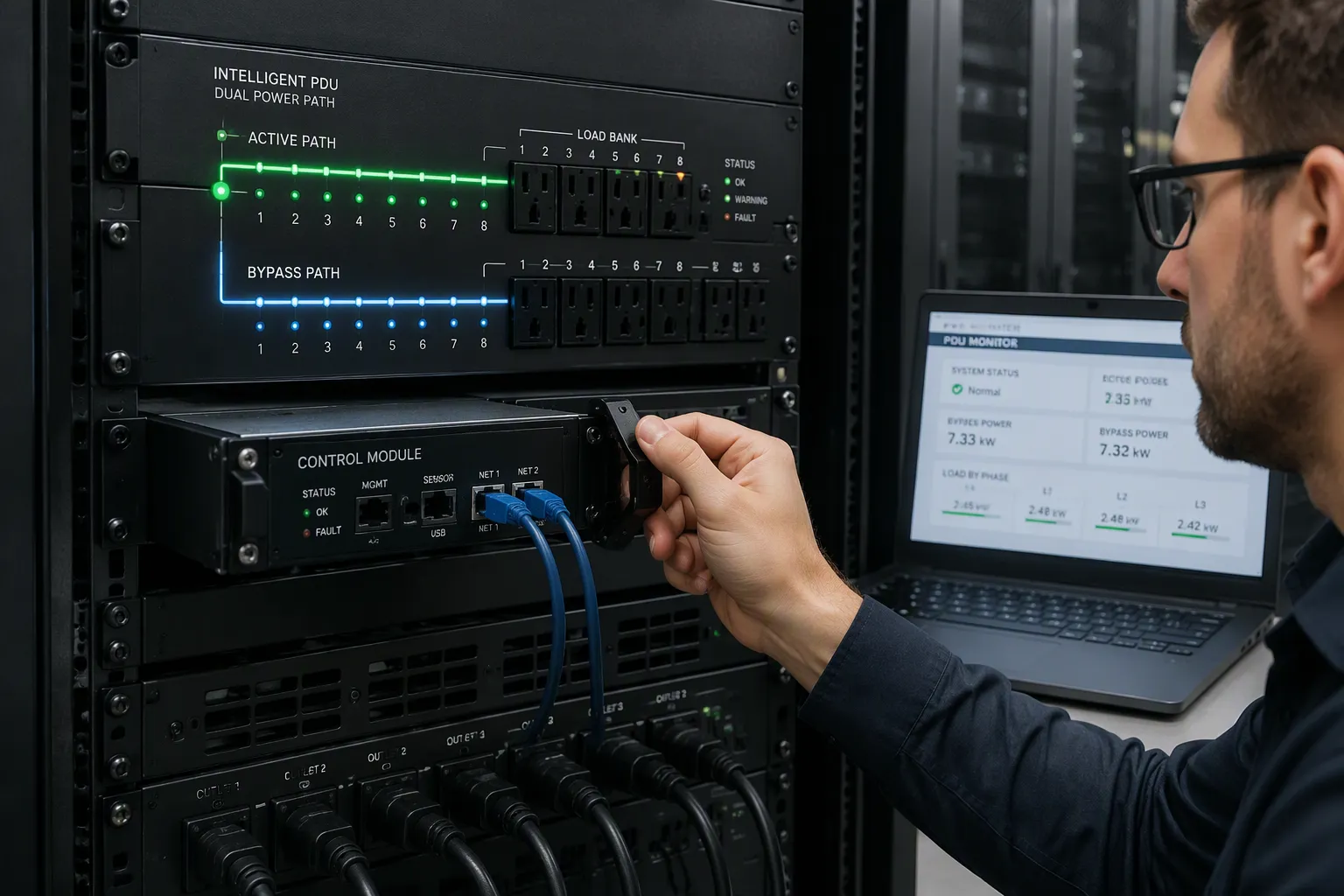
Bypass Circuits and Latching Design
A bypass circuit gives you a second route for power. It sends electricity around the controller instead of through it. You can then service the module while the load stays energized. The sequence matters, so follow it in order:
Confirm the load is healthy and that an alternate bypass source is available before switching.
Transfer the load from the primary path to the bypass path following the approved order.
Isolate the primary device from the active path so it can be serviced.
Perform maintenance or replacement on the isolated device while the load remains energized via bypass.
Restore the load to the primary path and verify that full protection is active again.
The table below shows how power behaves in each state.
State | Power flow behavior |
|---|---|
Normal path | Power is conditioned and controlled by the main device before reaching the load |
Bypass path | Power is rerouted around the device via an alternate source or path to keep the load online |
Service window | The primary equipment is isolated, inspected, or replaced while the load stays energized |
Latching mechanisms add a physical safeguard. A latch locks the module in place during normal operation. You release it deliberately before removal. The latch also guides insertion, so the connector seats in the correct order. This design prevents partial contact and accidental disconnection.
Power and Data Continuity
Power continuity is only half the job. An intelligent PDU also keeps monitoring alive during a swap. Communication protocols carry status data to your management platform. SNMP and Modbus both support integration with third-party DCIM and BMS platforms. That integration enables centralized monitoring and control across mixed-vendor environments.
Network redundancy strengthens this continuity. Dual Ethernet connectivity provides redundant network paths. Wi-Fi and Bluetooth add further connectivity options. IPv6 stack support keeps the device current, and authentication logging tracks access for security. Daisy-chaining and centralized firmware updates simplify deployment and help maintain continuity across the rack.
Hot-swappable communication cards cut service time further. You replace a card while the unit stays operational, so no full shutdown is needed. That capability reduces MTTR during servicing. The table below summarizes the effect.
Feature | Mechanism | Effect on MTTR |
|---|---|---|
Hot-swappable communication cards | Cards can be replaced while the PDU stays operational, so no full shutdown is needed during servicing | Reduces MTTR |
Hot-swappable components (general) | Components can be swapped out without taking the unit offline | Reduces MTTR |
The combination works well in practice. Bypass routing protects the power path. Latching protects the physical connection. Protocols and redundant links protect your visibility. Together, these features let you swap a controller without cutting power to the rack.
Step-by-Step PDU Control Unit Replacement

Pre-Swap Checks
Start by confirming the need for a swap. Check the module LEDs and the alarm log on your management platform. A failed network module, a firmware fault, or a dead management port all justify replacement while the unit remains operational. Identify the faulty module before you order parts, so the correct unit arrives on site.
Next, verify compatibility before you touch hardware. Match the new module to the existing PDU chassis and confirm the electrical and network requirements.
Electrical compatibility: confirm input voltage, phase, frequency, plug type, outlet type, and breaker rating match the rack installation. A 30-amp feed is not automatically suitable for every rack.
Capacity and load: review per-outlet and per-phase load under normal and peak conditions, and keep headroom below protective-device ratings.
Network and integration: check dual Ethernet ports, IPv4/IPv6 support, VLAN compatibility, and SNMPv3, HTTPS, SSH, and REST API support. Test failover with one cable unplugged.
Redundancy: confirm the configuration supports the A/B power-path architecture you run and allows monitoring of each path.
Management tooling: verify the platform shows outlet status, energy trends, sensor history, and user activity. Test its API against your existing software.
Check firmware alignment between the new module and the chassis. A version mismatch can block communication after insertion. Confirm the part number and hardware revision match the chassis documentation. Track pdu controllers in your asset register, so you know the hardware revision of each unit.
Confirm monitoring status last. Record the current outlet states and energy baselines, so you can compare them after the swap. Note any active alarms and clear them from the log, so a new alarm stands out.
Safe Removal and Insertion
The swap itself is short, and outlet power stays live throughout. Only the network/control module leaves the chassis, and the PDU itself stays powered. Servers, storage, and network gear keep running with zero voltage dip. The design separates network service from power delivery, so management electronics are serviced independently of the power path. Plan the work during a normal shift. You do not need a quiet window, because the power path never changes state. Follow these steps in order:
Confirm the alternate path or bypass is active and the load is healthy. Check the monitoring dashboard for stable readings.
Put on an antistatic strap and hold module edges only. Never touch boards or connector pins.
Release the latch and unscrew the captive fasteners securing the module.
Slide the module out and set it on a grounded surface.
Insert the new module and seat the connector fully.
Tighten the fasteners and engage the latch.
Verify green status LEDs and confirm outlet states match your baseline.
Never assume power has been disconnected from a circuit. Always check before you reach into the chassis.
This procedure shortens service windows and protects uptime. You replace a controller without interrupting service to the rack. The same discipline applies across intelligent PDUs and ipdus in mixed fleets. Compare the post-swap readings against your baseline within the first hour. Keep a spare module on hand, and the next swap takes minutes instead of a scheduled outage. Document each swap, and your PDUs stay serviceable for years.
Uptime, Efficiency, and Cost Benefits
Maintenance Efficiency and MTTR
Zero-downtime swaps protect uptime directly. You service a controller while the rack stays live, so maintenance windows shrink to minutes. Without hot-swap, a power supply service forces a rack shutdown or a load transfer. That step adds scheduling delay and risk. With hot-swap, repair starts at fault detection, not at the next window.
The table below shows how each design element shortens repair time.
Hot-swap design element | Mechanism during repair | Effect on MTTR |
|---|---|---|
Hot-swappable modules with zero-downtime removal | You service the module while the shelf stays powered | Removes outage scheduling and power-down time |
N+1 / N+2 redundancy with parallel modules | Remaining modules compensate without voltage drop | Repair begins immediately on fault detection |
Blind-mate connectors with arc suppression | Safe insertion and removal without electrical damage | Avoids secondary faults and rework |
Smart controllers with real-time telemetry | Degraded units are flagged before failure | Cuts diagnostic time |
These features reduce MTTR and improve serviceability. Smart controllers also rebalance load during insertion and removal. Real-time telemetry flags aging units early, so you service them before failure. That proactive step prevents downtime instead of reacting to it.
Scalability and Service Life
Modular or upgradeable designs spread spending across the site's life. You pay for the capacity you need now and add modules later. You avoid full-unit replacement costs that traditional upgrades force. Each new module works with the modules already in place, so your earlier investment stays protected.
Condition monitoring extends service life too. An intelligent PDU tracks power consumption and environmental conditions. That data keeps equipment within safe parameters and lowers failure risk. Predictive maintenance uses historical and real-time data to flag units nearing failure. Timely intervention supports pdu reliability by design across the fleet.
ESTEL's Smart Power Distribution Unit delivers reliable power distribution and remote management. It helps you prevent downtime and cut maintenance costs. The same logic applies across intelligent PDUs and ipdus in mixed racks. Choose a smart PDU with hot-swap support, and your pdus stay serviceable for years.
Best Practices for Smart Power Distribution
Compatibility and Firmware
You protect a swap with checks before you touch hardware. Confirm the new module matches the chassis, and align firmware before insertion. A version mismatch can block communication after the module seats. Follow these steps to verify hardware revision and firmware alignment:
Identify the hardware revision of the control unit before you swap or upgrade firmware. Check the product sticker for a field labeled HW, such as 6.1, 6.1.2, or 4.2.
For units without an HW label, log into the PDU web UI, scroll to the System Status section on the home page, and read the Version field. The HWx.x value shows the hardware revision.
Match the firmware Hardware Revision to the device's hardware revision before flashing. Download the correct file for that revision from the vendor support page.
Check the version downgrade rule. If the firmware revision is older than the existing version, the device will not attempt an upgrade.
These steps apply across network-connected smart PDUs and mixed fleets of intelligent PDUs. Record each module's revision in your asset register, so the next swap starts with the right file.
Monitoring and Training
Monitoring before and after a swap closes the loop. Record outlet states and energy baselines first. Compare post-swap readings against that baseline within the first hour. Active alarms should clear from the log, so a new alarm stands out.
Operator training prevents avoidable risk. Teach technicians to release the latch deliberately, hold module edges only, and wear an antistatic strap. Drill the bypass sequence until it becomes routine. Operational discipline matters more than speed during a live swap. A trained team turns a hot swap into a short, predictable task on any smart PDU, and the same habits carry over to ipdus in the same rack.
You now see how a modular layout keeps your racks live. The control unit sits apart from the power path. Bypass circuitry routes current around the module, and continuity protocols hold your monitoring data steady. Together, these elements deliver uninterrupted operation during a control-unit swap.
That capability protects uptime, simplifies operations, and supports scalable growth. You service hardware on your schedule, not the calendar's. As your fleet grows, in-place upgrades keep pace without full-unit replacement.
Adopt modular smart PDUs as a resilience strategy. ESTEL's Smart Power Distribution Unit offers a practical example, pairing reliable smart power distribution with remote management for pdus that stay serviceable for years.
FAQ
Does a control unit swap cut power to connected equipment?
No. The control unit sits apart from the power path. Bypass circuitry routes current around the module during the swap. Your servers and network gear keep running with no voltage dip. You service the management brain while the outlets stay energized.
How long does a typical swap take?
The work is short. You release the latch, slide the module out, and seat the replacement. Outlet power never changes state, so you skip the power-down and power-up steps. Most of the time goes to pre-swap checks and post-swap verification.
What should I verify before inserting a new module?
Match the hardware revision to the firmware file. Confirm the part number and revision against the chassis documentation. Record outlet states and energy baselines first. Check that the alternate path is active and the load is healthy.
Do I lose monitoring during the swap?
You may lose the module's own telemetry briefly. Redundant network paths and communication protocols keep the rest of your visibility intact. Hot-swappable communication cards shorten the gap further. Compare readings against your baseline within the first hour.
Can I upgrade an existing smart PDU in place?
Modular pdus support in-place service and module upgrades. You add capacity later without replacing the whole unit. Confirm compatibility with your chassis first. This approach spreads spending across the site's life and extends service life.
See Also
Understanding ESTEL PDUs and Their Function in Data Center Cabinets
How to Optimize Outdoor Cabinets Using Power, Cooling, and Monitoring
Smart and Sustainable Outdoor Communication Cabinets for the Year 2025
Choosing the Optimal Cooling Method for ESTEL Telecom Cabinets
ESTEL Smart Microgrid-Integrated Energy Storage System for Telecom Cabinets
CALL US DIRECTLY
86-13752765943
3A-8, SHUIWAN 1979 SQUARE (PHASE II), NO.111, TAIZI ROAD,SHUIWAN COMMUNITY, ZHAOSHANG STREET, NANSHAN DISTRICT, SHENZHEN, GUANGDONG, CHINA
