How to Auto Power-Off Smart PDUs in No-Load State for Fine-Grained Energy Saving in Telecom Cabinets

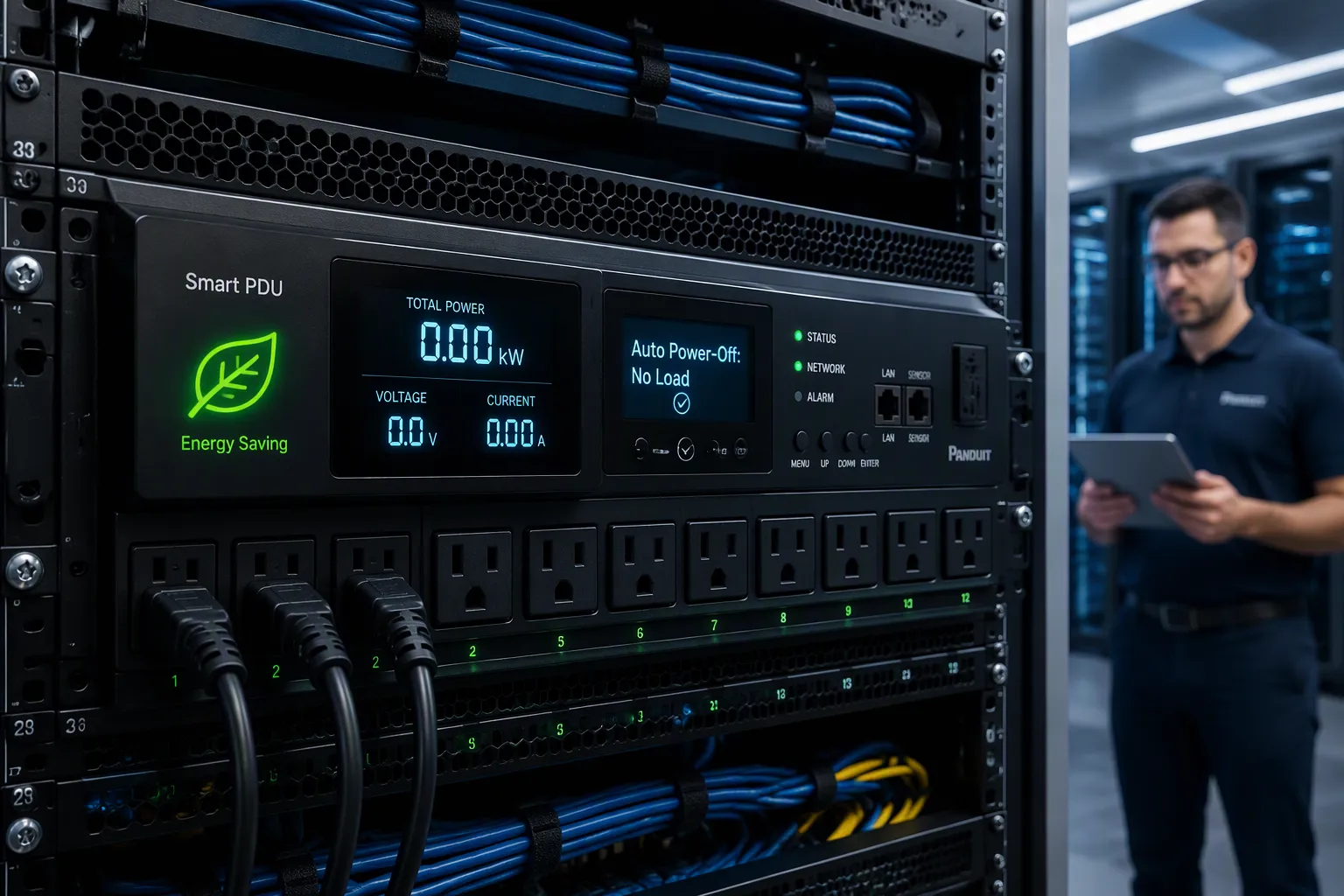
Auto power-off in the no-load state means a smart PDU senses current at each outlet, compares it against a threshold you set, and cuts power after a delay when the load stays idle. The payoff is simple: unused rectifiers, fans, and idle access gear stop drawing standby power. That saved energy adds up across a cabinet fleet. You will work through three levers — detection method, configuration workflow, and reliability safeguards. Expect concrete steps, option comparisons, telecom cabinet fit, compliance notes, and troubleshooting guidance you can apply directly. ESTEL's Smart Power Distribution Unit supports outlet-level no-load policies, and its settings serve as the reference for the examples below.
Key Takeaways
Set current thresholds above standby draw and below normal operating current to avoid false triggers.
Use hysteresis and timers to prevent rapid on-off switching and protect equipment.
Group outlets by equipment type and assign one policy per group for consistent control.
Bind a wake-up trigger to every group so outlets can restore power after cutoff.
Pilot the policy on non-critical cabinets first and log every change for easy rollback.
How Smart PDU No-Load Detection Works
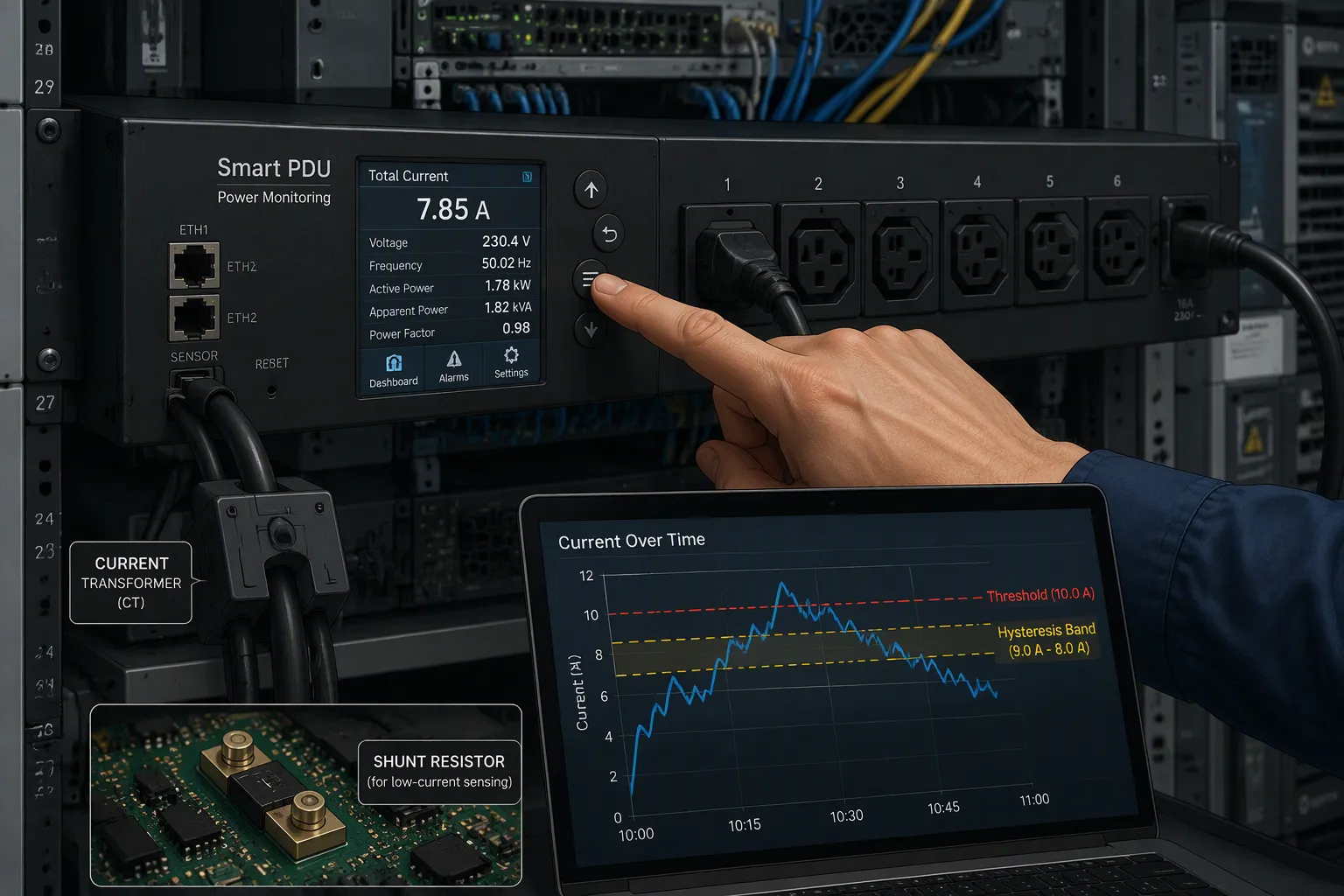
Detection starts with measurement. A smart PDU watches current flow at each outlet or outlet bank, then decides whether that current represents real work or idle standby. Two sensing approaches dominate. Current transformers (CTs) clamp around the conductor and report current inductively, so they isolate the measurement circuit from the live line. Shunt resistors sit in series with the load and produce a small voltage drop proportional to current. CTs suit higher-current branches and offer natural isolation; shunts give fine resolution at low currents, which matters when you want to catch a device idling at a few watts. Either way, the controller compares the reading against a threshold you assign per outlet or per bank. Outlet-level thresholds let you treat a rectifier shelf differently from a cooling fan. Bank-level thresholds cost less and simplify wiring, but they force every device on that bank to share one policy.
Sensing Methods and Threshold Logic
Threshold logic deserves care because idle loads are not zero loads. Field observations show idle devices can draw up to 50W or more, so a threshold set too low will never trigger, and one set too high will cut active equipment. Set the threshold above the standby draw you want to eliminate but safely below the smallest legitimate operating current on that outlet. Group outlets by equipment profile, then assign one threshold per group. This keeps the policy auditable and prevents a single misconfigured outlet from affecting unrelated gear.
Delay, Hysteresis, and Wake-Up Triggers
A single threshold invites chatter. The load hovers near the setpoint, the relay opens and closes, and connected equipment suffers. Hysteresis solves this by creating a dead band between the cut-out point and the restore point, so the switch does not oscillate around one value. Delay adds a second gate. An on-delay timer ignores brief current dips and commits only after sustained no-load, while an off-delay timer holds the relay closed for a minimum runtime after the load returns. Combined timers guarantee a minimum interval between switching events. The table below summarizes practical settings drawn from relay-control practice and optical protection switching.
Parameter | Suggested Value | Purpose |
|---|---|---|
Wait-To-Restore timer | Delays restore until power stabilizes after the trigger clears | |
Threshold hysteresis | 1.0 dBm equivalent | Prevents flipping readings near the threshold |
On-delay | Rejects momentary dips | |
Off-delay | 10–20 seconds | Forces minimum runtime and builds a buffer |
Wake-up triggers complete the design. A scheduled restore brings outlets back at a known time, and a remote command overrides the policy instantly. Pair every auto power-off rule with at least one wake-up path, or an idle outlet becomes unreachable.
Configuring Your Smart PDU Step by Step
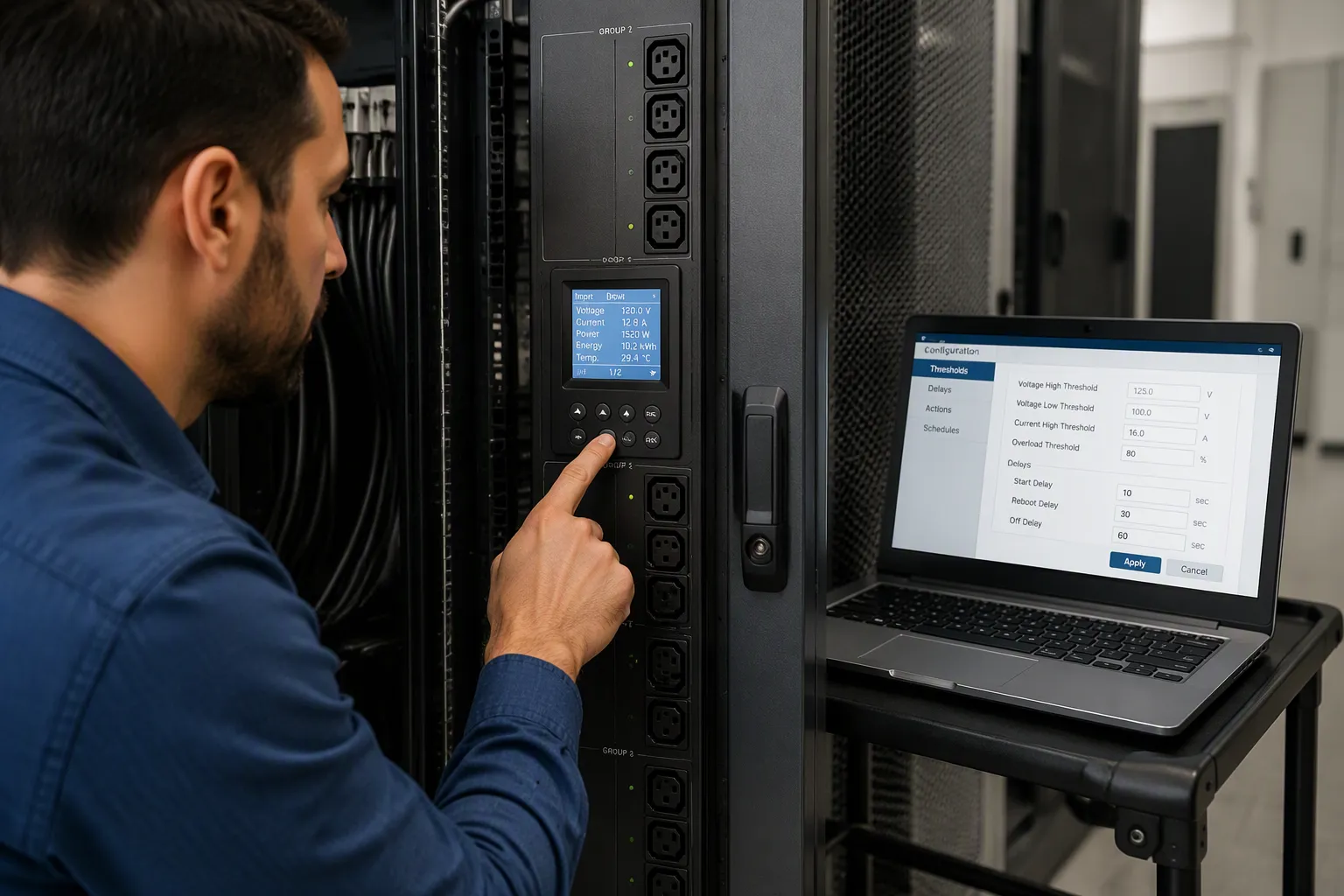
Setting Thresholds, Delays, and Outlet Groups
You can configure a no-load policy in a short sequence of steps. Follow this order to keep the logic consistent across every cabinet you touch.
Inventory each outlet. Record the device type, its standby draw, and its smallest normal operating current. This baseline tells you where the threshold belongs.
Assign outlets to logical groups. Put rectifiers on one group, cooling fans on another, and access gear on a third. Grouping by equipment profile keeps one policy from spilling onto unrelated hardware.
Set the threshold per group. Place it above the standby draw you want to eliminate and safely below the smallest legitimate operating current. Leave a margin on both sides.
Configure hysteresis. Define a restore point that differs from the cut-out point. This dead band stops the relay from oscillating near the setpoint.
Add on-delay and off-delay timers. The on-delay rejects brief current dips. The off-delay forces a minimum runtime after the load returns.
Bind a wake-up trigger to every group. Use a scheduled restore or a remote command. An outlet with no wake-up path becomes unreachable once it cuts off.
Save the policy and log the change. An audit trail lets you compare settings across cabinets and roll back a bad rule quickly.
Using the ESTEL Smart Power Distribution Unit
The ESTEL Smart Power Distribution Unit gives you a concrete platform for these steps. Its specifications map directly onto the configuration workflow above.
Specification | Value |
|---|---|
Maximum input current | 16 A |
Outlet count | 8 to 19 outlets |
Communication protocols | Intelligent protocols, RESTful APIs, SNMP |
Remote management | Real-time updates, remote control and monitoring |
Additional features | LCD real-time monitoring, surge protection, dehumidifying function |
The LCD display lets you verify outlet status on site during commissioning. Surge protection guards connected equipment, and the dehumidifying function helps maintain stable conditions inside the enclosure. The 8-to-19 outlet range covers both small and densely populated cabinets.
Integration with monitoring turns a local policy into a fleet-wide practice. The Smart PDU reports outlet data through SNMP and RESTful APIs, so your network management system can poll current readings and confirm that a cut-off actually happened. RESTful APIs suit modern applications, while SNMP works well for legacy equipment. Configure alarm forwarding so a failed relay, a threshold breach, or a controller fault reaches your operations team before it becomes a site visit. Remote control then lets you restore an outlet or adjust a threshold without dispatching a technician.
Comparing Technical Options and Performance
Outlet-Level vs. Bank-Level Switching
Outlet-level switching gives you the finest control. Each receptacle carries its own relay and current sensor, so you can cut one idle rectifier while the fan beside it keeps running. This granularity protects service continuity in mixed cabinets. The trade-off is cost and wiring density. More relays and sensors raise the unit price, and commissioning takes longer because you configure every outlet.
Bank-level switching groups several outlets under one relay. You save money and simplify installation, and the policy stays easy to audit. The limitation is shared fate. Every device on the bank follows the same rule, so one active load keeps the whole bank energized. Bank-level control fits cabinets where equipment profiles are uniform, such as a dedicated fan shelf or a battery cabinet with identical modules. Choose outlet-level control where devices differ in duty cycle and standby draw.
Metering Accuracy, Protocols, and Fail-Safe Behavior
Accuracy decides whether your threshold logic can trust its own readings. Most monitored PDUs certify ±1% metering accuracy at all metering points, and billing-grade models reach ±0.5% under IEC 61557-12 PMD-III. A tighter meter resolves small standby currents with more confidence, which reduces false triggers near the threshold.
Accuracy Tier | Typical Value | Standard / Note |
|---|---|---|
Billing-grade models | ±0.5% | Compliant with IEC 61557-12 PMD-III |
Most monitored PDUs | Commonly cited as billing-grade threshold |
Ideally, kWh measurement accuracy should be ±1%, which is considered billing-grade accuracy.
Protocol support shapes fleet integration. A Smart PDU exposes meter data through SNMP, web interfaces, or DCIM platforms, and that data feeds real-time monitoring and historical trend analysis. Fail-safe behavior matters just as much. Decide whether outlets return to default-on or stay default-off after an outage. Default-on restores service automatically; default-off prevents an unattended restart. Load-shedding and UPS-triggered shutdown use the same relay logic, and right-sizing your outlet count to the actual equipment load keeps both strategies effective.
Telecom Cabinet Fit, Compliance, and Cost
Matching Policies to Cabinet Equipment Profiles
Different equipment inside a telecom cabinet deserves different no-load rules. Rectifiers often sit idle as backup capacity, so a longer delay and a higher threshold suit them well. Cooling fans follow temperature, not traffic, so tie their policy to a schedule rather than current alone. Access gear may drop to standby at night, which makes a scheduled restore essential. Battery cabinets need the most caution: never cut an outlet that carries charge current, and treat the battery management circuit as always-on. Map each profile to its own outlet group before you enable any rule.
ESTEL Cabinet and PDU Integration
Outdoor enclosures face humidity as much as heat. The dehumidifying function in ESTEL's Smart PDU controls humidity and prevents condensation inside the cabinet. That protection avoids moisture-related damage such as corrosion and operational failures, and it extends equipment lifespan while reducing maintenance costs. ESTEL's outdoor cabinet portfolio pairs naturally with this capability, since both target harsh field conditions.
Capability | ESTEL Smart PDU | Competitors |
|---|---|---|
Dehumidifying function | Included | Not standard |
Surge protection | Included | Varies |
Compliance and cost close the picture. Confirm that your policy meets the remote reset requirements your operator mandates, and document every automatic cutoff in an audit log. Total cost of ownership improves through avoided standby draw, fewer site visits, and deferred capacity upgrades. A PDU refresh often costs far less than adding rectifier capacity, so right-size before you buy more power.
Best Practices and Troubleshooting
Avoiding False Power-Offs and Service Impact
Start with a pilot on non-critical cabinets. Pick a pilot group that mirrors your wider fleet across hardware, firmware, and workload type. Treat this group as controlled real-world testing. Watch installation outcomes, health metrics, and user-reported issues during the trial. Define your expansion criteria in advance, such as acceptable performance and endpoint stability over an observation window. Keep a fallback path open throughout testing, and validate your rollback procedure before you widen the rollout. An untested rollback carries the same risk as having no recovery plan at all.
A staged rollout limits the blast radius of a bad rule. Canary deployment rolls changes to a small subset first, which enables early detection but demands progressive automation. Blue-green keeps two identical environments and shifts traffic only after testing, with fast rollback by flipping traffic back. Rolling updates move through nodes in batches and stay relatively simple to revert. Avoid updating all cabinets at once; that approach is the riskiest and offers poor rollback. Log every policy change in an audit trail so you can compare settings and revert quickly.
Diagnosing Configuration and Network Faults
Most faults trace back to four causes. A threshold set too high never triggers, and one set too low cuts live equipment. A delay that is too short causes relay chatter. A controller or network outage blocks remote access entirely. A misconfigured wake-up trigger leaves an outlet unreachable after cutoff. Work through these in order before you touch the hardware.
Diagnostic Method | |
|---|---|
Network connectivity blocking remote access | Verify network settings; inspect physical connections |
Overload tripping circuit protection | Perform load balancing checks |
Hardware failure or software bug | Upgrade firmware; review event logs |
Do not rely solely on pinging the gateway. In some failure modes the router and switch still respond while locked up. Use a test ping tool for remote debugging, and configure AutoPing to monitor the managed switch, the router, and an external target at once. If the external target drops, treat it as an internal fault and power cycle the networking gear. Group the router and switch outlets together so one command restarts both.
Your decision chain runs in a fixed order: pick a sensing method, set thresholds and delays with hysteresis, group outlets by equipment profile, then connect monitoring and remote wake-up. Before wide deployment, inventory hardware models and firmware, build a compatibility matrix, and pilot on non-critical cabinets. Map settings to a tiered model — mandatory, recommended, exception-only — and check them against compliance needs. Plan a phased rollout with published rollback steps.
Treat auto power-off as a repeatable, auditable practice. Confirm four items: thresholds above standby draw, hysteresis set, a wake-up trigger bound to each group, and every change logged. ESTEL's Smart PDU offers one option for outlet-level policy control.
FAQ
What does no-load auto power-off actually do on a smart PDU?
The PDU measures current at each outlet. When the reading stays below your threshold for the full delay period, the relay opens and cuts power to that outlet. Idle rectifiers, fans, and access gear then stop drawing standby power.
How do I pick a current threshold for an outlet?
Measure the device's standby draw first. Set the threshold above that standby level and safely below the smallest normal operating current. Idle equipment can draw up to 50W, so a threshold set too low will never trigger a cutoff.
How do I stop an outlet from switching on and off repeatedly?
Add hysteresis and timers. Hysteresis creates a dead band between the cut-out and restore points. An on-delay of 5–10 seconds rejects brief current dips, and an off-delay of 10–20 seconds forces a minimum runtime after the load returns.
What brings an outlet back after an automatic cutoff?
Bind a wake-up trigger to every outlet group. A scheduled restore returns power at a known time, and a remote command overrides the policy instantly. An outlet with no wake-up path becomes unreachable once it cuts off.
Does the ESTEL Smart Power Distribution Unit support these policies?
Yes. It offers 8 to 19 outlets, a 16A maximum input, an LCD for on-site verification, and remote management through SNMP and RESTful APIs. Surge protection and a dehumidifying function support stable cabinet conditions.
See Also
Ways to Guarantee Consistent Power Supply for Telecom Cabinets
Solar Energy Storage Power System Designed for Telecom Cabinets
Understanding ESTEL PDUs and Their Function in Data Center Cabinets
ESTEL Smart Microgrid Integrated Energy Storage System for Telecom Cabinets
Calculation Methods for Telecom Cabinet Power Systems and Telecom Batteries
CALL US DIRECTLY
86-13752765943
3A-8, SHUIWAN 1979 SQUARE (PHASE II), NO.111, TAIZI ROAD,SHUIWAN COMMUNITY, ZHAOSHANG STREET, NANSHAN DISTRICT, SHENZHEN, GUANGDONG, CHINA
