How Smart PDUs Generate Dynamic Energy Efficiency Dashboards with Real-Time Data Center Power KPI Visual Reports

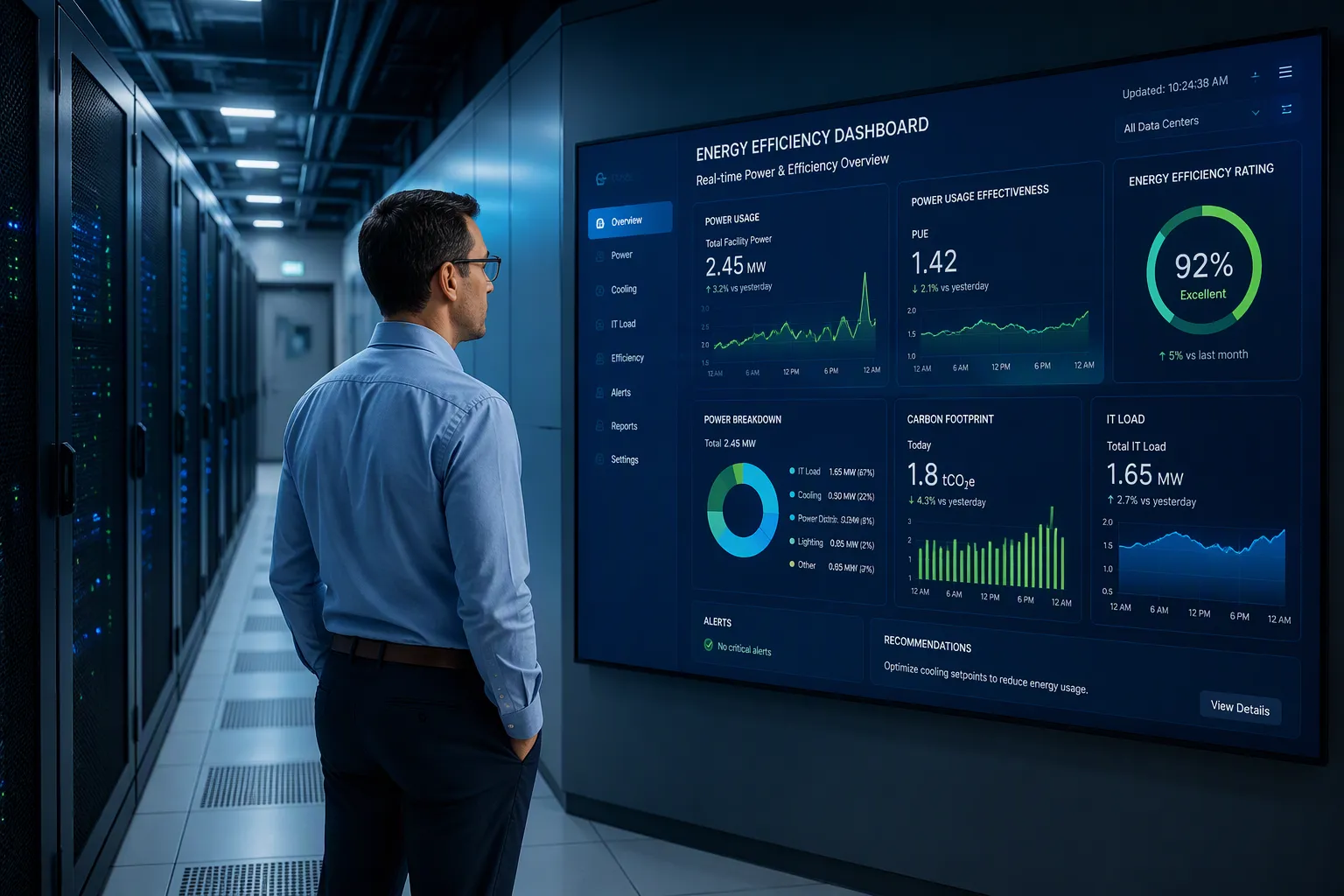
Rack PDUs meter power at the outlet and circuit level. They stream data over the network and feed an electrical power monitoring system or EPMS layer. That EPMS renders live KPI visuals for energy efficiency. Static monthly readings cannot track shifting rack loads. You need continuously refreshed views.
This article explains the collect–process–visualize pipeline behind those dashboards. Electricity is the leading cause of impactful data center outages, at 45% of incidents in 2025, according to Uptime Institute reports cited by CoreSite. Enconnex reports 44% of outages stem from onsite electrical system failure. Real-time monitoring helps you see risk early. ESTEL's smart PDU line is one example of this data-to-dashboard flow.
Key Takeaways
Smart PDUs measure power at each outlet and circuit. This gives detailed data for accurate dashboards.
An EPMS collects and organizes data from many devices. It turns raw numbers into useful KPIs.
Dynamic dashboards update in real time. You can see power changes as they happen.
Track KPIs like PUE and load balance to improve energy efficiency. These metrics guide better decisions.
Start with a small pilot before scaling up. Audit your metering coverage first for best results.
Smart PDU Data Collection
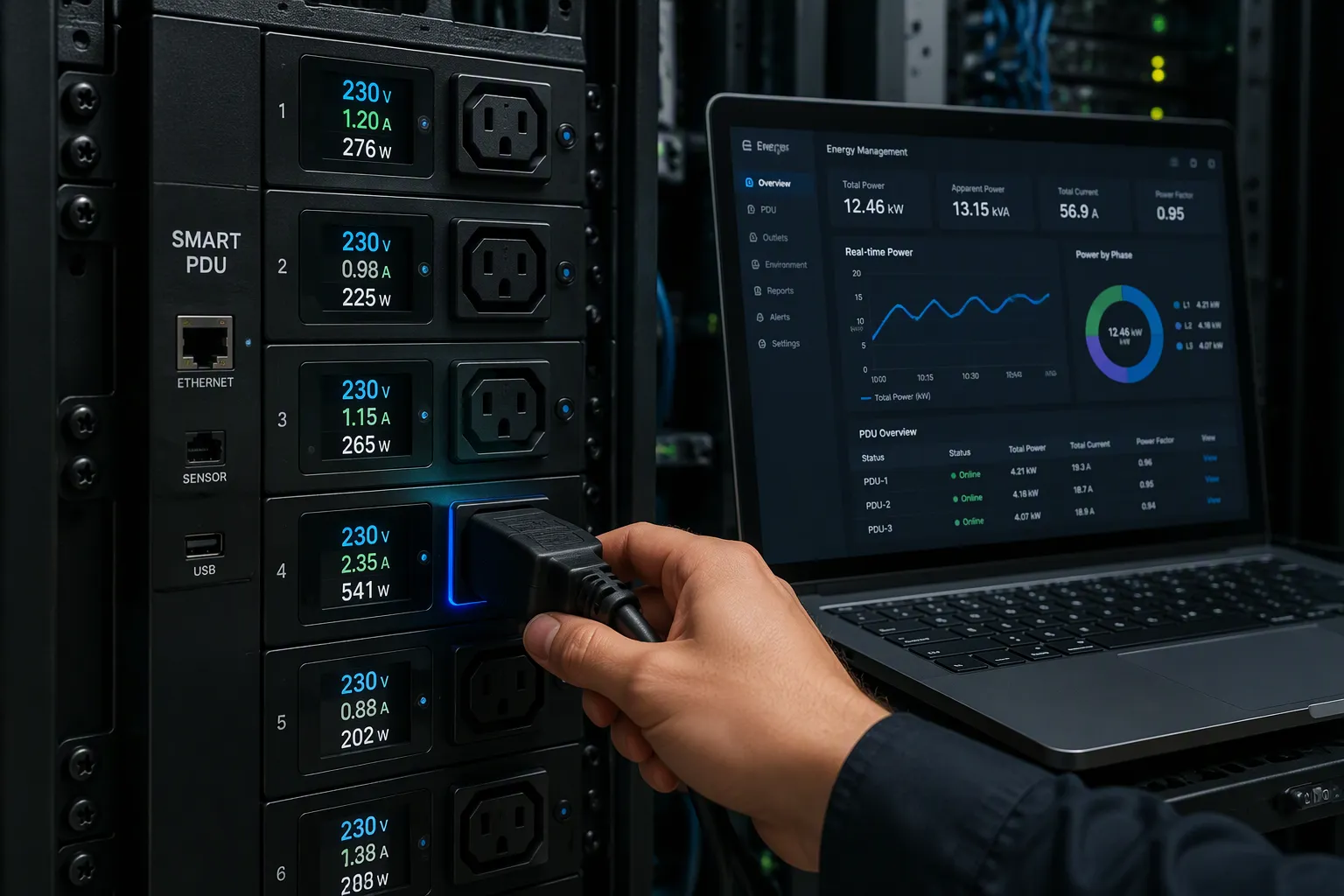
A smart PDU measures, manages, and reports device energy usage in real time. It captures voltage, current, and power at the outlet and circuit level. Every dashboard downstream depends on this raw data. Collection quality sets the ceiling for every KPI you build later.
Outlet and Circuit Metering
Outlet-level sensing gives you the most granular point-of-use measurement available without instrumenting the server itself. This matches The Green Grid's Category 3 (L3) measurement level: continuous monitoring at the IT equipment input. You see each server's draw directly, not a shared cabinet average. Circuit-level metering covers the branch feeding a whole rack strip. Outlet metering covers the single cord. Together they show both the aggregate and the culprit.
Smart or metered PDUs with built-in monitoring capabilities deliver outlet-level data — the most granular point-of-use measurement available without instrumenting the server itself. This corresponds to The Green Grid's Category 3 (L3) measurement level: continuous monitoring at the IT equipment input.
On units with per-outlet sensing, you capture a rich parameter set at each receptacle:
Parameter Captured at Outlet | Measured At Outlet |
|---|---|
Voltage, RMS (VRMS) | Yes |
Current, RMS (ARMS) | Yes |
Watts (W) | Yes |
Volt-Amps-Apparent Power (VA) | Yes |
Power Factor, True (PFtrue) | Yes |
Energy (kWh, kVA) | Yes |
Accuracy depends on the metering class. Standard metered PDUs show ±1–3% of full-scale error. That margin suits trend monitoring and capacity planning. Billing-grade metering holds ±1% or better per IEC 62053-21 Class 1, so you can trust it for financial use cases. Check the spec sheet before you promise chargeback numbers.
PDU Type | Typical Measurement Error |
|---|---|
Standard metered PDU | ±1–3% of full scale |
Billing-grade metered PDU | ±1% or better (IEC 62053-21 Class 1) |
Per-circuit current and power tracking builds the foundation for AI-driven energy optimization and capacity planning. Quality signals matter too. A crest factor above 1.41 signals harmonic distortion. A distortion power factor of 0.95 means 95 percent of the supplied energy does useful work. A falling power factor can point to a failing power supply. You can also group several outlets to watch one device, server, or application. ESTEL smart PDUs are one example of this granular metering approach.
Sensors and Connectivity
Environmental sensors extend collection beyond electricity. Intelligent rack PDUs connect temperature, humidity, pressure, and airflow sensors. These readings reveal rising heat or moisture before equipment fails. You catch a hot aisle trend while it is still cheap to fix.
Network protocols carry power and environment sensor data to the monitoring layer. Rack PDU inlet readings then flow into your EPMS alongside outlet data. The EPMS aggregates everything into one analysis layer. From there, the EPMS normalizes timestamps and units across device types. A later EPMS pass flags drift and threshold breaches. Your EPMS finally feeds the dashboard. Polling intervals and protocol choice decide how fresh the numbers look on screen. Metering coverage gaps are the most common reason a dashboard looks empty.
From Data to KPIs via Electrical Power Monitoring
An electrical power monitoring system turns raw device readings into usable KPI inputs. It polls meters, UPSs, generators, and other sources — the WAGES set — and consolidates them into one unified view. Modern EPMS platforms poll devices as often as once per second. That cadence gives your EPMS near real-time visibility across the whole distribution network.
Aggregation Across the Facility
Your EPMS follows a hierarchical measurement structure across the data center distribution chain: utility, main meter, switchgear, UPS A/B, meters, PDU A/B, branches, and rack loads. Each layer feeds the EMS/DCIM layer for analytics. A centralized monitoring platform collects data from many meters, passes it through a communication layer to a gateway, and delivers it to the EPMS server. Your EPMS then lets you compare buildings, electrical rooms, UPS systems, PDUs, branches, and racks from one interface.
Component | Role in Aggregating Data |
|---|---|
Smart Meters | Real-time load monitoring at each point |
Current Transformers (CTs) | Scale high-current signals to manageable levels for meters |
Communication Gateways | Convert serial protocols to Ethernet for network integration |
EPMS Software Platform | Polls devices and consolidates data into a single dashboard |
Current transformers scale high-current signals down to levels your meters can read. Gateways convert serial protocols such as Modbus RTU to Ethernet. Both pieces keep every rack visible to your EPMS.
Time-Series Normalization
Devices report at different intervals and in different units. Normalization aligns timestamps and scales so readings compare fairly. Your EPMS then builds key performance indicators from consistent series. Historical data in databases supports long-term capacity planning and trend analysis. Automated alarms can trigger when a circuit approaches 80% of rated capacity. Waveforms from multiple phases can overlay to diagnose issues.
Some EPMS platforms learn normal conditions and flag anomalies. Data center infrastructure management systems often serve as this processing and single-dashboard layer. A well-normalized electrical power monitoring system keeps data center power monitoring a continuous discipline, not a monthly report. Your EPMS also captures power quality events for later review. That makes your EPMS the single source of truth for every efficiency review.
Building Dynamic Dashboards
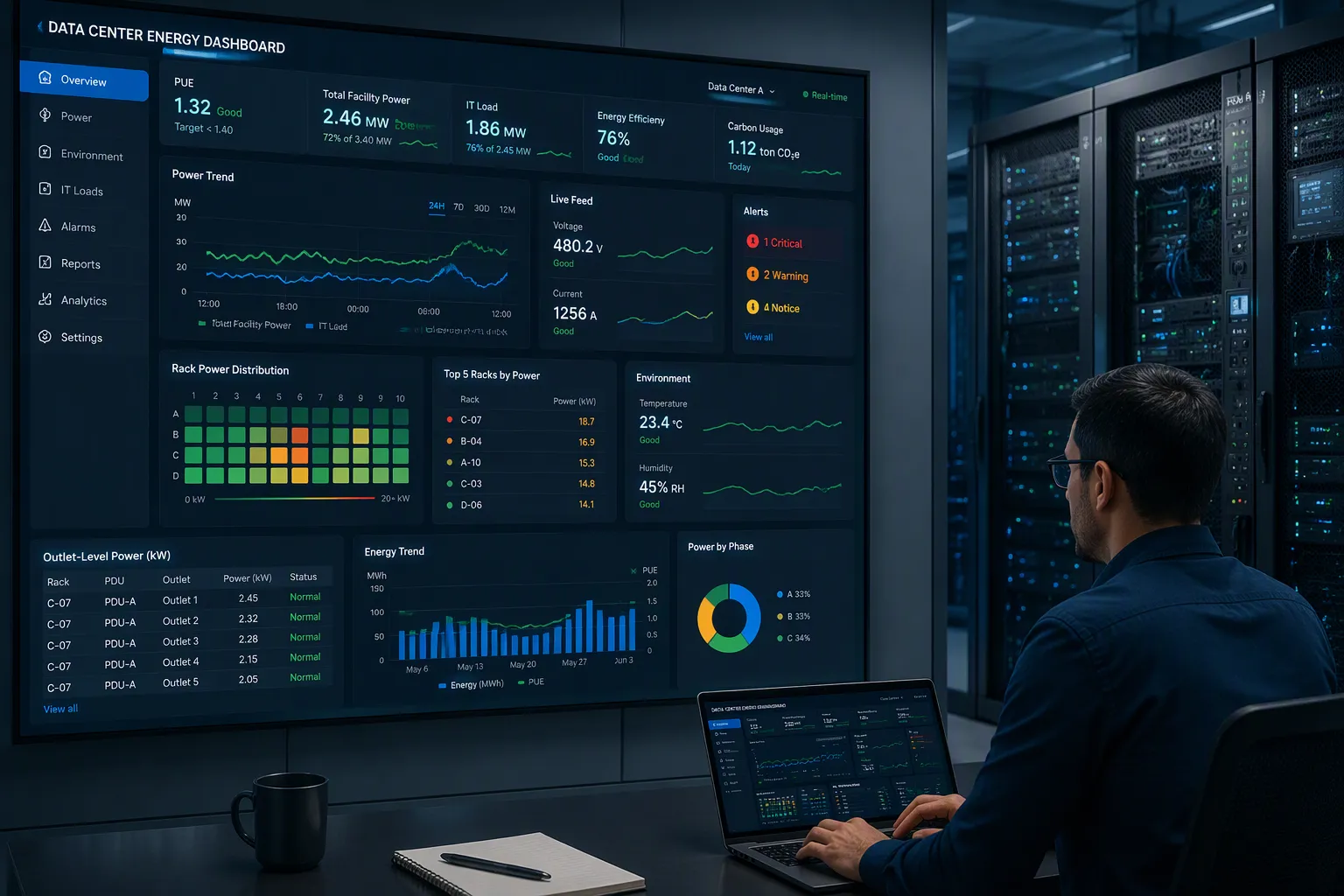
A dynamic dashboard never sits still. New readings arrive from your smart pdu on a fixed polling cycle, and the display updates as each batch lands. You watch load shift in near real time instead of reading yesterday's snapshot.
Real-Time Refresh Logic
Each PDU communicates via SNMP over your existing Ethernet infrastructure. You need no proprietary software and no extra hardware. Remote probes monitor pdus across distributed locations and consolidate all power monitoring data into a single web interface. Consistent polling and correct SNMP configuration ensure the data is present and current when displayed. Metrics and thresholds stay adjustable from anywhere, with role-based access control for the team.
The refresh cycle follows a simple path:
The PDU polls its outlets and circuits on a set interval.
SNMP carries each reading to the monitoring layer.
Your epms normalizes the values and writes them to the time-series store.
The dashboard re-renders the affected dashboard widgets.
Voltage and current appear as live values that flag irregularities and prevent overloads. Outlet-level power consumption shows per outlet to optimize distribution and cut costs. Environmental conditions such as temperature and humidity are monitored to prevent overheating and extend device life. Historical energy trends render as graphs and charts that reveal patterns for capacity planning. Critical thresholds surface through color-coded visual alerts, with red marking high usage. This visual analytics layer turns raw streams into real-time insights you can act on.
Custom Views and Alerts
You can shape views by rack, row, or room. In DCIM software, drill down from a building view to a data center floor view, then to a rack view, and further to equipment cards and ports. To inspect a specific rack, locate the building, then the room, then the row, and select the rack. A direct search finds the rack faster. Capacity reports also let you view capacity by data center room or by data center, which supports room-level customization.
Data visualizations are how data center information is presented, such as in a dashboard, trend charts, reports, rack and row elevations and floor layout plans.
Alert thresholds commonly follow a two-tier pattern:
Alert Level | Threshold (PDU Load) |
|---|---|
Warning | |
Error | 85% load |
Configure these per sensor rather than globally. A high-density compute rack then gets tighter limits than a storage rack. Your epms flags efficiency drift qualitatively, since no single numeric limit fits every workload. Your epms compares current draw against the learned baseline. Your epms raises a notice when the gap widens. Your epms keeps that history for review. Your epms feeds every view. Your epms remains the engine behind real-time tracking of load and headroom. DCIM provides the single dashboard for real-time power loads, and smart PDUs feed it. That pairing gives you real-time information across the whole floor.
Power KPIs for Energy Efficiency
PUE and Consumption Trends
Power usage effectiveness compares total facility power to IT load. Real-time power usage effectiveness is not a single instantaneous reading. PUE fluctuates with workload and environmental conditions. Accurate values rely on continuous monitoring and long-term averaging, such as monthly or annual data. Measurement boundaries matter. Whether you measure IT load at the UPS output, the PDU level, or the server input changes the result. Keep boundaries and methodology consistent, and track PUE over time rather than chasing the lowest single-point value.
Real-time visibility lets you link efficiency changes to specific actions. Install new equipment, and the dashboard shows the PUE impact as it happens. Adjust cooling, and you see the shift immediately. Your epms correlates each event with the trend. Your epms keeps that history for review. Your epms supports data center energy efficiency decisions with evidence, not guesswork. Your epms also surfaces energy consumption and costs across the floor. Your epms turns consumption trends into a visual story you can act on.
Load Balancing and Headroom
Load balancing and capacity headroom are core power metrics on any live view. Your epms shows per-rack draw against rated capacity. Your epms highlights imbalance between A and B feeds. Your epms tracks capacity utilization across rows and rooms. Your epms flags racks approaching their limits. Your epms keeps power utilization visible at every level. Your epms feeds the dashboard that guides your next deployment.
Outlet-level power quality monitoring adds another efficiency lens. It spotlights inefficiencies and needless consumption, so you can act early.
Monitoring Insight | Efficiency Value |
|---|---|
Surges, lags, and temporary fluctuations | Reveals variances from normal operation |
Real-time usage of individual IT equipment | Shows per-device consumption |
Trending and reporting at every facility level | Supports planning and pue tracking |
Granular power quality data turns raw monitoring into energy efficiency insight. Your epms ties it all together.
Benefits and Deployment Tips
Practical Efficiency Gains
Live KPI views pay off in daily operations. Capacity planning gets faster, because you see real draw per rack instead of estimating from nameplate ratings. Compliance reporting becomes easier too. Your epms keeps a continuous record, so you can generate reports from stored history rather than chasing manual readings. Event-correlated tracking closes the loop. When you install equipment or adjust cooling, the dashboard shows the efficiency impact right away. Your epms ties each change to its measured effect.
Rollout Considerations
Start with a metering coverage audit before you buy anything. Aggregate-only metering will not support a serious audit. Confirm per-outlet amperage and real-time wattage in the datasheets, not a generic load percentage. Verify that the unit lists per-outlet current sensing rather than total load monitoring alone.
Confirm the measurement location (inlet vs. outlet) and whether readings are available per outlet or only per phase.
Verify the published accuracy class — roughly ±1% for electrical measurements is a practical target for operational monitoring.
Check the refresh interval so short load spikes between reporting cycles stay visible.
Determine the minimum measurable load and confirm data export options.
Request test conditions, calibration information, and the operating temperature range.
Compare PDU readings against a calibrated handheld meter during rack audits.
Then pilot one row. Watch how your epms handles the data stream, and confirm the dashboard views match your operational questions. Scale to more rows once the pilot proves stable. ESTEL smart PDUs are one integration path, and other vendors fit the same pipeline. A smart pdu with solid per-outlet sensing gives your epms the raw material for accurate capacity utilization views. Treat monitoring coverage as the first deliverable, and every later dashboard improves.
Smart PDUs generate dynamic dashboards through a simple chain. They meter granular power data at the outlet and circuit, your electrical power monitoring system or DCIM layer processes it, and visualization tools stream the KPIs. Your epms does the heavy lifting in the middle.
Start small. Audit your current PDU metering coverage, then pilot a dashboard on one row before you scale. Watch how your epms handles the stream and confirm the views answer your operational questions.
Real-time KPI visibility keeps capacity planning honest and efficiency targets measurable. Your epms turns monitoring into decisions. ESTEL smart PDUs offer one starting point for that pipeline.
FAQ
What makes a dashboard dynamic instead of static?
A dynamic dashboard updates as each new batch of PDU readings arrives. Your smart PDU polls its outlets on a set interval, and the display re-renders the affected widgets. You watch load shift in near real time instead of reading yesterday's snapshot.
How often should the data refresh?
Refresh speed depends on your polling interval and SNMP configuration. Modern epms platforms can poll devices as often as once per second. Choose an interval short enough to catch load spikes that matter to your operations.
Can I compare racks with different PDU models?
Yes, if your epms normalizes the data first. Devices report at different intervals and in different units. Normalization aligns timestamps and scales so readings compare fairly. Confirm each unit's accuracy class, since standard metered PDUs and billing-grade units carry different error margins.
What alerts should I set on a new row?
Start with a two-tier pattern: a warning near 70% load and an error near 85%. Configure limits per sensor rather than globally, so high-density racks get tighter thresholds than storage racks. Your epms then flags drift against the learned baseline.
How do I prove efficiency gains to management?
Use event-correlated tracking. When you install equipment or adjust cooling, the dashboard shows the efficiency impact right away. Your epms keeps that history, so you can generate reports from stored data rather than manual readings. Continuous monitoring makes every claim checkable.
See Also
Understanding ESTEL PDUs And Their Function In Data Center Cabinets
Enhancing Outdoor Cabinets Through Power Cooling And Monitoring Optimization
Solar Energy Storage Power System Designed For Telecom Cabinets
ESTEL Smart Microgrid Integrated Energy Storage System For Telecom Cabinets
CALL US DIRECTLY
86-13752765943
3A-8, SHUIWAN 1979 SQUARE (PHASE II), NO.111, TAIZI ROAD,SHUIWAN COMMUNITY, ZHAOSHANG STREET, NANSHAN DISTRICT, SHENZHEN, GUANGDONG, CHINA
