Downward Compatibility of Smart PDUs with Microinverters for Distributed Solar Direct Access in Edge Telecom Cabinets

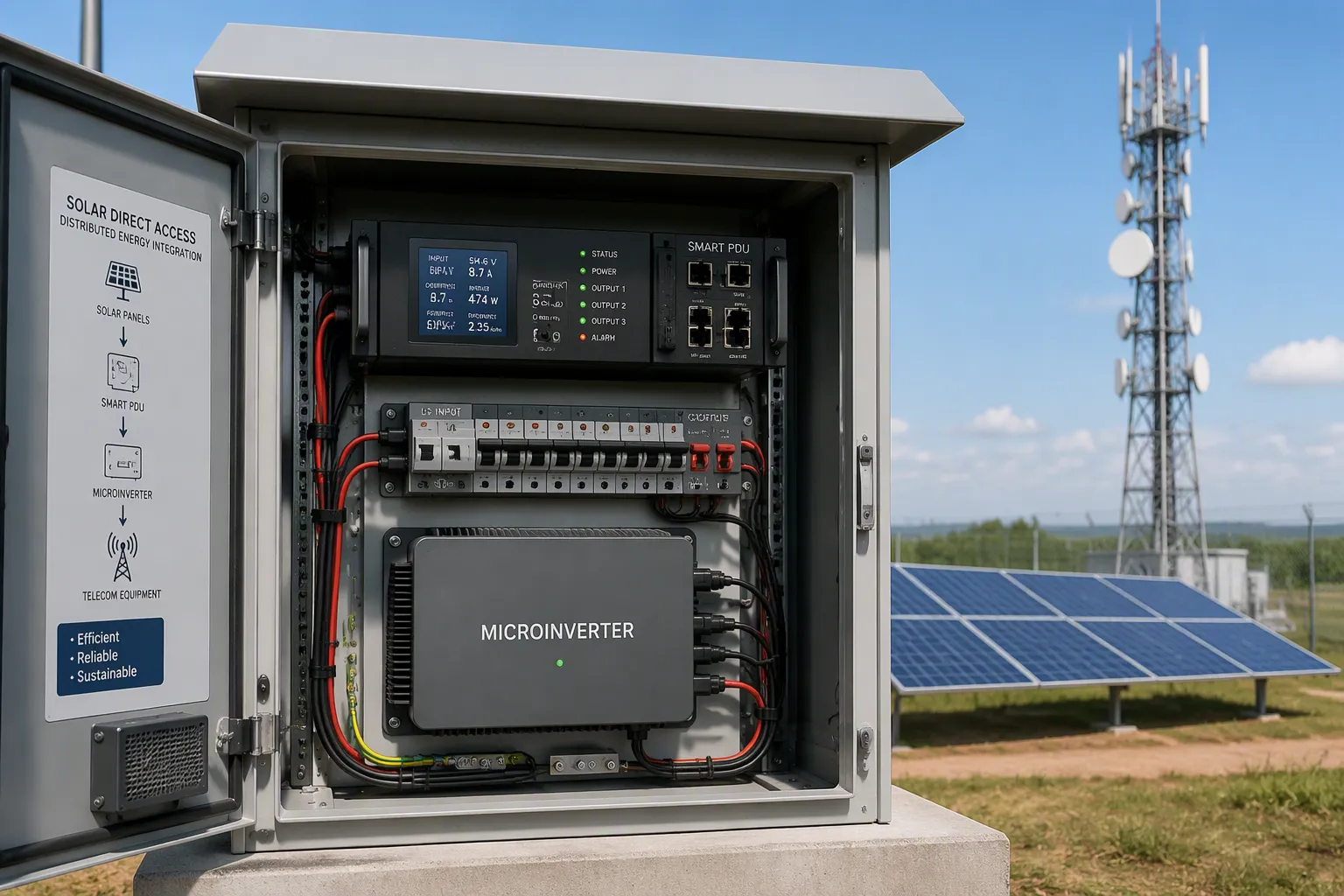
Yes — deployed PDUs in edge telecom cabinets can support downward compatibility with microinverters for distributed solar direct access. The condition is verification, not assumption. Four dimensions decide the outcome: voltage and power matching, communication interoperability, safety compliance, and cost. This analysis focuses on AC-coupled microinverter inputs feeding an installed base of Smart PDU hardware, so you can avoid rip-and-replace. Expect an assessment checklist and three practical integration paths — gateways, firmware updates, and add-on modules — instead of a product pitch. Each dimension carries its own test method, and each one can be checked against your real site data before you commit capital.
Key Takeaways
Verify compatibility instead of assuming it. Check voltage, power, communication, and safety for each cabinet.
Use a Smart PDU with monitoring and remote control. Passive PDUs cannot support solar input.
Choose from three integration paths: gateways, firmware updates, or add-on modules. Match the path to your cabinet's gaps.
Test on a bench first, then pilot one or two cabinets. Scale only after the pilot data looks clean.
Compare retrofit cost against replacement cost. A retrofit often wins when the existing unit still meets electrical limits.
Compatibility Feasibility
Defining Downward Compatibility
Downward compatibility means your existing power distribution hardware accepts a new solar input without a full replacement. You keep the installed cabinet, wiring, and outlet layout. You add microinverter output at the AC side, and the PDU continues to serve its telecom loads. This approach protects your capital investment and shortens deployment time.
AC-coupled microinverter input is the relevant architecture for this scenario. Each microinverter converts DC from its module into grid-matched AC at the point of installation. That AC then feeds the cabinet's distribution bus. You avoid DC cabling runs into the cabinet and you avoid re-engineering the DC plant. The PDU sees a familiar AC source, and your integration work stays at the AC distribution layer.
Scope for Edge Cabinets
Not every PDU in the field can support this role. You must separate intelligent active units from simple passive units. A passive PDU is a wiring block with outlets. It offers no monitoring, no remote control, and no data path. Solar direct access needs measurement and switching, so a passive unit cannot deliver the function you need.
An intelligent active unit, or Smart PDU, carries the monitoring and control layer that makes solar direct access workable. It reports outlet-level power data and accepts remote commands. Those capabilities let you observe solar contribution and manage loads at an unmanned site. Check the nameplate and the management interface of each cabinet before you plan a retrofit. Units with remote management and real-time display fit the scope. Units without them fall outside it.
Smart PDU Voltage and Power Matching
AC Voltage Windows
Your first check is the voltage window. A microinverter must deliver AC inside the range your distribution unit accepts. Take the ESTEL Smart Power Distribution Unit as a concrete reference. It carries a rated voltage and current of 230VAC 32A, a maximum input current of 16A, and outlet configurations from 8 to 19. Its cable plug system follows IEC60309. Any microinverter you pair with this unit must sit inside that electrical envelope.
Voltage drift matters at edge sites. Grid voltage rises and falls with feeder conditions, and microinverters ride those changes. Confirm the microinverter's AC output window overlaps the PDU's accepted input range across the full day. A narrow overlap leaves you exposed to nuisance trips at dawn and dusk, when solar output ramps.
Load Profiling and Backfeed Limits
Power matching starts with a load profile. Log the cabinet's actual consumption across a full week. Telecom loads often stay flat, so a solar source can cover a steady share of demand. Compare that baseline against the microinverter array's peak AC output. The 16A maximum input current on the ESTEL unit sets a hard ceiling for what you can push through that input path.
Backfeed limits deserve the same attention. Some circuits tolerate reverse power flow and some do not. Map each outlet group and confirm where solar current will travel. Use microinverter compatibility calculators and compatibility charts to match module and microinverter families to the PDU's electrical envelope. These tools shorten the matching work and flag mismatches before you buy hardware. A Smart PDU with clear nameplate data makes this step faster and more reliable.
Communication Protocol Interoperability
Protocol Mapping
Microinverters report a different data model than a distribution unit expects. Each microinverter tracks per-module output, module-level maximum power point tracking (MPPT) status, AC voltage, frequency, and temperature. A PDU monitoring interface typically expects branch-level current, outlet-level power, and input voltage. You must map one model onto the other before any dashboard or control loop can use the data.
Start with the data points you actually need. Per-module monitoring gives you granular production data, and MPPT status tells you whether a module is tracking its power curve correctly. Map these into the PDU's monitoring schema as production and health fields. Where the two models do not share a field, a gateway or translator sits between them and performs the conversion. Direct connection works only when both devices speak the same protocol natively.
Legacy-to-Modern Bridges
Installed cabinets often run older management protocols. New microinverter gateways usually speak modern ones. A bridge device translates between the two, and it must feed the PDU-side capabilities you rely on. The ESTEL Smart PDU offers remote management and LCD-based real-time monitoring. Your bridge must deliver data the remote management layer can read and values the LCD can display in real time.
Choose the bridge by function, not by brand. A protocol translator handles data conversion. A gateway handles data conversion plus network routing and device enrollment. Map your existing Smart PDU interfaces first, then select the bridge that matches. Test the handshake on a bench before field installation, and confirm that per-module data reaches the PDU display and the remote console without loss.
Safety and Regulatory Compliance
Anti-Islanding and Rapid Shutdown
Anti-islanding protection keeps a microinverter from energizing a circuit after the grid disconnects. This matters at an unmanned edge cabinet. A technician may service the cabinet without knowing solar production continues. Confirm that every microinverter you pair carries certified anti-islanding protection, and verify that the protection responds within the trip limits your local interconnection rules define.
Rapid shutdown addresses a related risk. It forces module-level voltage to a safe level when responders or technicians need it. Microinverters typically provide module-level shutdown by design, because each unit sits at the module. Check the shutdown behavior against your cabinet's service procedure. Then confirm the PDU's remote control path can command a safe state during an emergency.
Grounding, surge protection, and humidity control complete the environmental safety picture. The ESTEL Smart PDU includes surge protection as a standard feature, and it adds a dehumidifying function that limits condensation inside the cabinet. Bond the microinverter frames and the PDU enclosure to the site grounding system. Verify the bonding path before you energize the solar input.
Certification and Interconnection
Certification paths vary by market, and no single path fits every site. Microinverters carry their own safety listings, and your distribution hardware carries its own. Confirm both listings cover the combined installation you plan. Review the utility interconnection rules that apply to your region, and check whether your array size triggers a review or approval step.
Keep the review neutral and evidence-based. Collect the certificates, the interconnection application, and the site single-line diagram in one package. Submit that package to the authority that governs your site. Requirements differ across jurisdictions, so treat each cabinet fleet as its own compliance exercise. Document every approval before commissioning, and keep the records with the site file for future audits.
Cost Implications
Retrofitting vs. Replacing
A retrofit keeps your cabinet, wiring, and outlet layout in place. You pay for integration hardware, firmware work, and commissioning labor. A replacement swaps the whole distribution unit. You pay for new hardware, removal, installation, and a longer service outage. Compare the two on total cost of ownership, not sticker price alone.
Operating costs shift the comparison further. A retrofit preserves the monitoring and remote management you already run. The ESTEL Smart PDU supports remote control and LCD-based real-time monitoring, so your operations team keeps its existing workflow. A replacement forces retraining and new procedures. Add firmware, gateway, and commissioning costs to both paths before you decide. The retrofit usually wins when the installed unit still meets its electrical envelope.
Hidden Retrofitting Costs
Retrofits carry costs that rarely appear in the first quote. Firmware updates may need vendor involvement. Gateway hardware adds a line item. Protocol testing and commissioning consume technician hours at the site. Budget for these items explicitly, and you avoid surprises at the end of the project.
Multi-module microinverters can shift the economics in your favor. One unit serves several modules, so you install fewer devices and make fewer AC connections. Installation labor falls, and the per-module cost of power electronics drops. That efficiency gain can offset a meaningful share of the gateway and commissioning spend. Model the array with multi-module units first, then compare the result against single-module designs. The configuration with fewer connection points often delivers the lower installed cost.
Compatibility Assessment Guide
Site Audit and Nameplate Data
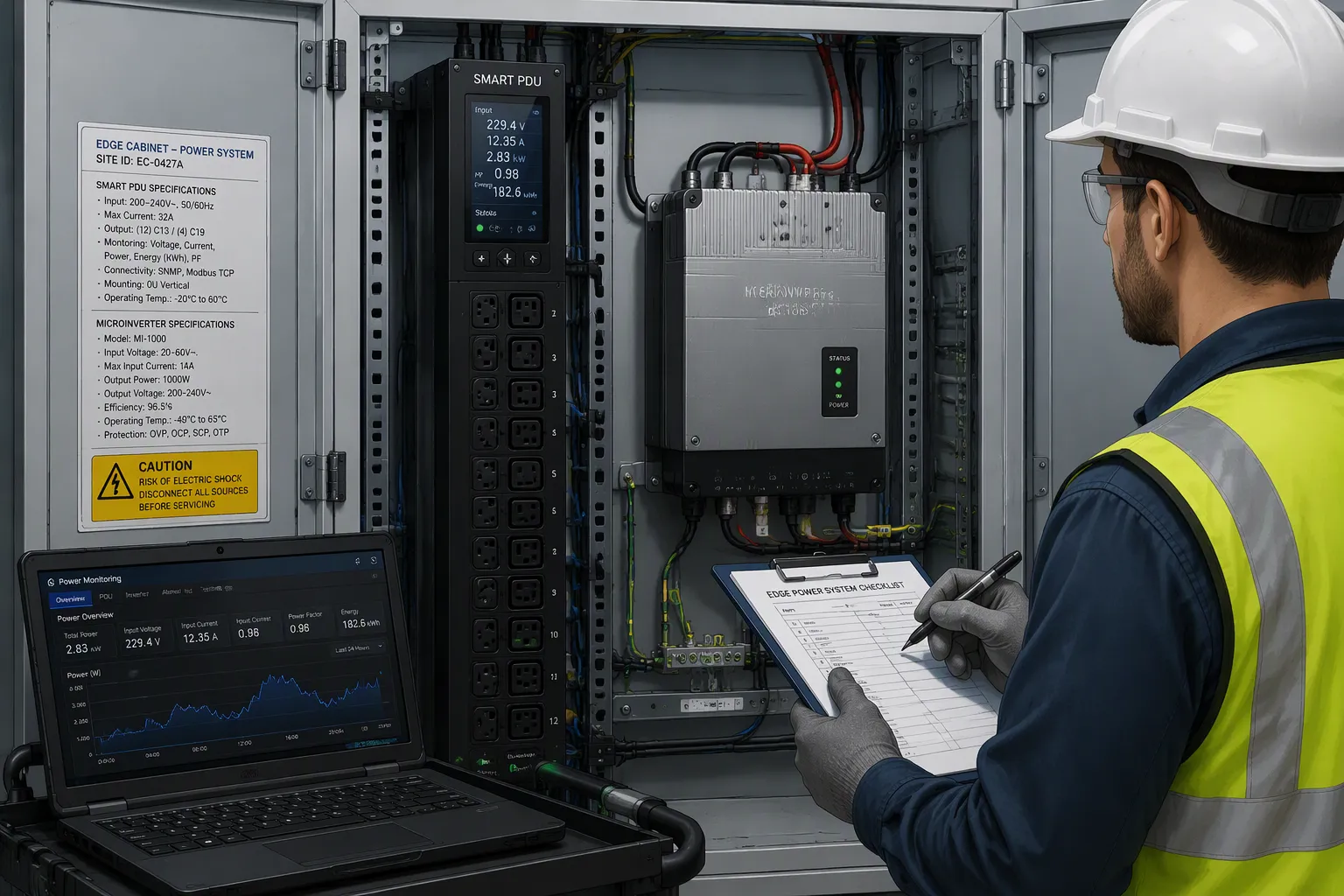
A structured audit turns compatibility from a guess into a verified result. Work through the following steps for every cabinet in your fleet.
Record the PDU nameplate data. Capture the input and output ratings, the maximum input current, and the outlet count. For an ESTEL Smart PDU, note the 230VAC 32A rated voltage and current, the 16A maximum input current, and the outlet configuration between 8 and 19. Photograph the IEC60309 cable plug and the internal wiring gauge.
Collect microinverter datasheets. Pull the AC output voltage window, the maximum continuous output current, the anti-islanding certification, and the communication protocol for each model you plan to use.
Log the site load profile. Measure cabinet consumption across a full week, including peak and idle periods. Record the solar irradiance pattern for the site so you can compare production against demand.
Map the communication interfaces. List every port and protocol the PDU exposes, then list what the microinverter gateway offers. Flag any gap that needs a translator.
Document the environmental conditions. Note cabinet temperature range, humidity exposure, and the existing surge and grounding arrangement.
Bench and Field Validation
Bench testing comes before any field work. Set up the PDU and a representative microinverter on a test bench. Run a protocol handshake first. Confirm that per-module data reaches the PDU display and the remote console without loss. Then run voltage window tests. Sweep the AC input across the microinverter's output range and watch for nuisance trips at the edges. Verify that surge protection and the dehumidifying function behave as expected during the test.
Field pilots follow a successful bench run. Select one or two cabinets that represent your typical site conditions. Install the integration hardware and commission the solar input. Monitor outlet-level power data for a defined trial period. Compare measured production against your load profile model. Check for voltage drift, communication dropouts, and any thermal issues inside the cabinet.
A pilot exposes conditions that a bench cannot reproduce. Feeder voltage swings, seasonal irradiance shifts, and real telecom load patterns all show up here. Resolve every anomaly before you scale. Then expand to a small cluster of cabinets and repeat the monitoring cycle. Fleet-wide rollout comes last, and only after the pilot data confirms the design. This test-first sequence protects your installed base and keeps the retrofit economics predictable.
Smart PDU Integration Solutions
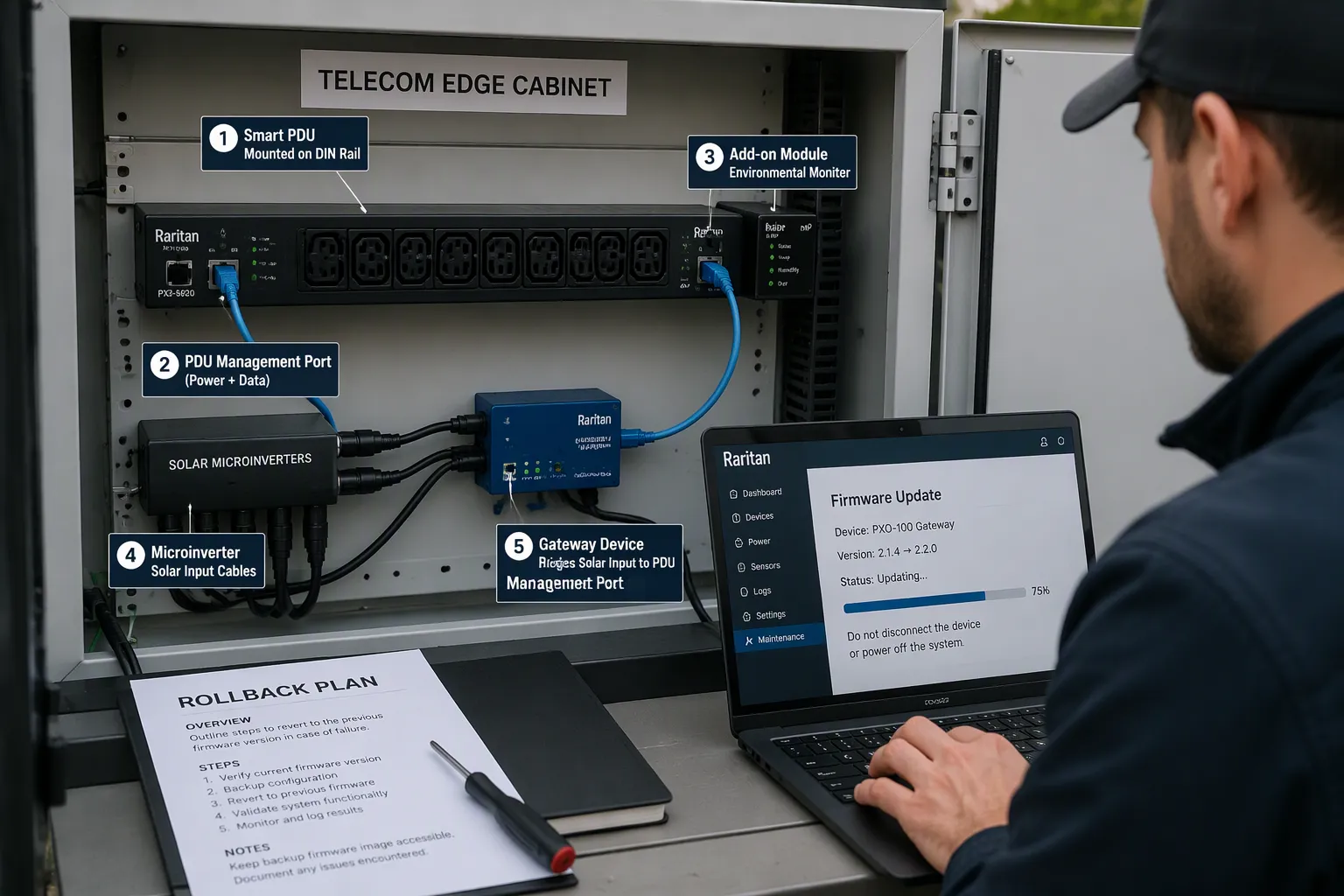
You have three practical integration paths for connecting microinverter solar input to an installed distribution unit: gateways and protocol translators, firmware updates, and add-on modules. Each path fits a different starting condition. Choose by what your cabinet already lacks, not by what is newest. A single site may need more than one path, and the combination should follow the gaps your audit found.
Gateways and Translators
A gateway fits when your microinverters speak a modern protocol and your distribution unit speaks an older one. The gateway handles data conversion, network routing, and device enrollment in one box. A translator fits when you only need data conversion and your network path already exists. Both devices sit between the solar source and the PDU management layer, and both must pass a bench handshake before field work begins.
The ESTEL Smart PDU remote control capability sets the requirement for any bridge you select. The bridge must deliver commands the unit can execute and data the unit can display. Switched-PDU remote power cycling extends that value at unmanned edge sites. You can cycle an outlet remotely after a fault, and you avoid a truck roll to a remote cabinet. That capability turns a monitoring retrofit into an operations tool.
Firmware and Add-On Modules
A firmware update fits when your existing hardware already carries the ports and processing headroom the solar input needs. The update changes how the unit interprets input data and how it reports solar contribution. Confirm the vendor supports the update path for your model before you schedule site work, and keep a rollback plan ready in case the new build misbehaves.
An add-on module fits when the hardware lacks a sensing or switching function outright. The module adds the missing capability without replacing the unit. Pair the module with remote power cycling so the site keeps its unmanned operating model. Test every path on the bench first, then pilot one cabinet before fleet rollout. The pilot data tells you which path earned its place in the fleet standard.
Deployment Decision Framework
Go/No-Go Scoring Criteria
Score each cabinet against four dimensions before you commit budget. Technical performance covers the voltage window, the current ceiling, and the protocol handshake. Application fit covers load profile match and site conditions. Regulatory compliance covers anti-islanding certification and interconnection approval. Cost covers retrofit spend against replacement spend.
Dimension | What You Score | Passing Signal |
|---|---|---|
Technical performance | Voltage window overlap, current headroom under the 16A input limit, protocol handshake | Bench test passes without nuisance trips |
Application fit | Solar output against measured load profile, cabinet environment | Solar covers a steady share of demand |
Regulatory compliance | Anti-islanding listing, interconnection approval | Documents complete before commissioning |
Cost | Retrofit total against replacement total | Retrofit wins on total cost of ownership |
Set a minimum score for each dimension and treat any failing dimension as a stop signal. A strong cost score cannot rescue a failed safety check.
Phased Rollout and Monitoring
Roll out in stages. Start with a bench validation of the protocol handshake and voltage window. Move to one or two pilot cabinets that represent typical site conditions. Expand to a small cluster once pilot data looks clean. Scale to the full fleet last.
Monitor outlet-level power data after every commissioning. Compare measured solar production against your load profile model. Watch for voltage drift, communication dropouts, and thermal issues inside the cabinet. Keep the remote power cycling path tested, so you can clear a fault at an unmanned site without a truck roll. Review the data at each stage before you widen the rollout.
Treat downward compatibility as an engineering verification exercise, not an assumption. Verify voltage and power matching against the nameplate, map communication protocols on a bench, confirm safety and interconnection compliance, and compare retrofit cost against replacement cost. Score each cabinet on those four dimensions, and let any failing dimension stop the project.
Deploy in phases. Validate on the bench, pilot one or two cabinets, then scale. Monitor outlet-level power data after commissioning, and keep the remote power cycling path tested.
The right configuration depends on your site specifics. Vendors such as ESTEL can support assessment and integration tooling for your Smart PDU fleet where applicable.
FAQ
Can I retrofit solar input onto a passive PDU?
No. A passive unit offers no monitoring, no remote control, and no data path. Solar direct access needs measurement and switching. Check each cabinet for an intelligent active unit with remote management and real-time display before you plan the retrofit.
How do I size a solar array against the PDU input limit?
Start with the 16A maximum input current on the ESTEL Smart PDU. Compare your array's peak AC output against that ceiling and against the cabinet's measured load profile. Keep production inside both limits across the full day.
Will a firmware update alone bridge the protocol gap?
Sometimes. A firmware update fits when your hardware already carries the needed ports and processing headroom. If the unit lacks a sensing or switching function outright, add a gateway, translator, or add-on module instead. Test the handshake on a bench first.
What should I monitor after commissioning?
Track outlet-level power data and compare measured solar production against your load profile model. Watch for voltage drift, communication dropouts, and thermal issues inside the cabinet. Keep the remote power cycling path tested so you can clear faults without a truck roll.
Is a pilot really necessary before fleet rollout?
Yes. A pilot exposes feeder voltage swings, seasonal irradiance shifts, and real load patterns that a bench cannot reproduce. Run one or two representative cabinets first, resolve every anomaly, then expand to a small cluster before full rollout.
See Also
Grid-Connected Solar Inverter And Battery System For Telecom Cabinets
Solar Energy Storage Power System Designed For Telecom Cabinets
ESTEL Smart Microgrid Integrated Energy Storage System For Telecom Cabinets
Latest Emerging Trends Shaping Outdoor Telecom Cabinet Technologies
CALL US DIRECTLY
86-13752765943
3A-8, SHUIWAN 1979 SQUARE (PHASE II), NO.111, TAIZI ROAD,SHUIWAN COMMUNITY, ZHAOSHANG STREET, NANSHAN DISTRICT, SHENZHEN, GUANGDONG, CHINA
