How Smart PDU Sensor Auto-Recognition and Triggered Alerts Enable Precision Data Center Management

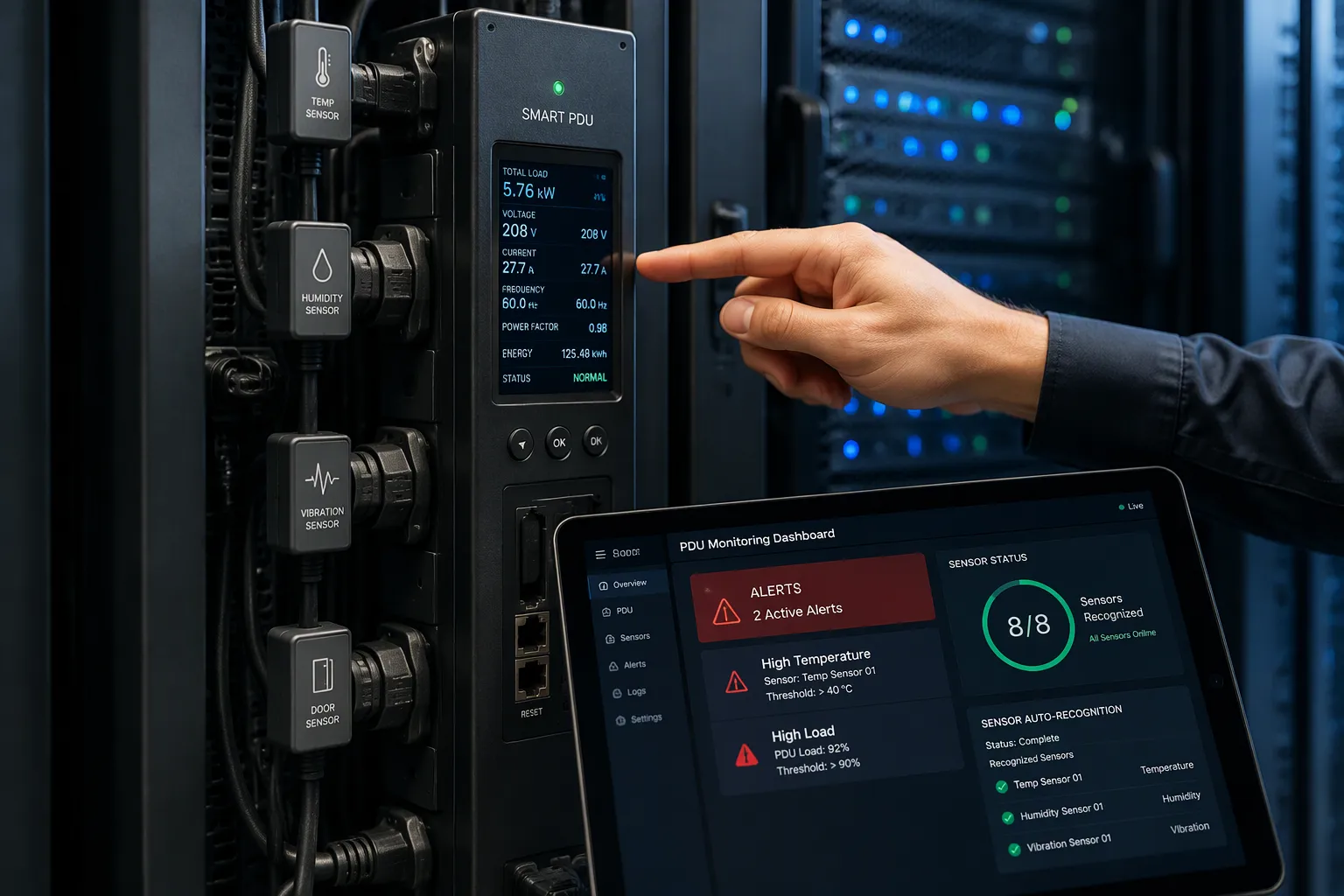
Smart PDU sensor auto-recognition and threshold-based alerts enable precision data center management. The system identifies each sensor type and configuration on its own. It then sends real-time alerts when readings cross your limits. You gain accurate monitoring and rapid response.
The stakes are high. Gatling reports that data center downtime costs $300K–$540K per hour. Visibility gaps make the problem worse. Envigilance notes that periodic walkthroughs catch problems only after they become emergencies. ServerTech describes a site that spent hours tracing random power issues to one faulty floor PDU. Manual configuration adds another burden to your team.
This article explains the mechanisms behind auto-recognition and alerting, the combined benefits, deployment best practices, and comparison criteria. You can then act with confidence.
Key Takeaways
Smart PDUs automatically recognize sensors, so setup is faster and more accurate.
Threshold-based alerts warn you before problems become emergencies.
Auto-recognition and alerts work together to give you precise monitoring and rapid response.
Baseline your thresholds from real readings and test alerts before go-live.
Choose a PDU that fits your rack and integrates with your DCIM system.
How Smart PDU Sensor Auto-Recognition Works
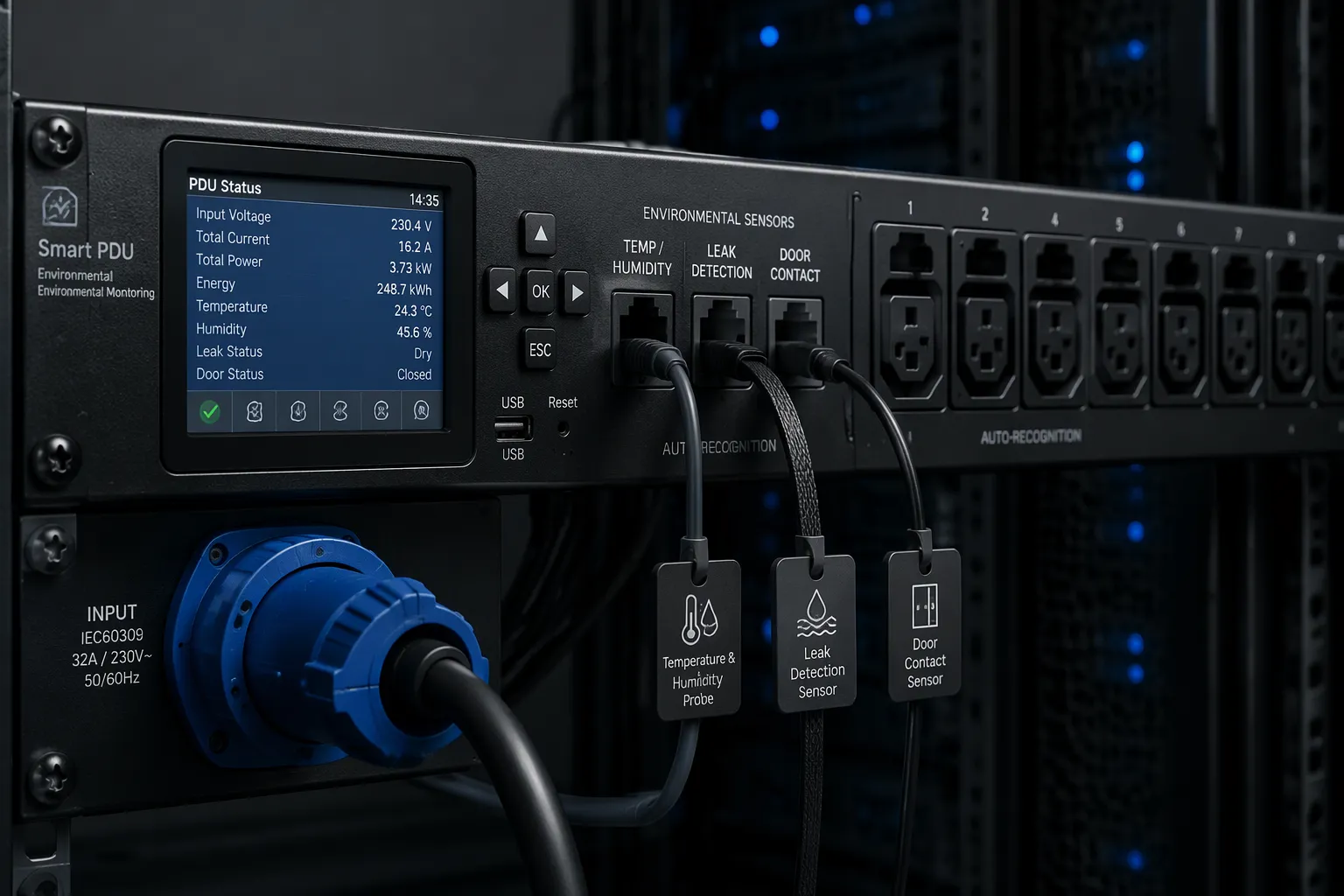
A smart PDU does more than distribute power. It also acts as a sensing hub for your rack. The unit detects each connected sensor, reads its identity, and loads the right configuration without manual mapping. You plug in a sensor, and the PDU recognizes it.
Detection and Identification of Data Center Environmental Sensors
The detection process starts at the port. Each port on the PDU polls the connected device for an identity signal. The device returns a code that states its type and its scaling. It then applies the correct units and limits. This handshake covers data center temperature sensors, humidity probes, door contacts, and leak detectors. You do not assign addresses or type in conversion values.
Consider a leak sensor. The PDU reads its identity, sets the alarm state to wet or dry, and maps the reading to the right port label. A door contact works the same way. The PDU knows the sensor reports open or closed, so it never misreads the signal as a temperature value.
ESTEL's Smart Power Distribution Unit shows how this works in practice. The unit includes an LCD display for real-time monitoring of connected sensors and power readings. A dehumidifying function helps hold humidity within your target band. Surge protection shields downstream equipment. You can choose 8 to 19 outlet configurations, and the unit accepts a maximum input current of 16A. The cable plug system complies with IEC60309.
Auto-recognition also supports mixed fleets. One intelligent PDU can host several data center environmental sensors at once. Each port keeps its own identity, so a swap does not disturb the others. This design keeps environmental sensors organized by physical location.
Faster Commissioning and Accurate Configuration
Commissioning time drops when the PDU configures sensors itself. Your technician mounts the rack-mounted power distribution unit, connects the sensors, and confirms each port on the display. It fills in type, units, and default thresholds. That step removes the manual mapping work that invites typos and wrong port labels.
Accuracy improves for the same reason. A mislabeled port sends the wrong reading to your dashboard. Auto-recognition ties each reading to the correct physical location. You then trust the data that feeds your alerts. A smart PDU with auto-recognition removes that guesswork.
Network-connected smart PDUs extend this gain across the floor. You can push a configuration template to many units and let each one identify its own sensors. The result is a consistent baseline across every rack in the data center. Auto-recognition also reduces misconfiguration risk.
Your teams value this speed during expansion. A new row in the data center can go live faster when each PDU identifies its own sensors. The data center manager sees accurate labels from day one. That accuracy matters in a data center where a single misread sensor can trigger a false alarm or hide a real one.
Treat auto-recognition as a starting point, not a finish line. Verify each detected sensor against your rack drawing during acceptance testing. Confirm the units and the default thresholds match your design. This short check catches a sensor plugged into the wrong port before it reaches production.
Alerting and Threshold-Based Notifications in Practice
Threshold Logic and Alert Generation
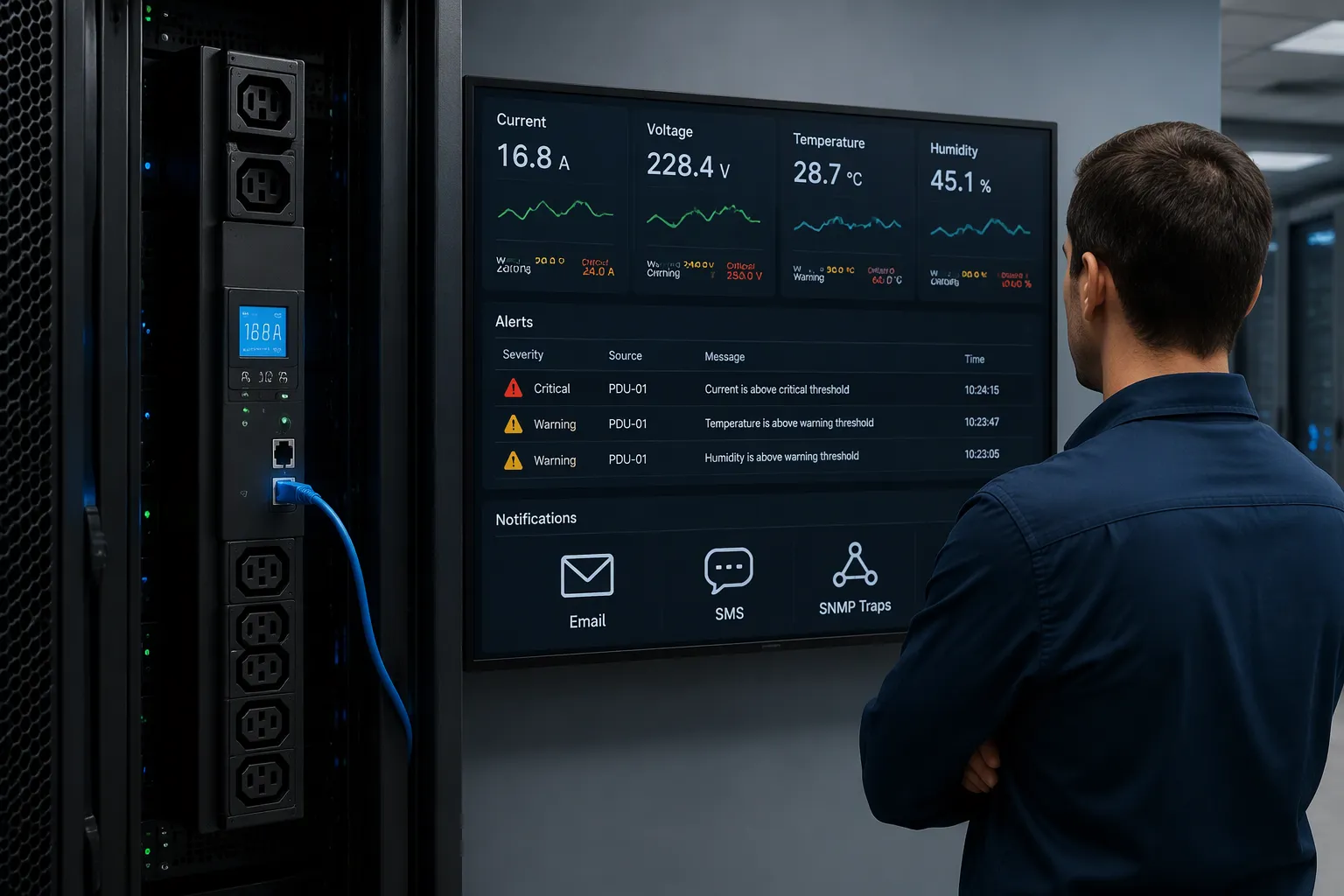
You set a threshold for each metric you care about. The smart PDU compares every reading against that limit on a fixed cycle. When a value crosses the line, the unit generates an alarm. Attom Tech lists the common triggers: high current, high power consumption, overload conditions, voltage abnormalities, temperature thresholds, and humidity thresholds. Each alarm carries a timestamp and a port label, so you know where the problem sits.
Threshold-based alerting works best when you set two levels per metric. A warning level gives your team time to act. A critical level demands immediate attention. You can apply the same logic to voltage, current, power, energy, temperature, and humidity. The PDU also supports remote outlet control, load balancing across phases or circuits, and power sequencing. These functions let you shed load or restart a circuit from your desk. Measurement accuracy on a quality unit stays within a tight band, so the reading you act on reflects the real load.
Notification Pathways and Escalation
An alarm only helps when it reaches the right person. Deipower notes that smart PDUs deliver alerts through SNMP traps (v2/v3 with TRAPs and INFORMs), email, SMS, and Syslog. You route each severity to a different channel. A warning may go to email. A critical alarm should reach an on-call phone.
Access Methods | SNMP, Redfish interfaces, secure web interface, email alerts |
|---|---|
Alerts and Threshold Notifications | Sends alerts when power usage exceeds limits. |
Integration with DCIM Systems | Supports centralized management. |
That table, from NBYOSUN, shows the access paths you can expect. The same source notes that intelligent PDUs support network and serial access, so users view data through secure web interfaces or receive alerts by email. Your DCIM software can also pull power and environmental data through SNMP v2/v3 with identical MIBs, a Redfish RESTful API, JSON-RPC, or Modbus/TCP. Real-time monitoring then feeds one dashboard.
Build an escalation ladder. The first alert goes to the shift operator. An unacknowledged critical alarm escalates to the facility lead after a set interval. Document who owns each alarm type. This step keeps alerting useful instead of noisy.
Precision Data Center Environment Monitoring Benefits
Accuracy, Uptime, and Proactive Maintenance
Auto-recognition and triggered alerts turn raw readings into early warning. A leak sensor detects water at a defined spot and alerts your team at once, so you intervene before the leak spreads, as Icon Procon explains. Temperature sensors track ambient and rack-level heat and flag overheating before it causes downtime, according to IOX Connect. Humidity sensors help you hold the 40%–60% range that IOX Connect cites as ideal. ZPE Systems notes that environmental sensors give remote teams advance warning, so they can fix a problem before systems go down.
A smart PDU adds power-side alerting to that picture. Real-time power monitoring and historical data analysis help you spot trends and plan ahead, NBYOSUN reports. Custom alerts fire the moment a threshold breaks. NBYOSUN also states that proactive alerts can cut maintenance expenses by up to 25% and lift operational efficiency by 30%. Treat those figures as reported outcomes, not guarantees.
Feature | Benefit |
|---|---|
Real-time energy monitoring | Quick issue identification |
Historical data analysis | Trend spotting and planning |
Environmental sensors | Prevent overheating and equipment damage |
Customizable alerts | Immediate notification of problems |
DCIM integration | Centralized management |
Efficiency and Capacity Planning Gains
Precise metering pays off in planning. NBYOSUN explains that smart PDUs provide insights into power usage for better capacity planning and future growth, and that per-device monitoring identifies energy hogs. You can right-size power infrastructure and plan for growth against actual consumption. Historical trend data informs right-sizing and prevents over-provisioning, according to L-P. NBYOSUN adds that per-device monitoring exposes energy hogs and guides capacity planning.
Pair that with remote monitoring and you gain real-time insights and alerts across the floor. Your DCIM software pulls power and environmental data into one view, and rack-level metering data shows where headroom remains. That combination supports remote data center environmental monitoring and keeps data center management precise as loads grow.
Implementation Best Practices for Data Center Teams
Deployment and Configuration with ESTEL
Start with the physical install. CHINT recommends checking that the floor bears at least 10,000 N/m² and keeping 1200mm of clearance in front of the panel. Then map every outlet to its device before you power anything on. Pair each sensor and confirm its label on the display. Baseline your thresholds from real readings taken at idle, startup, and representative load, as Newsunn advises. Finish with validation testing of readings, outlet mapping, and alert delivery.
ESTEL's Smart Power Distribution Unit fits these steps well. Its LCD display supports real-time monitoring during commissioning. Surge protection and a dehumidifying function address two common deployment concerns in one unit. Remote management lets you verify settings without a second site visit. Choose from 8 to 19 outlets to match your rack density.
Integration with DCIM and Monitoring Systems
Your data center infrastructure management platform needs clean data. NBYOSUN notes that intelligent PDUs use SNMP, REST API, Modbus, BACnet, and Redfish to feed dcim software. Pick SNMP for general monitoring and REST APIs for automation. Heather Technologies warns that most enterprise units enforce polling intervals of no less than 5 seconds per outlet group, so set your dcim software poll rate accordingly.
Align alerting with existing workflows. Route PDU traps into the same queue your switches and UPS systems use. Define warning and critical thresholds with a named owner, then test escalation before go-live. Remote outlet control and remote monitoring belong in your change management process, not outside it.
"The convergence of smart PDU telemetry with DCIM platforms is closing the gap between physical infrastructure and IT operations. Organizations that integrate outlet-level data into their change management workflows report measurable reductions in capacity-related incidents and significantly faster root-cause analysis during outages."
Comparing Smart PDU Options Across Key Criteria
Technical Performance and Application Fit
Start your comparison with technical performance. Check measurement accuracy, sensor support, and alerting depth. A unit that reads power within a tight band and accepts several sensor types gives you trustworthy data. Alerting depth matters too. Look for warning and critical levels on every metric you plan to monitor.
Application fit decides the rest. Attom Tech advises you to count current IT equipment, planned additions, dual-power configurations, spare capacity, and future rack expansion before you pick an outlet count. More outlets do not make a unit better. The layout must match your rack design. Deipower notes that horizontal PDUs typically offer 8–16 outlets and suit smaller or low-density racks. Vertical 0U models reach up to 54–60 outlets and fit high-density racks. Deipower recommends a vertical PDU for racks above 70% full or above 10 kW per rack. AI and GPU servers raise rack power density, so weigh electrical capacity, load balancing, and thermal awareness together with the rack architecture.
ESTEL's Smart Power Distribution Unit fits telecom and edge environments well. Its 8 to 19 outlet configurations cover modest racks, and its LCD display supports real-time monitoring. Surge protection and a dehumidifying function suit remote sites where humidity control is hard.
Compliance and Cost Considerations
Confirm the certifications your site requires. NBYOSUN lists ISO9001, CE, UL, and RoHS as common marks, with some models adding VDE, CB, GS, and CCC. Newsunn adds REACH and notes that IEC 62368-1 replaced IEC 60950-1 in December 2020. ESTEL's plug system complies with IEC60309, and the company follows ISO9001-aligned quality processes.
Cost means total value, not unit price. NBYOSUN reports that eBay cut operating costs by 50% at its new data centers by using intelligent PDUs to meter energy per server. Smart units cost more upfront, and they demand more technical knowledge to configure. Weigh energy savings, equipment protection, and scalability against that premium. A smart PDU that feeds your dcim software and supports remote outlet control earns its price through faster response. Set one threshold on a critical circuit and you see the value.
Sensor auto-recognition and triggered alerts work as one system. The smart PDU identifies each sensor and loads the correct configuration. Threshold alarms then fire the moment a reading crosses your limit. Together they give you accurate monitoring, rapid response, and proactive management of every rack.
That combination answers the core question. Precision comes from correct labels and timely warnings, not from more hardware. Apply the deployment steps and comparison criteria above to your own data center. Map outlets, baseline thresholds, and test escalation before go-live.
ESTEL's PDU supports precise, reliable deployments for telecom and edge sites. Start with a clear sensor map and a tested alert path for your data center.
FAQ
How does a smart PDU recognize a newly connected sensor?
You plug the sensor into a port. The unit polls that port for an identity signal. The sensor returns a code that states its type and scaling. The unit then loads the correct units and default thresholds. You confirm the label on the display and move on.
What should you set as a starting threshold?
Baseline each threshold from real readings. Capture values at idle, at startup, and under representative load. Set a warning level that gives your team time to act. Set a critical level that demands immediate attention. Then test both levels before go-live.
Can you receive alerts without standing in the data center?
Yes. The unit sends alarms through SNMP traps, email, SMS, and Syslog. You route each severity to a different channel. A warning may go to email. A critical alarm should reach an on-call phone. Your DCIM dashboard shows the same data in one view.
How many outlets should you choose for your rack?
Count your current equipment, planned additions, dual-power needs, and spare capacity first. Match the outlet layout to your rack design. More outlets do not make a unit better. ESTEL's smart PDU offers 8 to 19 outlet configurations to cover modest racks and edge sites.
What does commissioning involve?
Mount the unit, map every outlet to its device, and pair each sensor. Confirm each label on the LCD display. Baseline your thresholds from real readings. Finish with validation testing of readings, outlet mapping, and alert delivery. Remote management lets you verify settings without a second site visit.
See Also
Understanding ESTEL PDUs And Their Function In Data Center Cabinets
Ensuring Best Monitoring Practices For Outdoor Telecom Cabinet Performance
Improving Outdoor Cabinets Through Integrated Power Cooling And Monitoring Solutions
Installing And Maintaining Smoke Sensors Inside Communication Cabinet Systems
ESTEL Smart Microgrid Integrated Energy Storage For Telecom Cabinets
CALL US DIRECTLY
86-13752765943
3A-8, SHUIWAN 1979 SQUARE (PHASE II), NO.111, TAIZI ROAD,SHUIWAN COMMUNITY, ZHAOSHANG STREET, NANSHAN DISTRICT, SHENZHEN, GUANGDONG, CHINA
