Smart Automated Monitoring: A Complete Guide to Smart PDU Sensor Plug-and-Play Technology

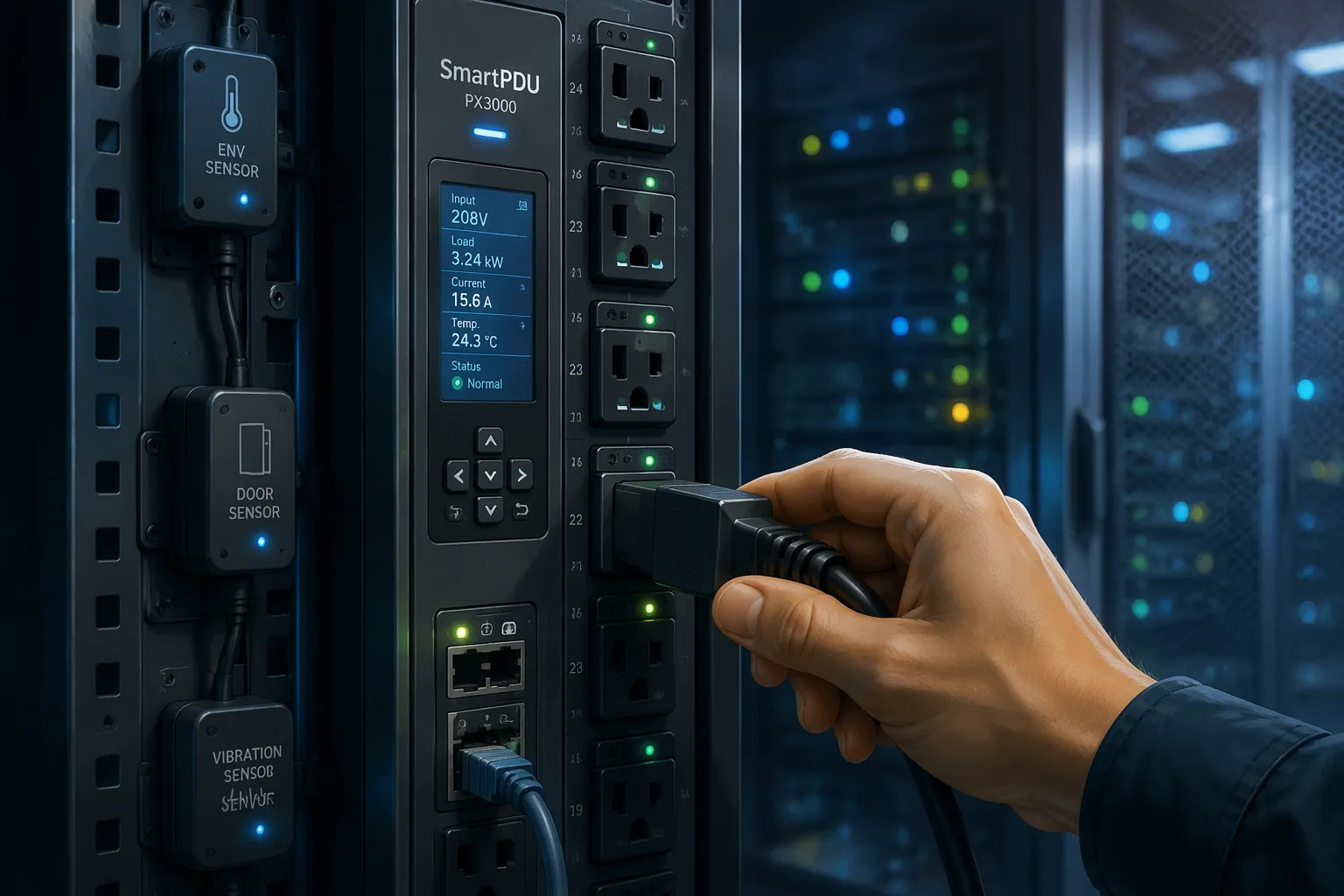
Smart PDU sensor plug-and-play technology means sensors that a smart PDU detects and configures automatically the moment you connect them. You plug in a temperature or current sensor, and the unit recognizes it, reads it, and starts reporting without any manual setup step.
Manual sensor work creates real trouble. Raritan describes power quality checks as a one-time event during commissioning, with manually placed sensors and electricians on standby to troubleshoot. Sensors rarely get revisited until a major server refresh. Configuration errors and monitoring blind spots follow.
Plug-and-play removes that burden. Your PDU handles detection and setup, so you gain continuous visibility across racks and edge sites.
Key Takeaways
Plug-and-play sensors save time and reduce errors. The PDU sets up each sensor automatically.
Choose a smart PDU that matches your rack's power needs and supports the sensors you want.
Follow a simple deployment checklist: mount, connect power, devices, sensors, and network.
Validate each sensor's readings and set alerts to catch problems early.
You can scale plug-and-play monitoring across many racks and sites without extra work.
PDU and Sensor Basics for Smart Power Distribution
What a PDU Does
A power distribution unit is the device that takes power from a building feed and spreads it across the rack and network equipment. Power distribution is its core function. You feed it one input, and it delivers many outlets, each one ready for a server, switch, or storage array. Think of it as the branch point between facility power and the gear that depends on it.
The device itself does not create power. It routes it, protects the circuit, and gives you a safe, organized way to connect equipment. That role stays the same whether the unit is a simple strip or a networked model with remote access.
Why Sensors Matter
Sensors add visibility that the power path alone cannot give you. Environmental-monitoring PDUs connect temperature, humidity, and airflow sensors, according to Dgorient. Higher-level models also watch conditions near critical equipment. Monitored PDUs report voltage, current, power, and energy through a network dashboard, so you see the electrical picture alongside the physical one.
Common sensor types include:
Temperature and humidity sensors, which track the air around the rack.
Current sensors, which measure draw on a circuit or outlet.
Voltage sensors, which confirm the feed stays within range.
This monitoring matters because environmental sensors can reveal rising heat or humidity before equipment fails, as Dgorient notes. A current reading that climbs past its normal band tells you something changed. A voltage dip warns you about supply trouble. Without sensors, a PDU distributes power blindly. With them, the same unit becomes a source of early warning and a record you can act on.
Traditional PDUs vs. Intelligent PDUs
Limits of Traditional PDUs
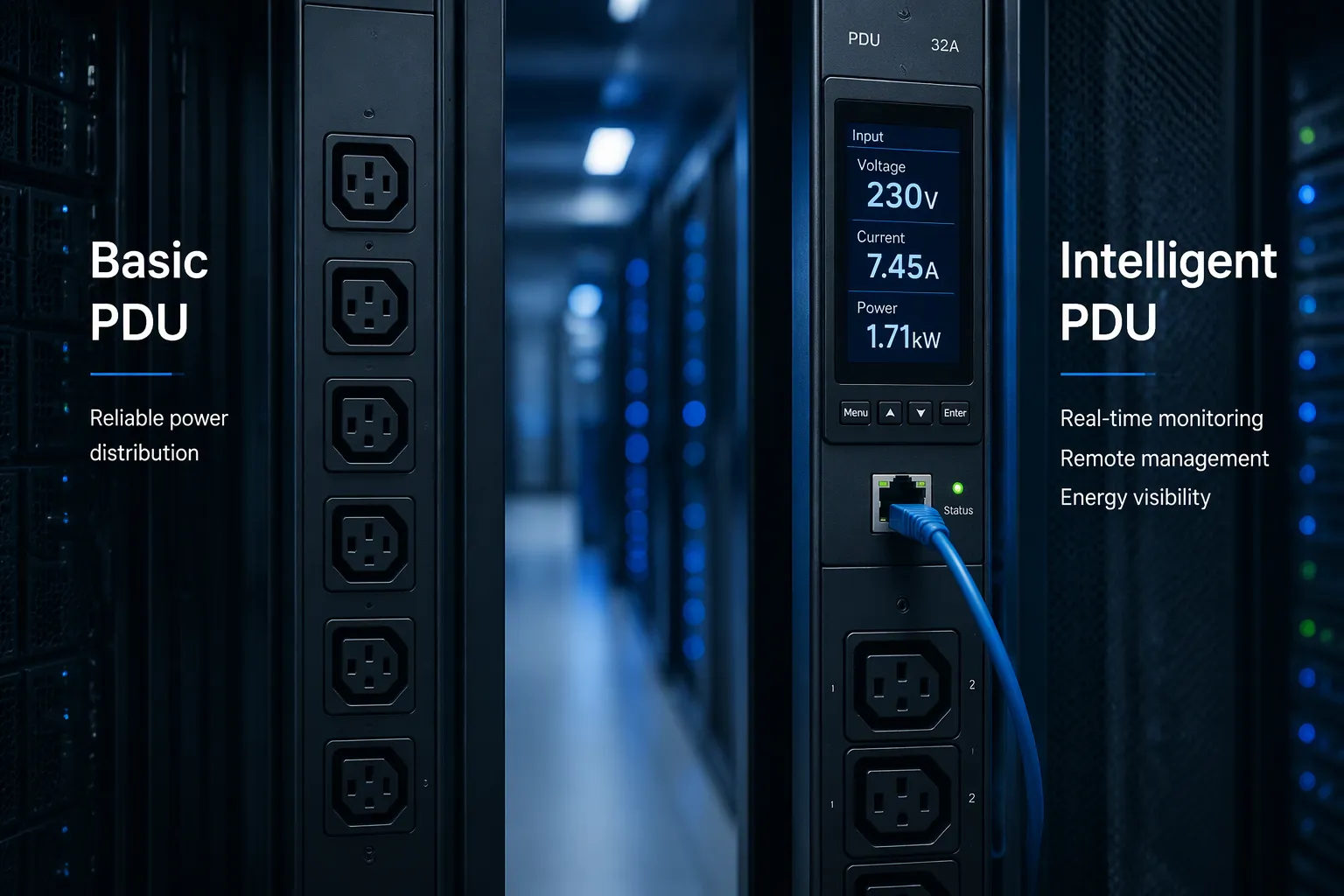
A traditional power distribution unit does one job well: it spreads power from a single input to multiple outputs. That is the whole job. Basic PDUs lack any form of metering, monitoring, or remote management capability, and they typically have no network connectivity, according to Nlyte. Enconnex puts it just as plainly: "basic" simply means the unit provides no monitoring or switched outlet capabilities.
This design suits plenty of situations. A small wiring closet with a fixed load and no remote staff may never need more. The limits appear when you want answers. You cannot see how much power a rack draws without walking over with a meter. You cannot reboot a frozen server from another city. Raritan notes that with basic PDUs you must be physically present in the facility to power equipment on or off. Every check becomes a site visit, and every site visit costs time.
What Makes a PDU Intelligent
An intelligent PDU adds a processor, a network interface, and the ability to report what it sees. The category splits into four common types, and each one fits a different need. The table below summarizes how monitoring capability grows across them.
PDU Type | Monitoring Capability |
|---|---|
Basic | Distributes power only; collects no data from connected equipment |
Metered | Built-in current meter shows load level locally; real-time display only, no network connection |
Monitored | Reports voltage, power, frequency, and load remotely over a network; supports historical data and threshold alarms |
Switched | Full monitoring plus remote on/off control of individual outlets |
Metered and monitored models report voltage, current, and power, which gives you the electrical picture of a rack. A metered unit keeps that data on a local display, so it suits a room where someone passes by regularly. A monitored unit sends readings across the network, so it fits distributed sites and remote teams. A switched PDU goes further. Vertiv explains that switched models add the ability to remotely turn on, turn off, or reboot power at each outlet. That capability supports remote power cycling and scheduled sequences without a truck roll.
Higher-tier intelligent PDUs also accept environmental sensors for temperature, humidity, and airflow, per Vertiv. They run their own firmware and expose management interfaces such as a web GUI, SNMP, or REST APIs, Nlyte reports. Some units support IP aggregation, which lets you place multiple devices behind a single address; Vertiv cites aggregation ranges from 2 to 50 devices. These features feed data center power monitoring dashboards and DCIM tools, where you view real-time power and environmental data from one access point.
No type is better in every case. A basic unit fits a simple, static load. A metered unit fits a local room with occasional walkthroughs. A monitored unit fits a remote site that needs trend data and alerts. A switched smart PDU fits any rack where you must control outlets without being on site. Match the type to the job, and you avoid paying for capability you will not use.
How Plug-and-Play Sensor Monitoring Works
Auto-Detection and Setup
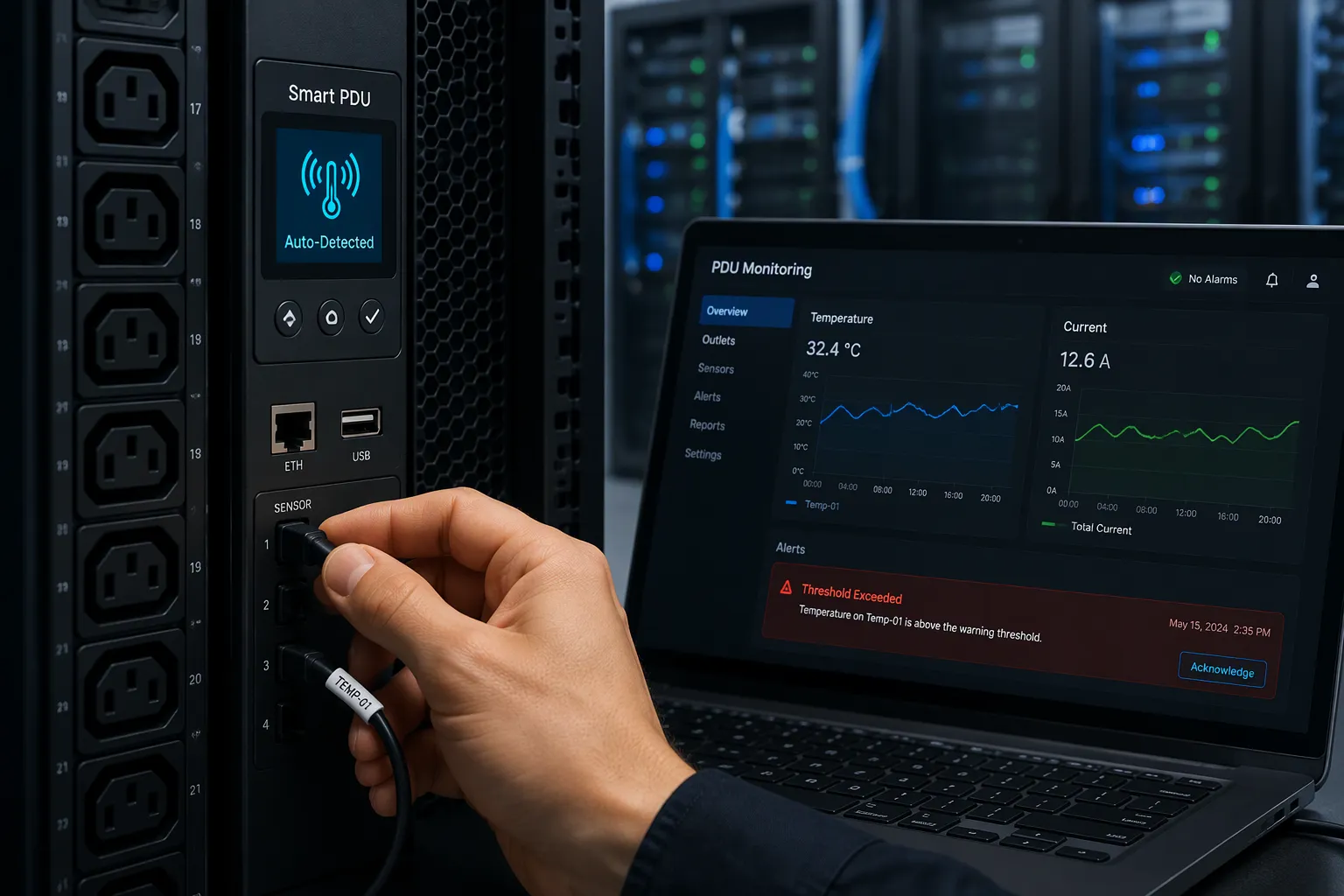
You connect a sensor to the port, and the work ends there. The PDU reads an identifier from the sensor, matches it to a built-in device profile, and applies the correct settings on its own. No address to assign, no unit to select from a menu, no configuration file to load. The unit recognizes the sensor type, knows what it measures, and begins reporting within moments of connection. A temperature probe and a current sensor follow the same routine, even though they measure different things. The profile holds the sensor's range, units, and reporting interval, so the data arrives already formatted for the dashboard.
This auto-detection changes the commissioning routine. Instead of a technician with a laptop and a checklist, you get a device that configures itself. The same logic scales across a rack, a room, or a fleet of edge sites. Each sensor you add follows the same pattern, so the tenth installation takes no longer than the first. Network-connected smart PDUs carry this further, because a single management interface collects every auto-detected sensor across the fleet. You gain one view of every rack without building it by hand.
From Readings to Alerts
A sensor alone only measures. The alarm function comes from programmable limit values. You set a threshold for each metric, and the intelligent PDU compares every reading against it. Jsy Power Meter describes the options: you can customize the total load current and voltage over-limit threshold, the load current over-limit threshold of each socket unit, and the temperature and humidity over-limit threshold. A limit value is just a number you choose, and you can change it whenever the rack's load profile shifts. The unit polls each sensor on a fixed cycle, so a breach surfaces quickly rather than at the next walkthrough.
The alert methods follow the same pattern. Jsy Power Meter notes that the buzzer sounds, an email goes to the system administrator, and SNMP sends a trap alarm status message. Kailes Power adds SMS to that list and describes the result as an early warning system. Teams can rebalance loads or adjust cooling before a problem escalates into a failure.
Common triggers include:
Current draw exceeds a user-defined over-limit threshold
Voltage exceeds a user-defined over-limit threshold
Temperature rises above a user-defined over-limit threshold
Humidity rises above a user-defined over-limit threshold
Consider a simple case. You set a temperature limit for a rack sensor. The reading climbs past that value on a warm afternoon. The PDU flags the breach, the buzzer sounds locally, and an email reaches the administrator. The team checks the rack before heat damages anything. Some units go further: Kailes Power describes an Intelligent Temperature-Sensitive Power Cut-off feature that switches off selected outlets when temperature passes a preset safety limit.
The display and the web page show the same data. Jsy Power Meter reports that the LCD screen shows total load current, voltage, power, energy, power factor, and per-outlet current, and that the web page mirrors this view. That visibility supports real-time environmental monitoring and data center power monitoring from one interface. These capabilities of smart/intelligent PDUs turn a power distribution strip into a monitoring node. Real-time monitoring then becomes routine, not a special project. Intelligent PDUs and their simpler smart PDU cousins both benefit, though the alarm depth differs by model.
Benefits of Plug-and-Play Monitoring
Faster, Error-Free Deployment
Setup time drops when the PDU configures each sensor for you. You skip the address assignment, the menu selection, and the configuration file. Reliamag describes the shift well: instead of four separate tools, workflows, and skill sets, teams get continuous multi-parameter data from one sensor with plug-and-play installation. That single connection replaces a chain of manual steps.
Fewer steps mean fewer mistakes. A manufacturer's guide notes that systems with quick integration reduce setup times and help teams gather data without extensive reconfigurations. You no longer depend on a technician remembering every setting. The device profile holds the correct values, so each sensor reports the same way every time.
Scalability follows the same logic. A smart PDU fleet with plug-and-play hardware scales across multi-site deployments, as UWAVE describes for remote asset monitoring platforms. USU System Monitoring adds that a fully scalable platform lets you build individual dashboards for different teams or sites. You add a rack or a region without rebuilding your monitoring from scratch.
Outlet-Level Monitoring and Control
Per-outlet power metering turns a rack total into a device-level picture. Dgorient explains that a metered and switched PDU combines electrical measurement with remote control of individual outlets or outlet groups. You see which server draws the load, not just how much the rack pulls. That visibility supports rack power management and feeds advanced data center power monitoring tools.
Outlet-level monitoring and control delivers practical gains:
Remote power cycling reboots a locked server without a site visit.
Controlled power sequencing staggers startup to reduce inrush current.
Device-level visibility shows exactly which equipment consumes power.
Earlier overload warnings flag rising loads before a breaker trips.
Remote access extends these benefits to distributed sites. A network power switch lets you turn equipment on or off from hundreds of miles away, per DPS Tele. You dispatch a technician only when necessary. This monitoring plus remote outlet control cuts truck rolls and supports remote power management across unmanned edge sites. A remote outlet reboot resolves many lockups from your desk, and SNMP integration feeds alerts into your existing systems.
Choosing a Smart PDU with ESTEL
Key Selection Criteria
You need a clear checklist before you compare models. Start with outlet count and configuration. Match plug and outlet types to your existing equipment, as Nbyosun advises. Confirm the maximum input current and voltage ratings against your facility feed. Check the form factor and dimensions so the unit fits your rack space.
Protocol and remote-management support come next. If the PDU will connect to DCIM or another platform, verify supported protocols, network interfaces, APIs, SNMP support, and alarm capabilities, per Attom Tech. Sensor compatibility matters too. Ask whether the unit supports environmental sensors for temperature, humidity, and other rack-level conditions. Attom Tech notes that combining power and environmental data gives you better context in high-density environments.
Safety features deserve equal weight. Dgorient recommends role-based access control, encrypted communication, audit logs, and regular firmware update options. Locking outlets secure the physical connection so cords do not pull out accidentally, as Vertiv explains. Review these criteria side by side before you commit.
Evaluating the Smart Power Distribution Unit
ESTEL supplies integrated outdoor telecom cabinets and related equipment. The company commits to quality and meets international standards such as ISO9001. Its Smart Power Distribution Unit offers a 16A maximum input current and configurations from 8 to 19 outlets. The unit includes an LCD display for real-time monitoring, a dehumidifying function, and surge protection. Remote management lets you control power distribution from a distance. The cable plug system complies with IEC60309 standards, and the unit measures 600×450×185mm.
This product suits rack power management and remote power management in distributed sites. It addresses many data center power monitoring requirements through its display and remote access. Treat it as one strong option among several. Compare its specifications against your own checklist, and confirm that its outlet count, protocol support, and safety features align with your rack-mounted power distribution unit needs.
Implementing Plug-and-Play Power Distribution
Deployment Checklist
A solid deployment starts with a plan. Eandisales recommends calculating the total load of all connected equipment and adding 20-25% for future capacity. That margin prevents undersizing and costly upgrades later. Match the voltage rating to your incoming utility service and major equipment requirements. Confirm the available fault current so the system can withstand a short-circuit event safely. Arrange breaker trip curves in a hierarchy for selective coordination, which isolates faults to the smallest possible area. Verify a solid grounding path protects personnel and equipment. Include metering for energy, power quality, and demand data.
Follow these installation steps in order:
Mount the unit securely in the rack.
Connect the unit to the power source.
Connect your devices to the outlets.
Connect the unit to the smart PDU network interface.
ESTEL's Smart Power Distribution Unit supports remote management and an LCD display for real-time monitoring during this process. The display shows live readings, so you can confirm each connection before you move to the next step.
Validating the Setup
Validation confirms that the PDU detects and reports each sensor correctly. Cross-reference sensor readings with trusted datasets or historical data to verify accuracy, as Clarity suggests. Compare readings against reference instruments in the same environment for ongoing confidence. Check that each sensor's units and range match expectations. A sensor that reports in the wrong unit will mislead your team later.
Next, set alert thresholds. Schneider Electric describes configuring overload alarms, near overload warnings, and low load warnings for the device, phases, banks, or outlets. You can specify thresholds to one decimal point. Configure email notifications through SMTP so up to four recipients receive event alerts. Send a test message to confirm delivery. Test each alarm path before you rely on it.
Finally, document the configuration. Record sensor assignments, threshold values, and notification settings. This record supports future troubleshooting and audits. A documented setup turns your PDUs into a reliable monitoring foundation.
Plug-and-play sensors turn a smart PDU into a fast, low-effort path to automated monitoring. You connect a sensor, and the unit configures it. No menus, no files, no site visits.
Keep three takeaways in mind. Match outlet count, current rating, and protocol support to your rack before you buy. Mount the unit, connect power, devices, and sensors, then link it to the network interface. Validate each auto-detected sensor and document your thresholds.
You can scale this approach across racks, edge sites, and fleets of PDUs without rebuilding your process. ESTEL's Smart Power Distribution Unit offers one option to evaluate as your monitoring needs grow.
FAQ
Do I need special software to use plug-and-play sensors?
No. The PDU reads each sensor's identifier and applies a built-in profile on its own. You connect the sensor, and reporting starts within moments. Your management interface then collects the data, so you view every reading from one dashboard.
What happens when a sensor reading crosses a limit?
You set a threshold for each metric, and the unit compares every reading against it. A breach triggers the alarm path you configured, such as a buzzer, an email, or an SNMP trap. Your team can act before the condition becomes a failure.
Can I reboot a single server without visiting the site?
Yes, if you choose a switched model. Switched PDUs support remote on, off, and reboot control at each outlet. You resolve many lockups from your desk and dispatch a technician only when the hardware truly needs hands-on work.
How many sensors can I add later?
That depends on the port count of your chosen unit, so check it against your growth plan. Auto-detection keeps expansion simple. Each new sensor follows the same routine, and the tenth installation takes no longer than the first.
What should I confirm before buying a smart PDU?
Match outlet count, plug types, and maximum input current to your rack. Verify protocol and remote-management support, sensor compatibility, and safety features such as surge protection and locking outlets. ESTEL's Smart Power Distribution Unit offers one option to compare against this checklist.
See Also
Guide to Installing and Maintaining Smoke Sensors in Communication Cabinets
Understanding ESTEL PDUs and Their Function in Data Center Cabinets
Enhancing Outdoor Cabinets with Power, Cooling, and Monitoring Solutions
Strategies to Achieve Optimal Monitoring for Outdoor Telecom Cabinets
Explaining Supervision System Integration in ESTEL Outdoor Cabinets
CALL US DIRECTLY
86-13752765943
3A-8, SHUIWAN 1979 SQUARE (PHASE II), NO.111, TAIZI ROAD,SHUIWAN COMMUNITY, ZHAOSHANG STREET, NANSHAN DISTRICT, SHENZHEN, GUANGDONG, CHINA
