Smart PDU and Sensors Made Simple for Your Data Center

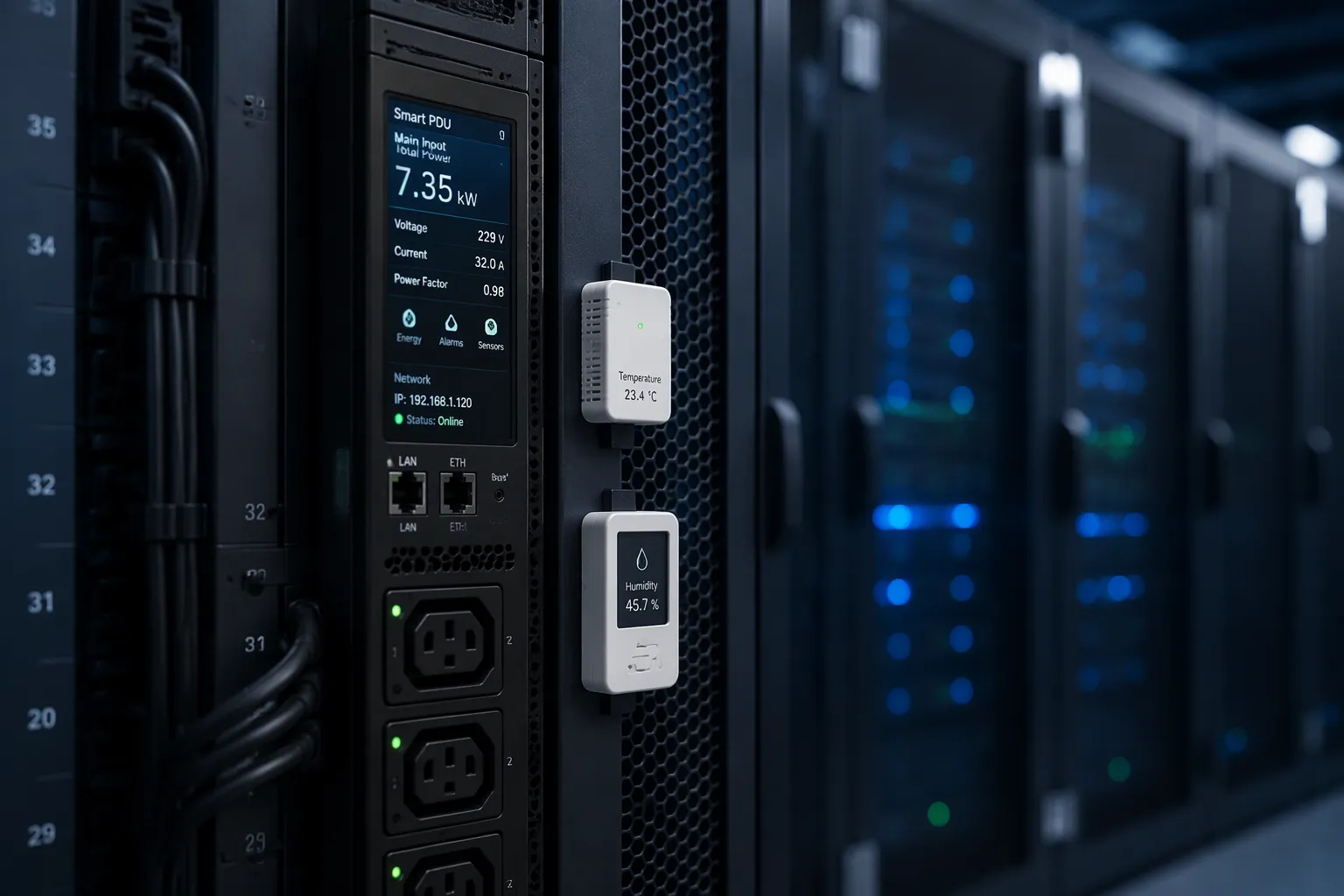
You know the feeling: a rack runs hot while room-level readings look fine, a circuit nears its limit with no outlet-level data, and every new sensor means another manual setup step. A smart PDU is a rack-mounted power distribution unit that connects to your network for remote monitoring and control, as deipower explains. Plug-and-play sensors connect and configure themselves, with no manual addressing. Together, they turn rack conditions into real-time, actionable data for micro-environment management in your data center. Hot spots and power blind spots stop hiding, and data centers gain simpler deployment, clearer visibility, and smarter energy decisions. So why leave your racks guessing?
Key Takeaways
Smart PDUs measure power at the inlet, circuit, and outlet. You see real usage and avoid overloads.
Plug-and-play sensors configure themselves. You connect them and the system starts reporting.
Smart PDUs and sensors work together. They give you real-time data on power and climate at the rack.
Real-time data helps you find energy waste and plan capacity. You can cut costs and prevent problems.
Start with one rack. Watch the data for a few weeks. Then expand row by row.
What Are Intelligent (Smart) PDUs?

A smart PDU is a power distribution unit with embedded monitoring, communication, and management capabilities. Unlike a basic strip that only delivers power, this device measures what flows through it. Metering happens at three points: the inlet, the circuit breakers, and the outlets. Raritan describes its intelligent rack PDUs as delivering metering accuracy of ±0.5% for capacity planning, infrastructure scaling, and troubleshooting at the cabinet. That precision turns guesswork into evidence.
Core features and metering points
The primary features associated with intelligent PDUs cluster around measurement and remote action. Raritan breaks metering into four jobs, and each one answers a different question:
Feature | Core Function |
|---|---|
Metering at the Inlet | Shows power usage and available capacity at the rack; avoids overloading circuits and supports efficiency metrics like Power Usage Effectiveness (PUE). |
Metering at the Outlet | Reveals device-level consumption so you can find ghost servers, spot underused hardware, and allocate costs to specific teams or customers. |
Metering at the Branch Circuit | Warns you early when a circuit nears its trip point, so you can add high-draw devices such as blade servers with confidence. |
Circuit Breaker Monitoring | Tells you when and where a breaker tripped, so you can reset it quickly. |
ESTEL's Smart Power Distribution Unit puts these ideas into a rack-ready package. You get remote management, a color matrix LCD display for real-time readings, surge protection, and a dehumidifying function that keeps moisture in check. The unit accepts a 16A input, uses an IEC60309-compliant cable plug, and comes in configurations from 8 to 19 outlets. Outlet-level power monitoring helps you detect issues and balance loads across the rack.
Why intelligence matters at the rack
Rack density keeps climbing, and cable management plus load balancing become real challenges. Vertiv notes that unbalanced loads across circuits and phases risk overloading circuits or stranding power. Intelligence solves this in three ways:
Real-time power and energy monitoring helps you optimize energy use, prevent overloads, and cut costs.
Load balancing features distribute power evenly and prevent system failures.
Metered PDUs show current, voltage, and energy use on a display, at the unit, circuit, or outlet level.
You can also monitor usage at the outlet to verify redundancy and catch hidden issues in your power chain. Raritan points out that power sequencing and load balancing automatically help prevent overloads while optimizing distribution. Operational visibility improves too. You see actual rack consumption instead of nameplate assumptions, and you can plan capacity with real power metrics. For any data center, that shift from assumption to measurement is the whole point of intelligent PDU technology.
Plug-and-Play Sensors and Smart PDU Pairing
How plug-and-play sensors work
A plug-and-play sensor needs no manual addressing. You connect it, and the system discovers it automatically. Auto-configuration then assigns the right settings without a technician typing in parameters. This cuts deployment time and removes a common source of human error. You plug in a probe, and the rack starts reporting.
The sensor market offers wide choice. Vendors pair different sensor types with their monitoring platforms, as this comparison shows:
Vendor | Sensor types paired or monitored |
|---|---|
Raritan (Legrand) | Up to 204 sensors — temperature, humidity, airflow, pressure, leak, access, asset |
RF Code | About 7 or more types — temperature, humidity, leak, door, pressure, power |
Schneider NetBotz (APC) | About 8 types — temperature, humidity, leak, smoke, vibration, door and access |
ServersCheck (InfraSensing) | 60 or more types — temperature, humidity, air quality, leak, power, vibration, smoke |
Vertiv Geist | 4 to 16 — temperature, humidity, dew point, airflow, door, leak, smoke |
Common environmental sensors include temperature, humidity, airflow, and door or contact types. A contact closure sensor detects and controls a signal from third-party dry contacts, according to Raritan. A reed door sensor monitors whether a rack door has opened, as ATEN describes. Airflow sensors track the rise and fall of air movement and flow velocity.
Smart PDU and sensor pairing
A smart PDU acts as the hub for these devices. Monitored PDUs add outlet-level current sensing on top of environmental sensors. That combination gives you one view of power and climate at the rack. You see which outlet draws current and how warm the intake air runs.
The pairing supports real-time monitoring across a row of racks. Plug-and-play sensor buses keep wiring simple, so you add a probe without re-architecting the setup. For any data center, this means environmental monitoring becomes a routine task rather than a project. Metered PDUs and sensors together form the base layer for managing conditions inside the rack, not just the room around it.
Micro-Environment Management in the Data Center
Real-time monitoring of rack conditions
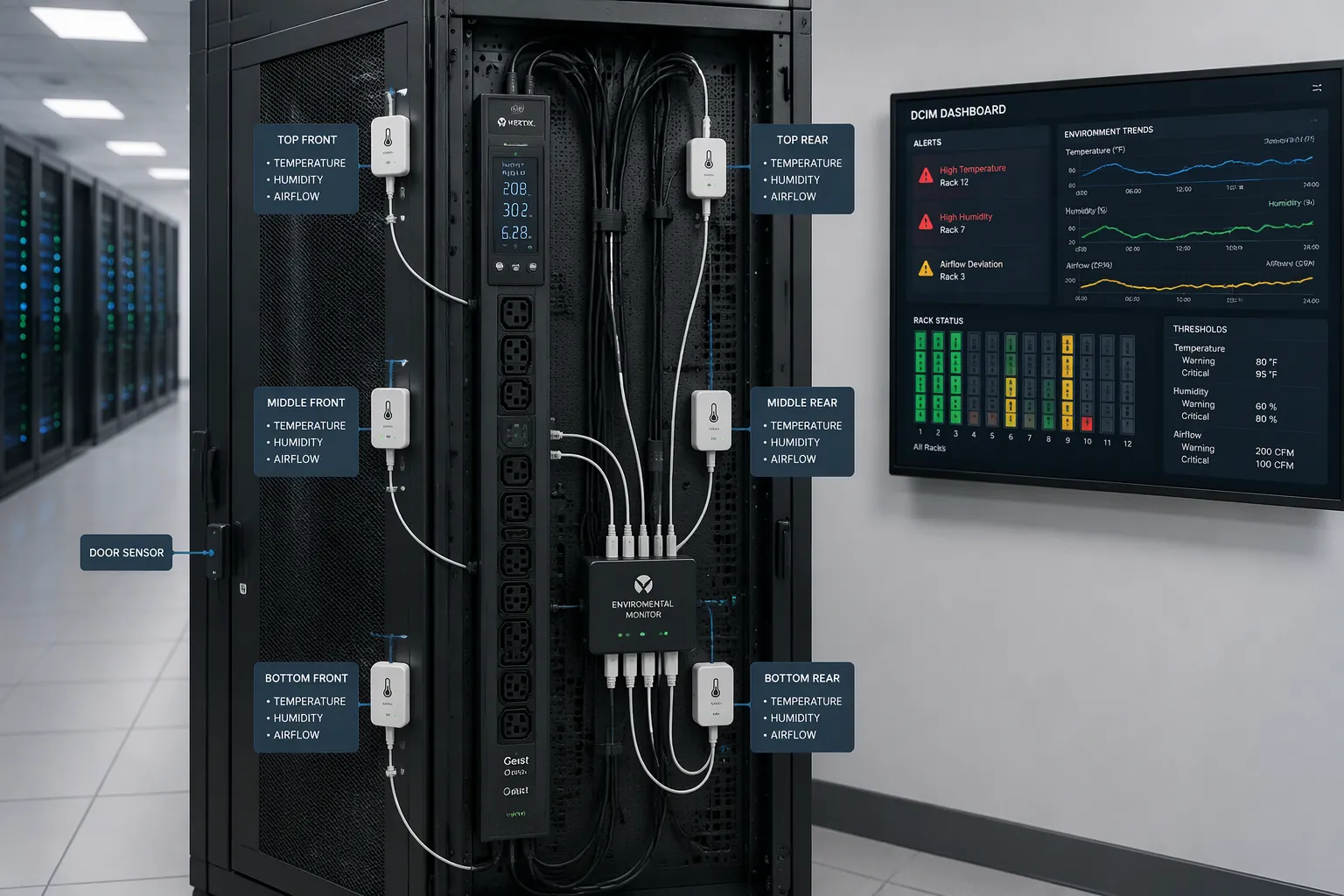
A smart PDU and its sensors work as one team. The PDU measures power at the inlet, branch circuit, and outlet. The sensors measure temperature, humidity, airflow, and door position. Together they give you real-time monitoring of the rack and the row, not just the room. BGASales describes monitored PDUs as offering a comprehensive view of power usage at the rack and through remote access, with unit-level and outlet-level options for device-level detail.
Placement decides whether that data means anything. ASHRAE recommends six sensors per rack, placed at the top, middle, and bottom of both the front and back. This captures air as it enters the rack, moves through it, and exits. Humidity changes more slowly than heat, so Packet Power suggests one sensor in the middle of each row for minimal coverage, one every five racks for better coverage, and one in front of every three racks for maximum coverage. Raritan's SmartSensors cascade up to 32 sensor heads in a row on standard CAT5/6 cables, so you can instrument a whole row through a single control device.
From alerts to automated control
Raw readings only help when they trigger action. You set thresholds, and the system responds. The table below shows common conditions and the automated responses that DCIM platforms support, based on Greenfield Software's DCIM FAQ.
Threshold or Alert Condition | Automated Action or Capability |
|---|---|
Tenant exceeds load limits | Generating alerts |
SLA parameters exceed threshold limits | Generating alerts |
Key metrics on any rack breach pre-set values | Visual alert with a color change on the affected rack or u-space |
Electric load imbalance across sockets and racks | Load balancing and capacity management to prevent stranded capacity |
UPS load | Calculating UPS load percentage and capacity in kVA |
Nlyte notes that DCIM lets you set thresholds to resolve issues while they are minor. Remote power management lets you control individual outlets, so you can power-cycle a device without traveling to the site. You can also schedule outlet power on and off. Load balancing spreads draw across circuits and phases. Where liquid cooling serves high-density racks, the same power and environmental data helps you match cooling output to actual heat load.
This is micro-environment management. You manage the rack, not just the room. Rack-level capacity planning means checking space, power, and cooling before you install a server. Device42 gives a worked example: a new server needs 2 kW of power, 4,000 BTU/hr of cooling, and 2U of space. You confirm the rack can supply all three before installation. That discipline protects uptime and turns capacity planning into evidence rather than guesswork.
Benefits of Smart PDUs for Your Data Center
Visibility and early problem detection
You cannot fix what you cannot see. Smart PDUs combine metering, monitoring, switching, and environment sensing, and they feed that data into DCIM platforms, as Lianjer describes. You watch power trends across racks, rows, or the whole room. You get alerts for voltage drops, temperature spikes, or circuit loads. Overload protection shuts down a circuit before it overheats, and some models throttle power automatically to prevent cascading failures. Balanced loads across phases also prevent hot spots and cut energy waste.
Real energy data then supports capacity planning. Raritan maps each metering type to a planning benefit:
Metering type | Real energy data provided | Capacity planning benefit |
|---|---|---|
Outlet metered | Power consumption at the device or server level | Locate new opportunities for power growth needs |
Inlet metering | Power usage and available capacity at the rack level | Identify available space for new equipment and consolidate existing assets |
Intelligent PDUs (general) | Power usage data | Smarter, more informed decisions for consolidating and future rack growth |
Energy efficiency and scalable growth
Real-time power monitoring shows you where energy goes. You can flag a server that runs at an average of 35% of peak power as a decommissioning candidate, per ENERGY STAR guidance. You can shut down unloaded PDUs while keeping required redundancy, so the remaining units run at a higher load factor. ENERGY STAR also notes that PDUs with high-efficiency transformers run 2% to 3% more efficient overall than units with generic transformers. Remote management lets you reboot equipment and respond to issues without a site visit.
Growth gets simpler too. Intelligent PDUs integrate with DCIM systems, so new racks join the same monitoring view without a redesign, as Andcable explains. Modular PDU architectures add capacity in discrete increments without deenergizing the system, according to Deipower. You expand in phases and keep data center operations predictable. That combination of power and environmental data on one dashboard protects uptime and supports long-term planning for data centers of any size.
Choosing and Implementing Smart PDUs
Comparing options that fit your needs
Start with the physical facts of your rack. CC Tech Group lists the core comparison points: installation type (rack, floor, or cabinet mount, vertical or horizontal), power source and rating (AC or DC, rated voltage for your country, and a maximum load rating that covers total demand), outlet count with room to grow, and outlet types that match your device plugs without adapters. Then decide how much intelligence you need. Basic power distribution suits a small, stable rack. Metered and switched units suit racks that change often.
Application fit shapes the choice too. Strategic Market Research notes that cloud service providers need high-density power and modular designs that scale, telecom operators need compact units for edge sites and distributed nodes, and enterprises with in-house facilities weigh cost against monitoring depth. Compliance and cost complete the picture. The table below summarizes what to verify.
Consideration | What to check |
|---|---|
EU market | CE marking and Low Voltage Directive compliance |
North America | UL listing |
China and India | CCC or BIS certification where required |
Plugs | IEC 60309 CEE mark; contact resistance under 2 milliohms per contact |
Materials | RoHS compliance |
Quality system | ISO 9001 practices, plus ISO 14001 where relevant |
IEC 60309 color coding simplifies matching: a blue housing means 200–250 V single-phase, and a red housing means 380–415 V three-phase for high-density racks, per Newsunn. These tips for selecting the right PDU keep you from buying capacity you cannot connect.
A practical rollout path
Prove the value before you scale. Instrument one rack or one row first. Add a smart PDU with remote management and environmental sensor support, such as ESTEL's Smart Power Distribution Unit, which offers 8 to 19 outlet configurations, a 16A input, an IEC60309 plug, and a dehumidifying function. Watch power and climate data for a few weeks. Compare readings against your assumptions, then expand row by row.
Plan for management early. Integrating an intelligent PDU into your network means treating it as a networked system with firmware and access controls, as Nlyte explains. Confirm dcim integration so new racks join the same dashboard. When you add racks, repeat the same template. This approach keeps smart power distribution consistent across data centers and lets data center teams scale without redesigning monitoring.
Smart PDUs and plug-and-play sensors turn rack conditions into clear, real-time data. That pairing makes micro-environment management simple to deploy, easy to see, and ready to scale across your data center. You gain visibility without extra setup work.
Start small. Instrument one rack, watch the readings for a few weeks, and prove the value against your own assumptions. Then expand row by row, and let each new rack join the same monitoring view. A partner like ESTEL can support that journey with rack power distribution built for remote management and environmental sensing. Your data centers grow smarter one rack at a time.
FAQ
What does a smart PDU actually do?
It distributes power and measures it at the same time. Metering happens at the inlet, the branch circuit, and the outlet. You see real consumption instead of nameplate estimates. Remote management lets you switch outlets and check readings without visiting the rack.
Do plug-and-play sensors need manual configuration?
No. You connect a sensor, and the system discovers it automatically. Auto-configuration applies the right settings without a technician entering parameters. This shortens deployment and removes a common source of setup errors. Your team spends less time on wiring and more time on the data.
How many sensors should one rack have?
ASHRAE recommends six sensors per rack, placed at the top, middle, and bottom of both the front and back. This captures air as it enters, moves through, and exits the rack. For humidity, one sensor in the middle of each row gives minimal coverage.
Can rack-level monitoring replace room-level cooling checks?
No. The two work together. Rack sensors catch hot spots that room averages hide. Room-level systems still handle overall cooling. Use both views, and you get a complete picture of conditions inside your data center.
What should I check before buying?
Confirm the input rating, outlet count, and plug type match your devices. ESTEL's Smart Power Distribution Unit offers a 16A input, 8 to 19 outlets, and an IEC60309 plug. Check surge protection, remote management, and sensor support. Verify certifications for your region before you order.
See Also
Understanding ESTEL PDUs And Their Role In Data Center Cabinets
Optimizing Outdoor Cabinets With Power Cooling And Monitoring Solutions
Simple Guide To Organizing Cables In Data Center Cabinets
How To Install And Maintain Smoke Sensors In Communication Cabinets
ESTEL Smart Microgrid Integrated Telecom Cabinet Energy Storage System
CALL US DIRECTLY
86-13752765943
3A-8, SHUIWAN 1979 SQUARE (PHASE II), NO.111, TAIZI ROAD,SHUIWAN COMMUNITY, ZHAOSHANG STREET, NANSHAN DISTRICT, SHENZHEN, GUANGDONG, CHINA
