User Permission Hierarchical Management of Smart PDUs in Telecom Cabinets: Safety Boundaries for Multi-Role Collaboration


When you manage a telecom cabinet, you need clear safety boundaries to protect your equipment and your team. Hierarchical user permission management in a Smart Power Distribution Unit creates these boundaries by setting structured access levels. This approach lowers the risk of unauthorized access and reduces mistakes. You also improve teamwork because everyone knows their responsibilities. ESTEL leads the way in telecom infrastructure by delivering advanced, reliable solutions built with innovation and strong quality control.
Key Takeaways
Establish clear user roles and permissions to enhance security and reduce errors in telecom cabinets.
Utilize multi-factor authentication to protect sensitive data and prevent unauthorized access.
Regularly monitor and maintain your Smart Power Distribution Unit to ensure optimal performance and prevent downtime.
Implement environmental controls and surge protection to safeguard your equipment from potential hazards.
Leverage centralized management features to improve teamwork and streamline operations in your telecom cabinet.
Smart Power Distribution Unit in Telecom Cabinets
Key Features and Benefits
You rely on a Smart Power Distribution Unit to keep your telecom cabinet running smoothly. This device manages and distributes power to all your critical equipment. It helps you prevent downtime and protects your investment. The Smart Power Distribution Unit offers advanced features that support your daily operations and long-term reliability.
Here is a quick look at the most common features and how they help your network:
Feature | Contribution to Network Reliability |
|---|---|
Surge protection | Shields telecom equipment from power surges and electrical disturbances. |
Environmental controls | Prevents equipment failure due to thermal issues and moisture. |
Real-time monitoring | Enables early detection of power issues, preventing downtime. |
Remote management | Allows for quick resolution of power issues from any location. |
Environmental sensing | Monitors conditions to prevent equipment failures due to overheating. |
Overload protection | Prevents system failures by managing power loads effectively. |
Integration with management systems | Centralizes alerts and control, enhancing operational continuity. |
You can see that these features work together to create a safer and more reliable environment for your telecom equipment. Real-time monitoring and remote management let you respond quickly to any issue. Surge protection and overload protection keep your devices safe from unexpected events.
Tip: Using a Smart Power Distribution Unit with environmental controls and sensing can extend the lifespan of your equipment.
Integration with ESTEL Solutions
When you choose ESTEL, you get more than just a standard power unit. ESTEL’s Smart Power Distribution Unit stands out for its high reliability, ease of use, and strong customer support. You can compare it to other brands in the market:
Brand | Reliability | Ease of Use | Value for Money | Customer Support |
|---|---|---|---|---|
ESTEL | High | High | High | High |
CyberPower | Moderate | High | High | Moderate |
Eaton | High | Moderate | High | Very High |
Vertiv | High | Moderate | Moderate | High |
Schneider Electric | Very High | Moderate | High | Very High |
Tripp Lite | High | High | Very High | Moderate |
You benefit from local data processing, which means faster response times and improved reliability. Edge computing keeps sensitive data inside the cabinet, making your system more secure. Real-time monitoring helps you prevent downtime and keeps your network running at its best.
Hierarchical User Permission Structure

User Roles and Authentication
You need a clear structure to manage who can access and control your Smart Power Distribution Unit. In telecom cabinets, you often work with teams that have different responsibilities. Assigning specific roles helps you avoid confusion and keeps your system secure. Each role comes with its own set of permissions. Here is a breakdown of the main user roles you will find in a hierarchical permission system:
Role | Permissions |
|---|---|
Administrator | Full access to all settings, logs, and remote controls. |
Operator | Can monitor power usage and perform basic controls, such as turning outlets on or off. |
Technician | Limited to viewing status and performing maintenance tasks. |
Auditor | Can review logs and reports but cannot change any settings. |
You can see that each role has a unique level of control. Administrators manage the entire system. Operators handle daily tasks. Technicians focus on maintenance. Auditors check records for compliance and safety.
To keep your telecom cabinet secure, you need strong authentication methods. Multi-factor authentication (MFA) adds an extra layer of protection. You do not rely on just a password. Instead, you combine two or more identity checks. This approach makes it much harder for unauthorized users to gain access.
Multi-factor authentication requires multiple identity checks, ensuring that only authorized users can access Smart Power Distribution Units.
This additional security layer helps prevent unauthorized access and protects sensitive data.
Advanced encryption methods like AES-256 are used to secure data during remote sessions, enhancing overall security.
When you use MFA, you protect your equipment and your data. You also meet industry standards for security.
Access Control Levels
You need to set clear boundaries for what each user can do. Access control levels define these boundaries. With a Smart Power Distribution Unit, you can assign permissions based on job roles. This structure reduces the risk of accidental changes or unauthorized actions.
For example, you might allow only administrators to change system settings. Operators can turn outlets on or off but cannot change configurations. Technicians can view system status and perform maintenance without altering critical settings. Auditors can review logs to ensure compliance but cannot control the equipment.
This layered approach gives you flexibility. You can add or remove users as your team changes. You can also adjust permissions to match new responsibilities. By using access control levels, you create a safer environment for your telecom cabinet. You also make teamwork easier because everyone knows their limits and duties.
Note: Regularly review your user roles and access levels. This practice helps you keep your system secure as your organization grows.
Enforcing Safety Boundaries
Power Safety Protocols
You must enforce strict power safety protocols in your telecom cabinet to protect both your equipment and your team. Industry standards require telecom cabinets to meet high levels of environmental protection, safety, and security. For example, many cabinets comply with IP55 and IK10 protection standards. These standards ensure resistance to dust, water ingress, and physical impacts.
A Smart Power Distribution Unit helps you maintain these safety boundaries by integrating advanced features that prevent electrical hazards. Review the table below to see how these features work together:
Feature | Description |
|---|---|
Overload Protection | Prevents excessive current that can lead to overheating and hazards. |
Surge Suppression | Protects equipment from voltage spikes that can cause damage. |
Environmental Sensors | Monitors temperature and humidity, providing alerts for unsafe conditions. |
Real-time Monitoring | Tracks power usage, allowing for immediate detection of issues. |
You benefit from these features in several ways:
You ensure a stable power supply for your critical systems.
You detect issues early, which helps you prevent outages.
You reduce downtime and improve the reliability of your network.
Remote management capabilities let you monitor power consumption from anywhere. You do not need to visit each site in person. This approach saves time, supports sustainability, and helps you address power-related issues quickly.
Tip: Regularly check your monitoring dashboard for alerts. Early action can prevent costly equipment failures.
Unauthorized Access Prevention
You must prevent unauthorized access to your telecom cabinet to maintain safety and compliance. Assigning user roles and permissions creates clear boundaries. Only authorized personnel can make changes to power settings or access sensitive data.
You can use these strategies to strengthen your access controls:
Implement multi-factor authentication for all users.
Review and update user roles regularly.
Use encrypted remote sessions to protect data during transmission.
Telecom cabinets are designed to comply with strict security standards. These standards help you protect your infrastructure from both physical and digital threats. When you combine strong authentication with regular audits, you create a secure environment for your team and your equipment.
Note: Always remove access for users who no longer need it. This simple step reduces your risk of unauthorized actions.
Emergency Controls
You need reliable emergency controls to minimize downtime during critical incidents. A well-designed system responds instantly to power failures or other emergencies. The following table shows how emergency features support your operations:
Feature Description | Effectiveness |
|---|---|
Ensures instant transition to secondary power source, minimizing downtime | |
Real-time Monitoring | Detects power loss and triggers alerts, allowing for quick response |
Advanced Surge Protection | Maintains stable power supply, preventing outages during critical incidents |
You can rely on automated switching to keep your equipment running if the main power source fails. Real-time monitoring detects problems and sends alerts, so you can act fast. Advanced surge protection keeps your systems stable, even during unexpected events.
Callout: Test your emergency controls regularly. Practice helps your team respond quickly and confidently when every second counts.
By enforcing these safety boundaries, you protect your telecom cabinet, your network, and your team. You also meet industry standards and build a foundation for secure, reliable operations.
Multi-Role Collaboration with ESTEL PDUs
Workflow Integration
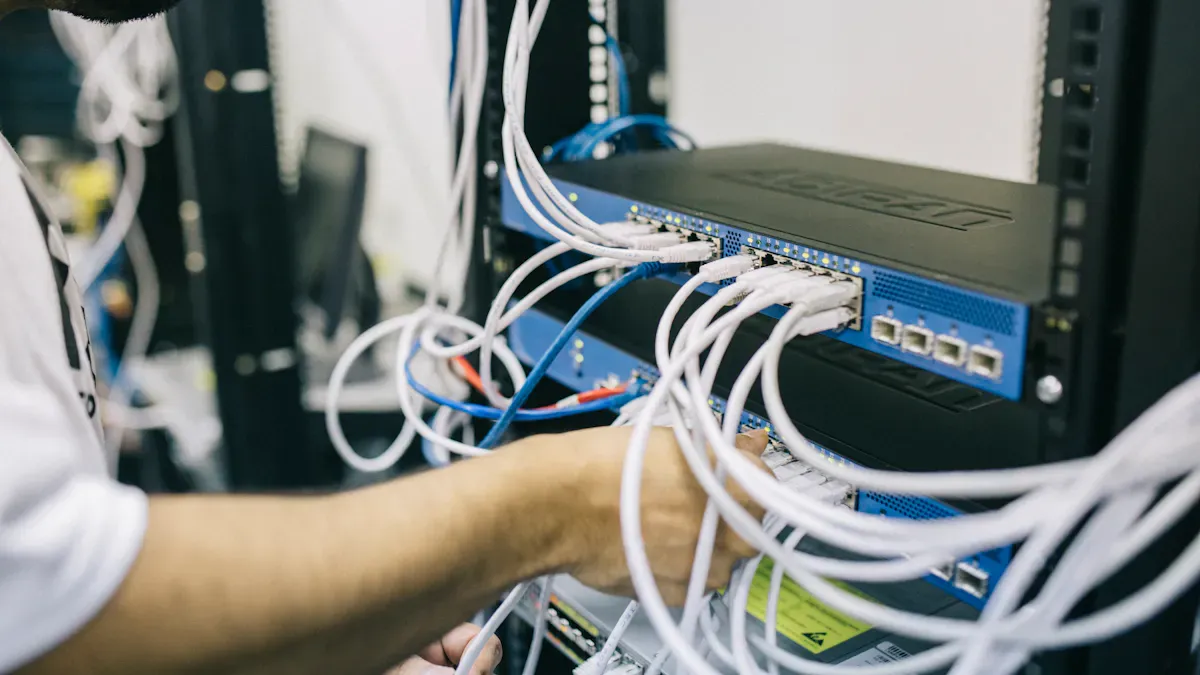
You can streamline your telecom cabinet operations by using workflow integration features in ESTEL’s Smart Power Distribution Unit. These features help your team work together more efficiently. Open APIs let you connect the unit with your existing telecom management systems. This connection makes it easier to share information and coordinate tasks. You gain centralized management, which means you can oversee power and cabinet data from one platform. This setup improves operational efficiency and reduces confusion among team members.
Feature | Description |
|---|---|
Open APIs | Facilitate easy connection with existing telecom management systems, enhancing integration. |
Enhanced Collaboration | Provides timely access to information for team members, supporting multi-role collaboration. |
Centralized Management | Allows oversight of power and cabinet data from a single platform, improving operational efficiency. |
You can assign tasks, monitor progress, and ensure everyone stays informed. This approach supports multi-role collaboration and helps you avoid errors.
Audit Trails and Monitoring
You need to track every action in your telecom cabinet. Audit trails in the Smart Power Distribution Unit record each change and access event. You can see who made changes and why. This tracking helps you meet compliance standards and boosts accountability. Real-time monitoring gives you insights into cabinet conditions. You can spot issues before they become problems. Automated alerts notify you of abnormal activity, so you can respond quickly. Predictive maintenance tools help you schedule repairs before failures occur. This reduces unexpected downtime and keeps your network running smoothly.
Audit trails link actions to specific users and justifications.
Monitoring features provide real-time insights into cabinet conditions.
Automated alerts enable quick responses to prevent outages.
Predictive maintenance tools reduce unexpected downtime.
Platform Support for Teamwork
You benefit from strong platform support when you use ESTEL’s Smart Power Distribution Unit. Customer support guides you during installation and maintenance. You have access to technical assistance 24/7, which is important for data centers that operate around the clock. Customization options let you fit the unit into your setup, minimizing downtime and risks. Many telecom operators have seen a 30% reduction in energy consumption and a 25% decrease in downtime after upgrading to ESTEL’s solution. One leading provider improved energy efficiency by up to 97.8% and reduced CO2 emissions by 40%. These results show how teamwork and advanced technology can improve your operations and support sustainability goals.
Tip: Use the platform’s teamwork features to assign roles, track tasks, and share updates. This practice keeps your team aligned and your network secure.
Implementation and Best Practices
System Integration
You can optimize your telecom cabinet by following best practices for integrating Smart Power Distribution Units. Regular monitoring helps you track power consumption and spot inefficiencies. Balanced loads prevent overheating and improve energy efficiency. Cleaning and inspecting your equipment keeps the physical integrity intact and reduces the risk of failures. Upgrading to intelligent PDUs enhances your monitoring capabilities and allows you to optimize power distribution. These steps create a reliable environment for your network.
Regular monitoring of power usage
Balanced loads for energy efficiency
Cleaning and inspecting equipment
Upgrading to intelligent PDUs
Tip: Schedule routine inspections and use real-time monitoring tools to catch issues early.
Compliance and Security
You must meet strict compliance and security standards when deploying Smart PDUs. Different regions require certifications like ISO9001 for quality assurance and VDE for electrical safety. In Europe, you need to follow the EU Green Deal and Energy Efficiency Directive. In the US, green building certifications such as LEED and BREEAM demand high energy efficiency. RoHS compliance ensures your equipment does not contain hazardous substances.
Strategy | Description |
|---|---|
Firmware Management | Update PDU firmware regularly to patch vulnerabilities. |
Network Segmentation | Isolate PDUs from public networks and limit access to authorized personnel. |
Access Controls | Use strong authentication and role-based access to PDU interfaces. |
Monitoring and Alerts | Employ real-time monitoring tools to detect unusual activity or environmental anomalies. |
Audit Trails | Maintain logs of all access and configuration changes for forensic analysis. |
Physical security measures include locking cabinets and racks. Digital security relies on strong passwords, regular changes, and role-based access control. Encryption protects your data during transmission, and secure protocols like HTTPS and SSH are recommended.
Deployment Tips
You may face challenges during deployment, such as compatibility issues, configuration difficulties, ongoing management, security concerns, and cost considerations. Surge protection devices shield your equipment from lightning strikes. Thermal regulation manages temperature, and sealing against moisture prevents failures. Lack of integrated telemetry and limited remote control can hinder expandability. You should choose PDUs that offer remote management and flexible configurations.
Address compatibility and configuration early
Use surge protection and thermal regulation
Seal cabinets against moisture
Select PDUs with integrated telemetry and remote control
Note: Plan for future expansion by choosing scalable solutions that adapt to new loads and technologies.
You create strong safety boundaries and enable secure teamwork when you use hierarchical user permission management in ESTEL’s Smart Power Distribution Units. This approach helps you control access, reduce errors, and support efficient collaboration in telecom cabinets. You also gain reliable power management and advanced monitoring. To get started, follow these steps:
Select products that match your requirements and allow customization.
Integrate your units with IoT platforms for easy monitoring and growth.
Step | Description |
|---|---|
Centralized Inventory Management | Track all spare parts in one system using automated software. |
Regular Inventory Audits | Check your stock often to spot missing items and keep supplier ties strong. |
Categorize and Organize | Group parts by type or usage for easy access and to prevent over-ordering. |
Cross-Functional Teams | Build teams with inventory experts to manage reordering and oversight. |
Consider Third-Party Solutions | Use outside providers for specialized tasks to free up your team. |
Tip: Review your user roles and inventory often. This keeps your system secure and your operations smooth.
FAQ
What is a Smart Power Distribution Unit (PDU)?
A Smart PDU lets you manage and monitor power in telecom cabinets. You can control outlets, track energy use, and receive alerts. This device helps you keep your equipment safe and your network reliable.
How do user roles improve security in Smart PDUs?
User roles limit what each person can do. You assign permissions based on job needs. This reduces mistakes and blocks unauthorized changes. You keep your system safe by controlling access.
Can you manage ESTEL’s Smart PDU remotely?
Yes, you can. ESTEL’s Smart PDU supports remote management. You monitor power, control outlets, and receive alerts from anywhere. This feature saves you time and helps you respond quickly to issues.
What should you do if a team member leaves?
Remove their access right away. Update user roles and passwords. This step protects your system from unauthorized actions. Regular reviews of user permissions keep your network secure.
See Also
Exploring ESTEL PDUs And Their Importance In Data Centers
Guidelines For Choosing And Installing Telecom Cabinets On Poles
Essential Strategies For Protecting Communication Cabinets In Risky Zones
Exploring The Various Applications Of Telecom Cabinets
Key Specifications For Outdoor Telecom Cabinets And Equipment
CALL US DIRECTLY
86-13752765943
3A-8, SHUIWAN 1979 SQUARE (PHASE II), NO.111, TAIZI ROAD,SHUIWAN COMMUNITY, ZHAOSHANG STREET, NANSHAN DISTRICT, SHENZHEN, GUANGDONG, CHINA
