How to integrate smart locks with Smart PDUs in telecom cabinets for cabinet access control and power linkage management


You integrate smart locks with a smart PDU through a shared controller or gateway. The controller reads each access event and triggers a matching power action. This pattern suits telecom cabinets. You face engineering questions: hardware compatibility, protocols, wiring, rule configuration, security, and safety compliance. Start with the lock and PDU interfaces. Confirm the reader protocol and control port match. Then plan the power sequence so locks stay live during switching. Next, define linkage rules and test them. Finally, harden security and document compliance. Follow these steps, and your telecom site gains auditable access control tied to power distribution. Smart PDUs and a smart power distribution unit round out the telecom setup.
Key Takeaways
Learn the lock and PDU interfaces first to ensure compatibility.
Choose a standalone controller for simple sites or a networked gateway for multi-site control.
Wire the lock and sequence power so access control stays live during PDU switching.
Define clear linkage rules that map unlock events to power actions.
Test every rule and validate fail-safe behavior before going live.
Smart Lock and Smart PDU Components
Locks, Controllers, and Credential Readers
A smart lock is an electronically controlled latch. You mount it in the door or as a handle adapter. A credential reader sits outside the door and accepts a card, PIN, Bluetooth phone, or Wi-Fi credential. The reader passes the credential to a controller or gateway. That controller decides whether to release the lock.
Reader interfaces matter for your design. Wiegand is a legacy point-to-point, multi-conductor arrangement. It lacks the security and bidirectional features of modern OSDP implementations. OSDP runs over RS-485 and, via Secure Channel, provides encrypted and authenticated communication. Secure Channel is a system configuration and key-management requirement, not something automatically enabled by using RS-485 cable. Controllers also expose dry-contact and request-to-exit (REX) inputs. You use these for push buttons, door contacts, and maintenance overrides.
ESTEL Smart Power Distribution Unit Interfaces
The ESTEL Smart Power Distribution Unit gives you the PDU-side interface for linkage. It provides outlet-level metering and outlet-level switching, and its monitoring integrates with most telecom management systems for remote power distribution control. The units are customizable and energy-efficient, with claims of up to 30% energy savings. Remote management and intelligent protocol support let the unit act on lock events.
Switching granularity shapes your linkage rules:
Switching Mode | Scope | Notes |
|---|---|---|
Whole-unit control | Entire PDU | Simplest and lowest cost |
Bank control (per-branch) | Grouped outlet banks | Middle option with some grouping logic |
Per-outlet switching | Individual outlets | Most granular; remote reboot of one device |
These switched PDUs also offer outlet-level metering and outlet-level switching. A Smart Rack Controller or gateway bridges lock events to PDU actions. It reads the access event, applies your rule, and commands the PDU. Sensor ports on the unit accept telecom cabinet sensors for temperature and door status. This architecture fits telecom cabinets, outdoor telecom cabinets, and other racks and cabinets.
Integration Architecture for Telecom Cabinets
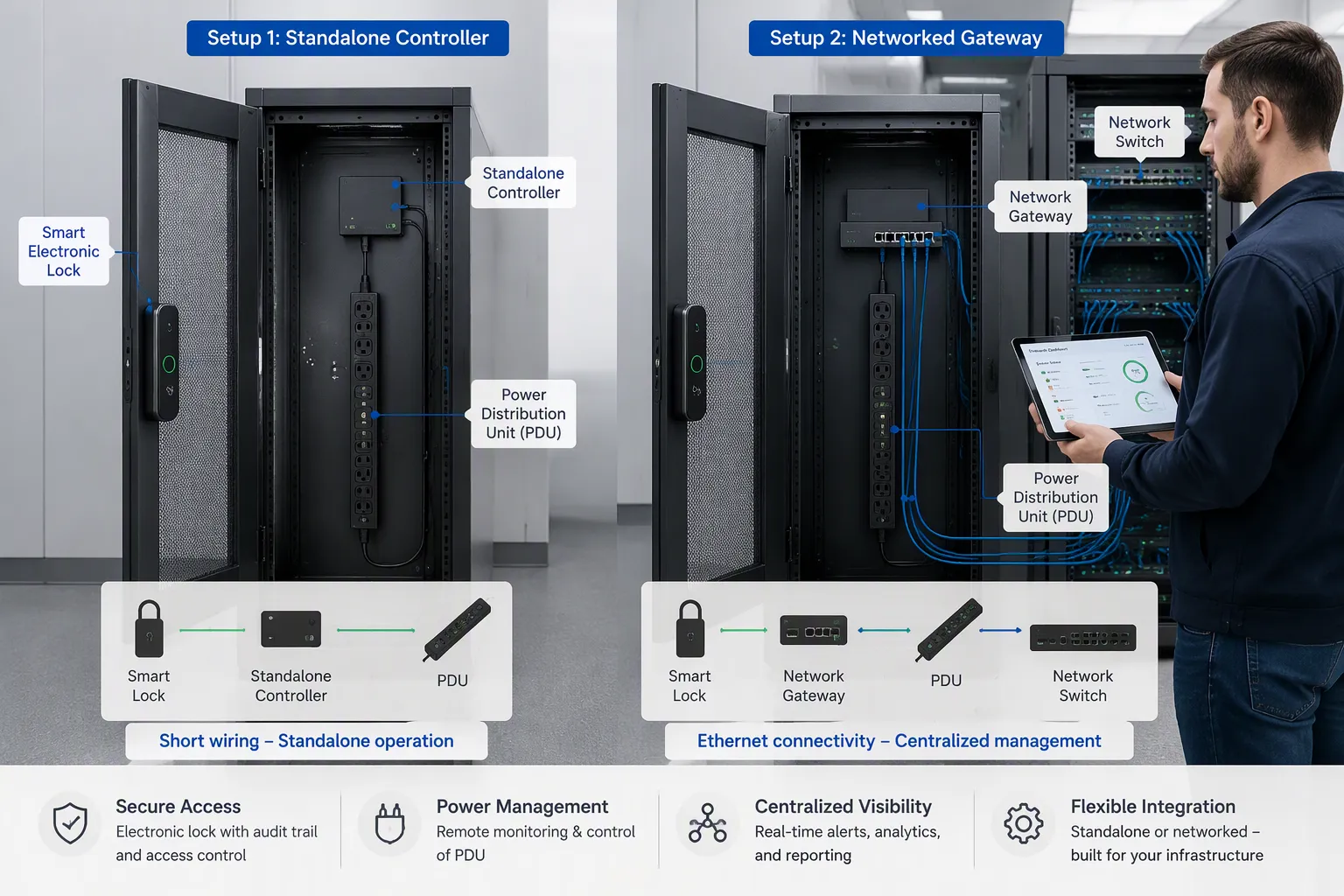
Standalone Controller vs. Networked Gateway
You have two architecture choices for linking smart locks to power distribution units. A standalone controller keeps the logic local. The reader, lock, and PDU connect to one controller inside the cabinet. Unlock events trigger power actions without touching the network. Wiring stays short, and the site keeps working when the network drops. This option fits single cabinets, remote sites, and deployments where you want simple commissioning.
A networked gateway moves the logic to a central platform. The gateway connects to your DCIM or BMS, and you manage every cabinet from one console. Network-connected PDUs accept commands over a web interface, SNMP, SSH, or a Telnet session. You can also reach them through Syslog, LDAP, or RS-232 serial links. This option fits multi-site fleets, centralized audit trails, and remote power management across many telecom cabinets.
Factor | Standalone Controller | Networked Gateway |
|---|---|---|
Linkage logic | Local, inside the cabinet | Centralized platform |
Wiring | Short, simple | More cabling, network drops |
Network dependency | None | Required for remote control |
Best fit | Single sites, remote locations | Multi-site fleets, DCIM/BMS integration |
Neither option is superior. Match the architecture to your site count and your monitoring strategy.
Mapping Lock Events to PDU Actions
Lock-PDU event linkage follows a simple rule set. An authorized unlock triggers power-on for the outlets serving that cabinet's equipment. A lock event triggers power-off after a delay you define. A door-held-open alarm raises an alert and can cut power to non-critical branches. A REX-based maintenance override suspends the rules while a technician works inside.
A gateway or PMS-RCU style architecture executes these rules centrally. Open standards keep the integration portable. OSDP carries reader traffic with encrypted communication, and SNMP lets the gateway poll and command managed PDUs. You define each rule as an event, a condition, and an action. The gateway evaluates the condition, then sends the command to the smart power distribution unit. This design keeps smart locks, telecom cabinet sensors, and power distribution on one policy engine. It also gives you one place to change rules across all cabinets.
Step-by-Step Physical Lock Integration and Configuration
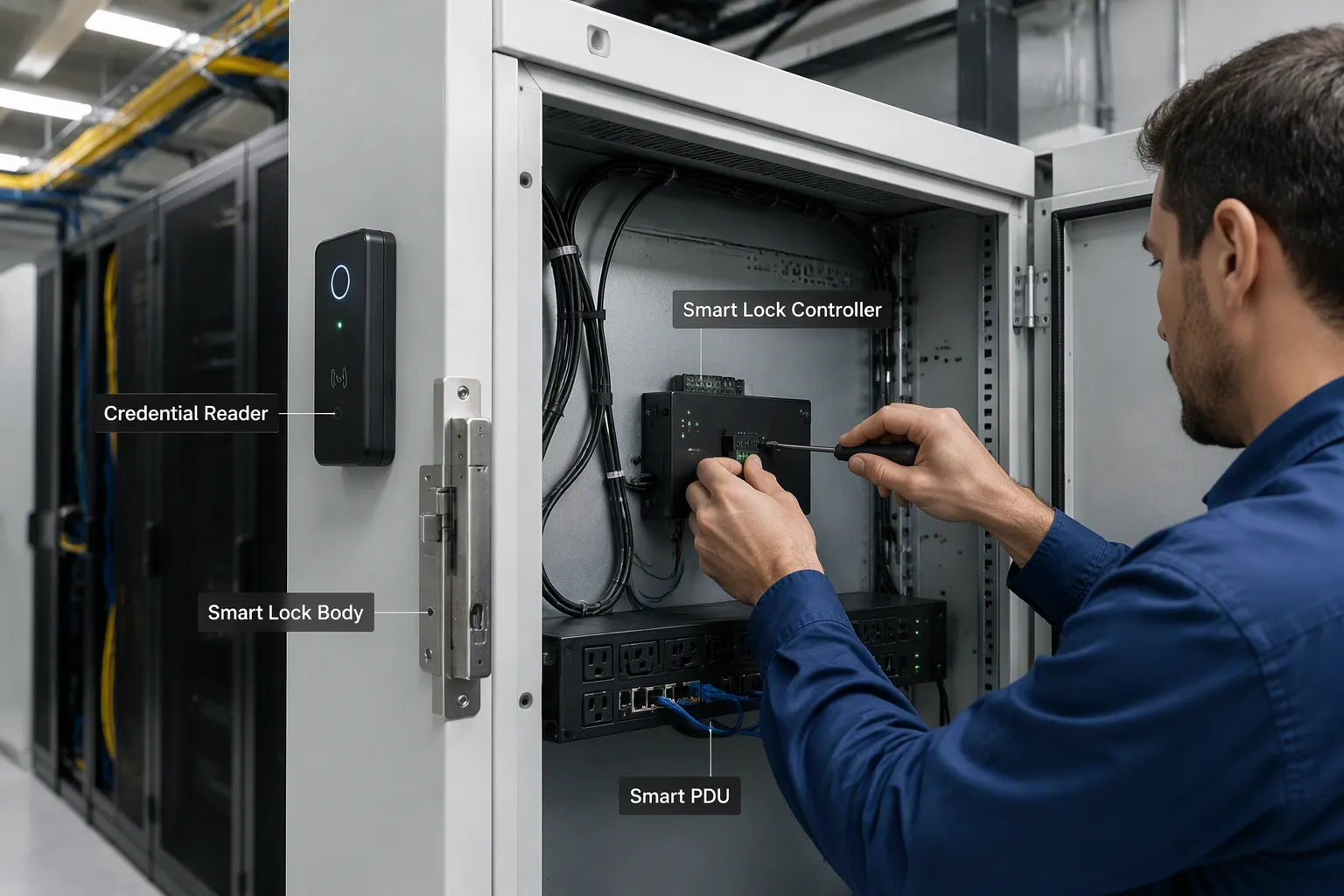
Wiring, Power Sequencing, and Protocol Setup
Physical lock integration starts at the door. Mount the lock body or handle adapter, then fix the credential reader at a comfortable height outside the cabinet. Run the reader cable to the controller inside the enclosure. Keep reader wiring away from AC mains runs to reduce electrical noise. Connect the lock to the controller's lock output, and wire the door contact and REX button to their inputs.
Next, connect the controller to the PDU sensor or control port. Choose fail-safe or fail-secure operation before you order hardware. A fail-safe lock releases when power drops, which suits life-safety egress. A fail-secure lock stays latched without power, which suits asset protection in unmanned telecom cabinets. Sequence the power so the lock circuit stays live during PDU switching. Feed the controller from a circuit the PDU does not switch, or add a small UPS. This step protects access control during a remote reboot of switched PDUs.
Protocol setup follows the wiring. Configure the reader link as OSDP over RS-485 for encrypted, bidirectional traffic. Use SNMP for the gateway to poll and command the smart power distribution unit. Use MQTT where your platform prefers lightweight publish-subscribe messaging. Dry contact remains a simple fallback for basic trigger signals. Confirm each protocol on both ends before you enable any rule.
Configuring Linkage Rules for Smart Power Distribution Units in Telecom Cabinets
Linkage rules turn access events into power actions. Open the web interface or management software, then define each rule as an event, a condition, and an action. A valid unlock of a smart lock triggers power-on for the outlets serving that bay. A lock event triggers power-off after a delay you set. A door-held-open alarm raises an alert and can shed non-critical branches. A REX override suspends linked access rules while a technician works inside.
Set delays with care. A short off-delay avoids cutting power to equipment still shutting down. A longer on-delay prevents repeated switching during quick re-entries. Test each rule against real events before you save it. Remote configuration lets you push the same rule set to every cabinet in a fleet. This approach keeps smart power distribution units in telecom cabinets consistent across sites. It also gives you one policy for power distribution and access in all your telecom cabinets. Review rules after any firmware update, and document each change for later audits.
Testing, Security, and Compliance
Functional and Fail-Safe Validation
Test every linkage rule before go-live. Trigger an unlock and confirm the smart PDU powers the correct outlets. Trigger a lock event and measure the off-delay. Exercise the REX override and verify it suspends linked rules. Repeat each test several times to catch timing drift, and log each result on a test sheet. Document the expected result next to each measured value.
Then validate failure modes. Cut mains power and watch the lock behave as designed: fail-safe releases, fail-secure stays latched. Drop the network and confirm local rules still run. Simulate a lock failure and check that alarms reach your console. Verify grounding continuity after installation; resistance between the cabinet frame and the earth point must be ≤ 0.1 Ω. Re-run the full test set after any firmware update.
Audit Logs and Access Policy
Collect access logs and audit trails from the lock controller and the smart power distribution unit. These records show who entered and which outlets switched. Role-based permissions block unauthorized power cycling. Assign outlet-level rights, so an operator can cycle one branch without controlling the whole strip. Integrate LDAP or RADIUS for centralized identity, and prefer SNMPv3 for encrypted management traffic. Rotate credentials on a schedule, revoke them when staff leave, and extend smart card compatibility to physical access control at each door.
Strong smart PDU security features give you a layered defense against unauthorized access across telecom cabinets and standalone cabinets. Match the deployment to the site. A small closet needs the physical key layer. A large data center relies on software roles and audit trails that scale across many PDUs. An outdoor telecom site needs both. Access logs and audit trails serve as compliance evidence for telecom operators. Confirm ISO9001-aligned manufacturing and CE, RoHS, and UL marks, then verify local authority acceptance such as BIS in India. Apply the same security policy to every smart power distribution unit, and review power distribution rights on each telecom site. Review these security controls quarterly, and keep them in your maintenance calendar for all telecom cabinets and PDUs.
You now have a clear path. Understand the lock, reader, and smart power distribution unit interfaces first. Choose a standalone controller or a networked gateway for your telecom cabinets. Wire the lock, sequence power, and configure linkage rules. Then test every rule and validate fail-safe behavior. Match protocols on both ends, define clear linkage rules, and prove fail-safe operation before go-live. Start with one pilot cabinet using ESTEL cabinet, lock, and PDU hardware. Scale to more cabinets once testing and security checks pass. This sequence keeps every telecom site auditable and reliable, and it keeps your PDUs and access control working as one system across all telecom deployments.
FAQ
Do I need a standalone controller or a networked gateway?
Match the choice to your site count. A standalone controller keeps linkage local and needs no network. A networked gateway centralizes rules across many telecom cabinets and feeds your DCIM or BMS. Single remote sites favor the first option. Multi-site fleets favor the second.
Should the lock be fail-safe or fail-secure?
Pick fail-safe for life-safety egress, because the lock releases when power drops. Pick fail-secure for asset protection in unmanned telecom cabinets, because the lock stays latched without power. Decide before you order hardware, then test the behavior during commissioning.
Which protocols should I enable?
Use OSDP over RS-485 for encrypted reader traffic. Use SNMP for the gateway to poll and command the smart power distribution unit. Add MQTT if your platform prefers publish-subscribe messaging. Keep dry contact as a simple fallback. Confirm each protocol on both ends before you enable a rule.
How do I keep locks powered during PDU switching?
Feed the lock controller from a circuit the pdu does not switch, or add a small UPS. This step keeps access control live during a remote reboot of switched PDUs. Verify the arrangement during fail-safe testing, and record the result on your test sheet.
What should the audit trail capture?
Collect access logs from the lock controller and power events from the smart power distribution unit. These records show who entered and which outlets switched. Pair them with role-based permissions and scheduled credential rotation. Strong security depends on both logging and identity control across all your telecom sites.
See Also
Ensuring Consistent Power Delivery for Telecom Cabinet Operations
Effective Methods to Enhance Anti-Theft Protection for Communication Cabinets
Exploring the Various Applications of Telecom Cabinets
Proper Installation and Maintenance of Smoke Sensors in Communication Cabinets
Understanding ESTEL PDUs and Their Function in Data Center Cabinets
CALL US DIRECTLY
86-13752765943
3A-8, SHUIWAN 1979 SQUARE (PHASE II), NO.111, TAIZI ROAD,SHUIWAN COMMUNITY, ZHAOSHANG STREET, NANSHAN DISTRICT, SHENZHEN, GUANGDONG, CHINA
