How Smart PDUs Enable Auto-Recognition of Temperature, Humidity, and Door Security in Unmanned Rooms


Picture an unmanned edge data center at 2 a.m. A smart PDU spots a temperature spike and a door breach. It alerts remote staff before any damage occurs.
How does it work? Smart PDUs use plug-and-play sensor ports and auto-recognition protocols. You connect temperature, humidity, and door sensors, and the unit identifies each device without manual setup. It checks the connection, reads the protocol, assigns an address, and begins data exchange. Readings appear on the LCD or in remote software.
This simplicity matters. Unmanned rooms have no on-site staff. They face environmental threats and unauthorized access. Smart sensors turn power infrastructure into a self-monitoring sentinel, giving you real-time security and peace of mind.
Key Takeaways
Smart PDUs automatically recognize sensors, so setup is quick and error-free.
Monitor temperature and humidity to prevent equipment damage in unmanned rooms.
Door sensors alert you to unauthorized access, keeping your site secure.
Remote management gives you real-time data and control from anywhere.
Early detection and energy monitoring save money and reduce downtime.
What Is a Smart PDU?
A smart power distribution unit is an intelligent rack device that distributes power and also watches over the equipment it feeds. It combines metering, network connectivity, and remote management in one chassis. You get power delivery plus visibility into what happens at the rack.
Smart PDU vs. Basic PDU
A basic power distribution unit does one job: it spreads the correct voltage and current across multiple outlets. It offers no monitoring, no sensor ports, and no remote access. You must stand in front of it to learn anything.
Intelligent PDUs go further. According to Enconnex, they collect voltage, current, active power, apparent power, energy, and power factor data. Some meter the input, and others meter each outlet. A smart PDU also connects to your network, so you can reach it through a web interface, SNMP, SSH, or telnet. Many intelligent PDUs expose RESTful APIs for integration with DCIM applications and building management systems. Basic PDUs cannot match this.
Capability | Smart PDU | Basic PDU |
|---|---|---|
Monitoring | Power metrics at input or outlet level | None |
Sensor ports | Supports environmental sensors | None |
Remote access | Web, SNMP, SSH, telnet, APIs | None |
Built-In Sensors and Network Connectivity
Intelligent PDUs ship with built-in sensors that track temperature, humidity, and airflow. Elcom notes that this monitoring keeps your equipment in good condition and helps you avoid damage. These built-in sensors remove the need for a separate monitoring box.
External sensor ports extend that reach. You can add temperature sensors, door contacts, smoke detectors, and water leak probes. A network interface card lets you reach the PDU remotely for power actions and status checks. SNMP trap notifications fire when conditions cross your thresholds. This plug-and-play integration turns a plain rack device into a monitoring node that feeds your DCIM platform in real time.
How Auto-Recognition Works
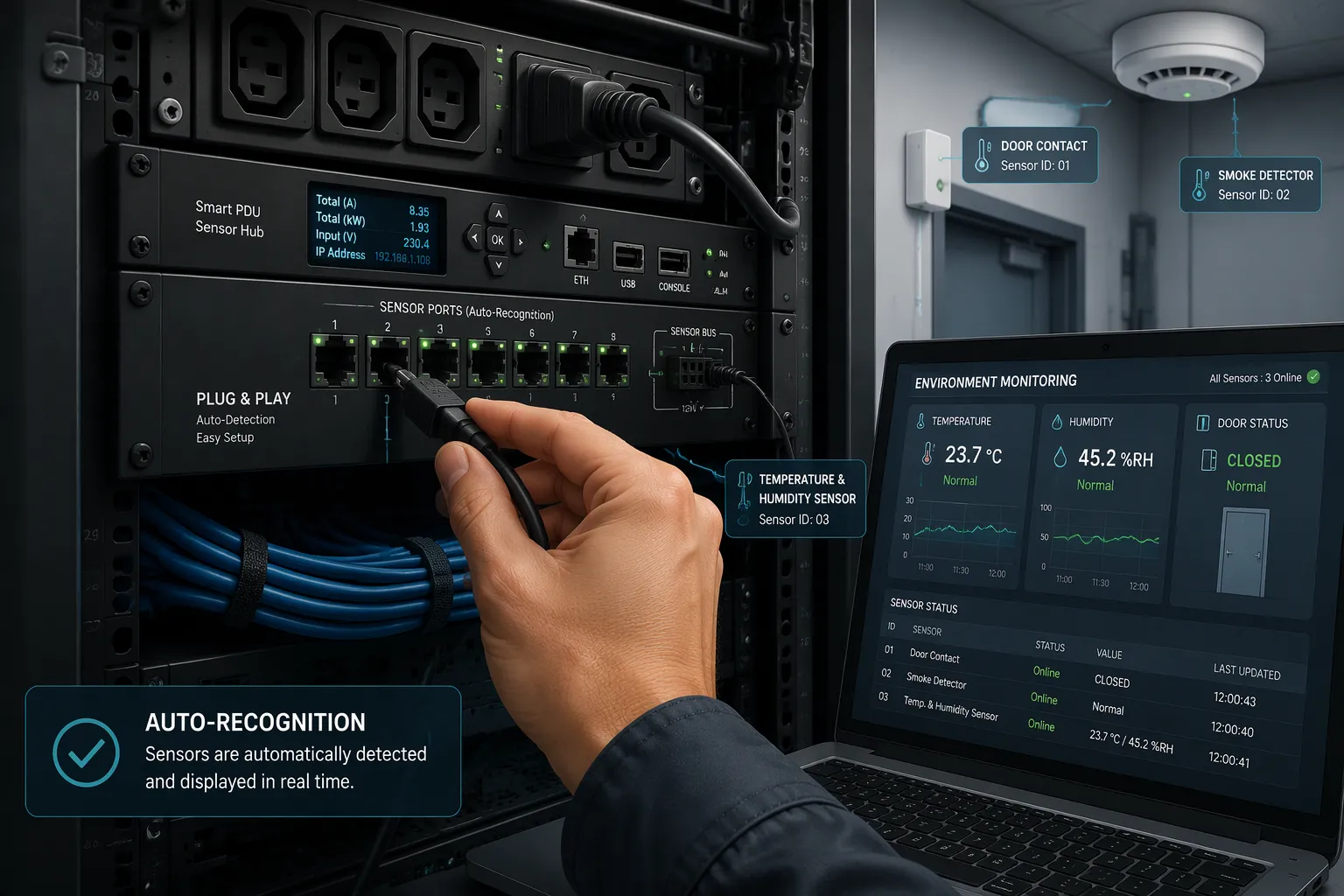
The Smart Power Distribution Unit Auto-Recognition Process
The smart power distribution unit auto-recognition process follows a clear sequence. You plug a sensor into an open port. The unit scans the connection and detects a new device. It reads the sensor's identity and confirms the type. Next, it assigns an address on the sensor bus. Finally, the unit begins reporting readings to your dashboard. You do not configure settings or install extra drivers. The outdoortelecomcabinet.com blog notes that auto-recognition reduces setup time and helps you avoid errors that can occur with manual configuration.
Setup Step | Auto-Recognition | Manual Configuration |
|---|---|---|
Sensor detection | Automatic scan on plug-in | You identify and enter the type |
Address assignment | Handled by the unit | You assign and track addresses |
Driver installation | Not required | Often required |
This plug-and-play integration lowers the risk of installation errors. Automated detection and configuration mean you avoid mistakes that often happen with manual setups. You save time, and your system becomes more reliable. Quick deployment also works without specialized IT staff.
Protocols and Standards for Sensor Identification
Intelligent PDUs rely on established serial protocols to identify and poll external devices. RS485 Modbus is the common choice. It supports door sensors, smoke detectors, temperature and humidity probes, and water leak sensors on one shared bus. Each device carries a unique address, so the unit can poll them in turn. A door contact reports open or closed. A smoke detector reports alarm or clear. A leak probe reports wet or dry. The unit maps each reading to the correct port and label.
Auto-recognition technology makes this mapping automatic. Intelligent PDUs read the device profile and apply the right polling interval and alarm thresholds. You get immediate monitoring without a configuration file.
Data then flows into your monitoring system or DCIM platform. Intelligent PDUs push readings over the network through SNMP traps, a web interface, or RESTful APIs. Your team sees real-time status for every connected device. Intelligent PDUs also log events, so you can review a temperature excursion or a door event after the fact. The smart PDU becomes a data source, not just a power strip. A single PDU can serve many sensors, and PDUs across a site feed one central view. That real-time visibility closes the gap left by an empty room.
Monitoring Temperature, Humidity, and Door Security
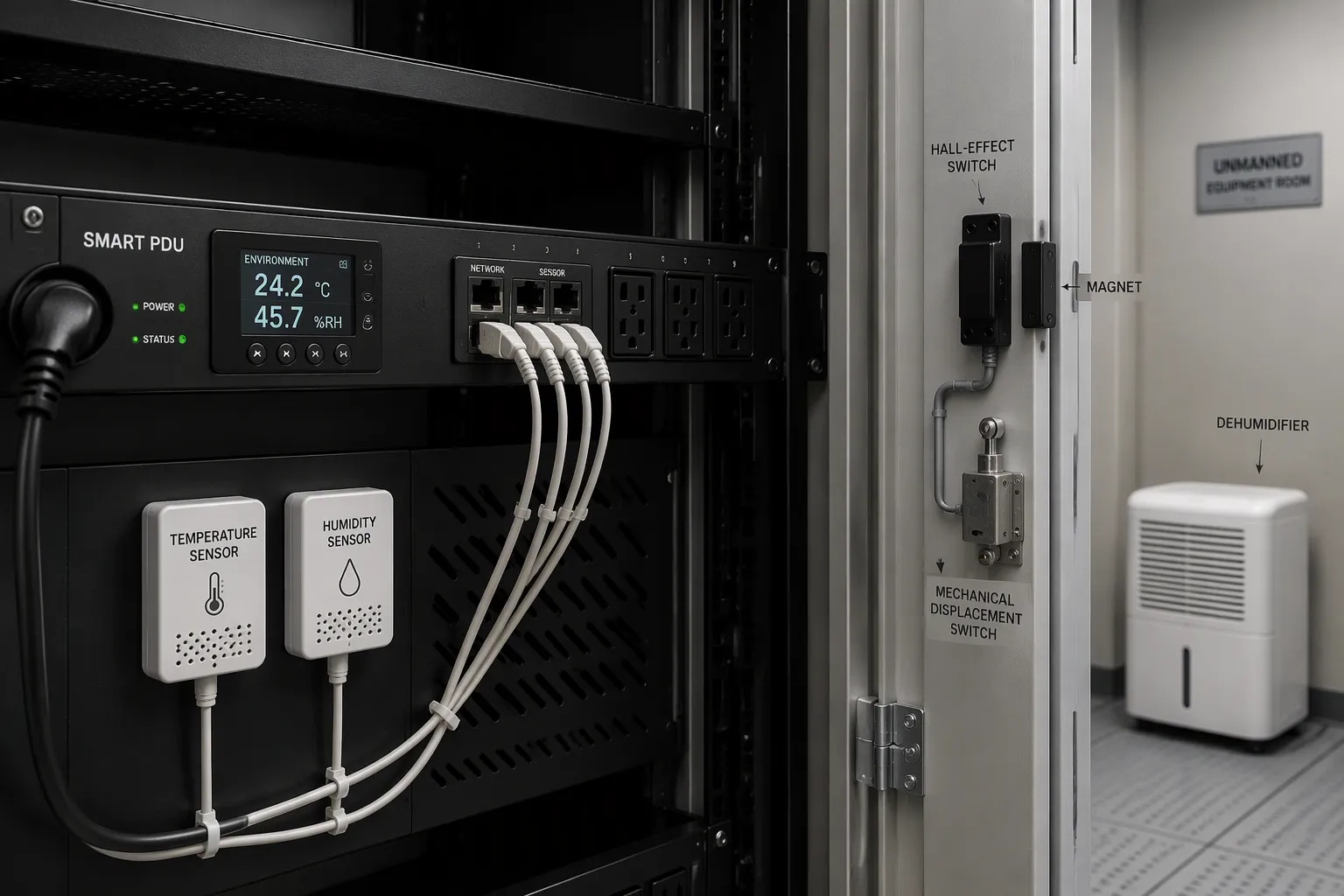
Temperature and Humidity Monitoring
Heat and moisture are quiet threats in an empty room. A failed cooling unit pushes temperature upward, and your equipment may fail before anyone notices. High humidity brings condensation, and moisture on circuit boards invites corrosion and short circuits. Temperature sensors catch the first trend, and humidity sensors catch the second. You set thresholds, and the smart power distribution unit sends an alert the moment a reading crosses them.
Environmental sensors can share the same monitoring path as security devices. The outdoortelecomcabinet.com blog explains that temperature and humidity readings travel alongside displacement events, and a dehumidifying function keeps internal electronics within a reliable operating range. One smart PDU therefore reports intrusion and environment together, which simplifies fleet monitoring. This combination delivers environmental monitoring for optimal conditions without a second control box.
Door Security and Additional Sensors
Door sensors guard the one opening that matters most. You mount Hall-effect or mechanical switches at door edges, seams, and mounting points. Route their signals into the smart PDU's remote management path. The unit's intelligent protocols then carry sensor events to your monitoring platform. For stronger coverage, wire two sensors to the same opening and latch both through a low-cost microcontroller. A defeated sensor cannot defeat the system, because the second sensor still reports the event. Latch the alarm state so a brief trigger stays visible until an operator acknowledges it. Confirm your monitoring platform can accept the new event stream before you commit to a retrofit.
Sensor option | Characteristic |
|---|---|
Hall-effect switch with mounted magnet | Detects opening without contact, wears slowly, tolerates dirty environments |
Mechanical displacement switch | Costs less, suits simple open/closed reporting |
Multi-sensor incident detection | Combines several sensing points into one event stream, confirms a real intrusion |
Smoke and water leak sensors complete the ecosystem. NetworkTech lists smoke detectors, rope-style leak detectors, spot leak detectors, liquid level float switches, and water flow sensors among common choices. DG Orient describes the environmental monitoring PDU as a vertical 0U or horizontal 1U/2U unit with sensor interfaces, commonly 8–48 outlets, built for remote edge sites and unmanned rooms. Selection considerations include sensor compatibility, alert response time, calibration, cable length, condensation risk, and software integration.
These security features work through plug-and-play integration. Connect a sensor, and the PDU recognizes it through auto-recognition and starts reporting. Your team gains real-time visibility into temperature, humidity, and airflow conditions across every site. Intelligent PDUs turn scattered readings into one clear picture, and that picture protects both equipment and access.
Benefits and Real-World Applications
Reducing Downtime and Energy Costs
Early detection is the first payoff. A smart power distribution unit catches a rising temperature or a wet floor probe before equipment fails. Your team responds to an alert instead of a repair bill. That shift from reactive to proactive maintenance protects uptime in rooms where nobody stands watch.
Energy savings follow the same data path. ESTEL's Smart Power Distribution Unit gives real-time power monitoring, showing exactly how much energy each device uses. Some users report up to 30% energy savings, and real-time monitoring can push reductions as high as 41%, according to the outdoortelecomcabinet.com blog. Raritan notes that data center managers can save 4% in energy costs for every degree of upward change in the set point. More sensors deliver granular data, and that data helps you find the ideal temperature for maximum savings.
Benefit | Description |
|---|---|
Hotspot detection | Identifies areas with excessive heat generation |
Cooling optimization | Helps match cooling output with actual demand |
Energy reporting | Provides accurate data for sustainability tracking |
Better resource planning | Supports smarter infrastructure decisions |
Remote Management and Real-Time Data
You gain a complete picture without leaving your desk. Intelligent PDUs monitor power consumption by rack and outlet, current load levels, voltage and power quality, and energy usage trends over time, according to nbyosun.com. Pair that with temperature, humidity, and airflow readings from your sensors, and you can spot inefficient equipment, find unused devices drawing standby power, and rebalance workloads.
ESTEL smart PDUs deployed in edge and remote facilities show real-time data per outlet and per device. Your dashboard lists each outlet, each connected sensor, and each door contact in one view. Intelligent PDUs feed this data into DCIM platforms for centralized monitoring, historical analysis, and automated alerts. The plug-and-play integration means you add a sensor and see it appear, with no configuration file. Intelligent PDUs also log events, so you can review a door event or a temperature excursion after the fact. That real-time environmental data turns an empty room into a monitored one, and your security posture improves with every sensor you connect.
Troubleshooting and Best Practices
Common Sensor Recognition Issues
Most recognition problems trace back to three causes: a loose cable, a duplicate address, or a protocol mismatch. Check the physical connection first. Reseat the cable and confirm the port LED shows activity. Then verify the sensor speaks the protocol your unit expects, such as RS485 Modbus.
Address conflicts cause the most confusion. Two devices may claim the same address, and one drops off the bus. The imatrixsys.com tutorial describes the symptoms and fixes clearly.
Symptom | Likely cause | Diagnostic step | Resolution |
|---|---|---|---|
Two devices claim the same address | Address conflict | Capture Address Claimed messages and compare NAMEs | Set a different preferred address on one device |
Device disappears after startup | Lost address claim to a lower NAME | Check for Cannot Claim Address messages | Assign a different preferred address to the losing device |
Network faults also block auto-recognition. The nbyosun.com guide recommends three steps. Assign a static IP address to the PDU so communication stays consistent. If you use DHCP, confirm the server hands out unique addresses to each device. Monitor network traffic to spot conflicts early.
Deployment Best Practices
Placement decides whether your data tells the truth. The mfe-is.com guide offers practical rules.
Put inlet probes at the top, middle, and bottom of representative racks to catch vertical gradients.
Place humidity and dew point sensors per room or zone near representative racks.
Mount door sensors on cabinet doors and room access points to correlate excursions with access events.
Run leak cable along piping paths and under raised floors.
After installation, do a thermal walk and compare readings across racks. This step catches blocked probes and mislabeled devices before you trust the data.
Protect the network path with strong credentials and encrypted access. Keep firmware current on your PDUs, and schedule routine checks of sensor calibration and cable condition. These habits keep plug-and-play integration reliable and your security features ready.
Smart PDUs turn an empty room into a self-monitoring sentinel. Auto-recognition lets a smart power distribution unit identify temperature, humidity, and door sensors on its own, so you gain real-time visibility without manual setup. That plug-and-play design cuts downtime, saves energy, and gives IT and facility managers peace of mind.
Future trends will sharpen this further. According to nbyosun.com, AI-driven predictive maintenance can cut downtime and costs by up to 30%, and intelligent PDUs will grow 7.7% to 8.8% each year, reaching $8.7 billion by 2034.
Future Trend | Expected Impact |
|---|---|
AI predictive maintenance | Cuts downtime and costs by up to 30% |
Market growth | 7.7% to 8.8% yearly, $8.7 billion by 2034 |
Evaluate ESTEL PDUs for your unmanned rooms. These intelligent PDUs deploy easily, scale with your sites, and keep real-time security within reach.
FAQ
Do I need special software to add a sensor?
No. You plug the sensor into an open port, and the unit detects it, reads its identity, and assigns an address on its own. Readings then flow to your dashboard or DCIM platform. This plug-and-play behavior removes the need for a configuration file or a separate driver install.
Which sensors can a smart PDU recognize?
Most units support RS485 Modbus devices on a shared bus. That covers temperature and humidity probes, door contacts, smoke detectors, and water leak sensors. Each device carries a unique address, so the unit polls them in turn and maps every reading to the correct port and label.
How do I fix a sensor that stops reporting?
Check the cable first and reseat it. Then confirm the sensor speaks the protocol your unit expects. Address conflicts are the next suspect: two devices may claim the same address, and one drops off the bus. Assign a different preferred address to the losing device.
Can I monitor several sites from one place?
Yes. Intelligent PDUs push readings over the network through SNMP traps, a web interface, or RESTful APIs. Your team sees real-time status for every connected device across the fleet. PDUs at each site feed one central view, and event logs let you review a past excursion or access event.
What should I check before a retrofit?
Confirm your monitoring platform accepts the new event stream. Verify sensor compatibility and cable length for each run. Mount door switches at seams and mounting points, and place probes at the top, middle, and bottom of representative racks. Then run a thermal walk to catch mislabeled devices.
See Also
Guide To Installing And Maintaining Smoke Sensors In Communication Cabinets
Understanding ESTEL PDUs And Their Function In Data Center Cabinets
Professional Advice For Protecting Communication Cabinets In High-Risk Locations
Explaining Supervision System Integration Within ESTEL Outdoor Communication Cabinets
Eco-Friendly And Intelligent Outdoor Communication Cabinets For 2025
CALL US DIRECTLY
86-13752765943
3A-8, SHUIWAN 1979 SQUARE (PHASE II), NO.111, TAIZI ROAD,SHUIWAN COMMUNITY, ZHAOSHANG STREET, NANSHAN DISTRICT, SHENZHEN, GUANGDONG, CHINA
