How to Streamline Smart PDU Upgrades and Configuration Cloning for Mass Deployment


Deploying a smart pdu across a large site means repeating firmware updates and settings entry unit by unit. That repetition invites drift, errors, and downtime. You need a faster path. Three options lead the field: network-based zero touch configuration over DHCP and TFTP, USB-based cloning, and centralized batch firmware upgrade tools. You can judge each one on speed, manual effort, reliability, network dependency, and fit for air-gapped racks. ESTEL's Smart Power Distribution Unit supports all three workflows, so you can test them on real hardware. Hundreds of rack pdus no longer demand hundreds of site visits. Pick the method that matches your site.
Key Takeaways
Choose network-based zero-touch configuration for large, connected sites to save time and reduce errors.
Use USB cloning for isolated racks or small batches where a network is not available.
Add cascading controllers to cut IP address needs and simplify management of many PDUs.
Always back up settings and test a rollback plan before starting a batch upgrade.
Match the deployment method to your site's needs to keep every rack predictable.
Smart PDU Mass Deployment and Lifecycle Management
Planning the Rollout
Effective pdu mass deployment and lifecycle management begins long before you touch a single unit. Start by inventorying every device and its dependencies. Measure actual power draw per device rather than trusting nameplate ratings. Record peak and average load per outlet group, and capture per-outlet current, voltage, and environmental telemetry. This data helps you size outlets and input capacity correctly. Map each workload's placement by asking four questions: data sensitivity, latency tolerance, demand variability, and data movement volume. These answers determine which racks need smart metering. Plan the load before connecting anything. Calculate peak consumption, choose a unit with at least 20% headroom, use N+1 redundancy, and feed each rack from dual A/B sources. Document cabling discipline by labeling both ends of every cable and color-coding power versus data runs. Pilot one rack first. Validate telemetry against LCD readings and confirm data reaches your management platform before scaling to the full batch.
Inventory and Rollback Basics
A sound rollback plan protects you when a batch change goes wrong. Back up device settings before starting any update. Keep a copy of the current firmware and settings so you can restore the system if issues appear. The table below shows three rollback design strategies worth confirming on your hardware.
Rollback Design Strategy | How It Supports Rollback |
|---|---|
Dual-bank firmware storage | Maintains active and inactive firmware copies so the device reverts to the prior version if an update fails |
Power-loss protection | Uses backup power during updates so interruptions do not corrupt the rollback-capable state |
Atomic writes | Ensures each write completes fully before the next begins, preventing partial updates |
Saving configuration does not guarantee rollback. Configuration restoration and firmware downgrade are separate capabilities. Confirm both where required, including version compatibility, before approving the change. DCIM software can streamline mass deployment and help you manage intelligent PDUs through their lifecycle. It automates outlet switching, power and environment data collection, and alarm thresholds. A centralized platform also supports mass configuration options and keeps your pdu setup and management consistent across every rack.
Zero Touch Configuration Over the Network
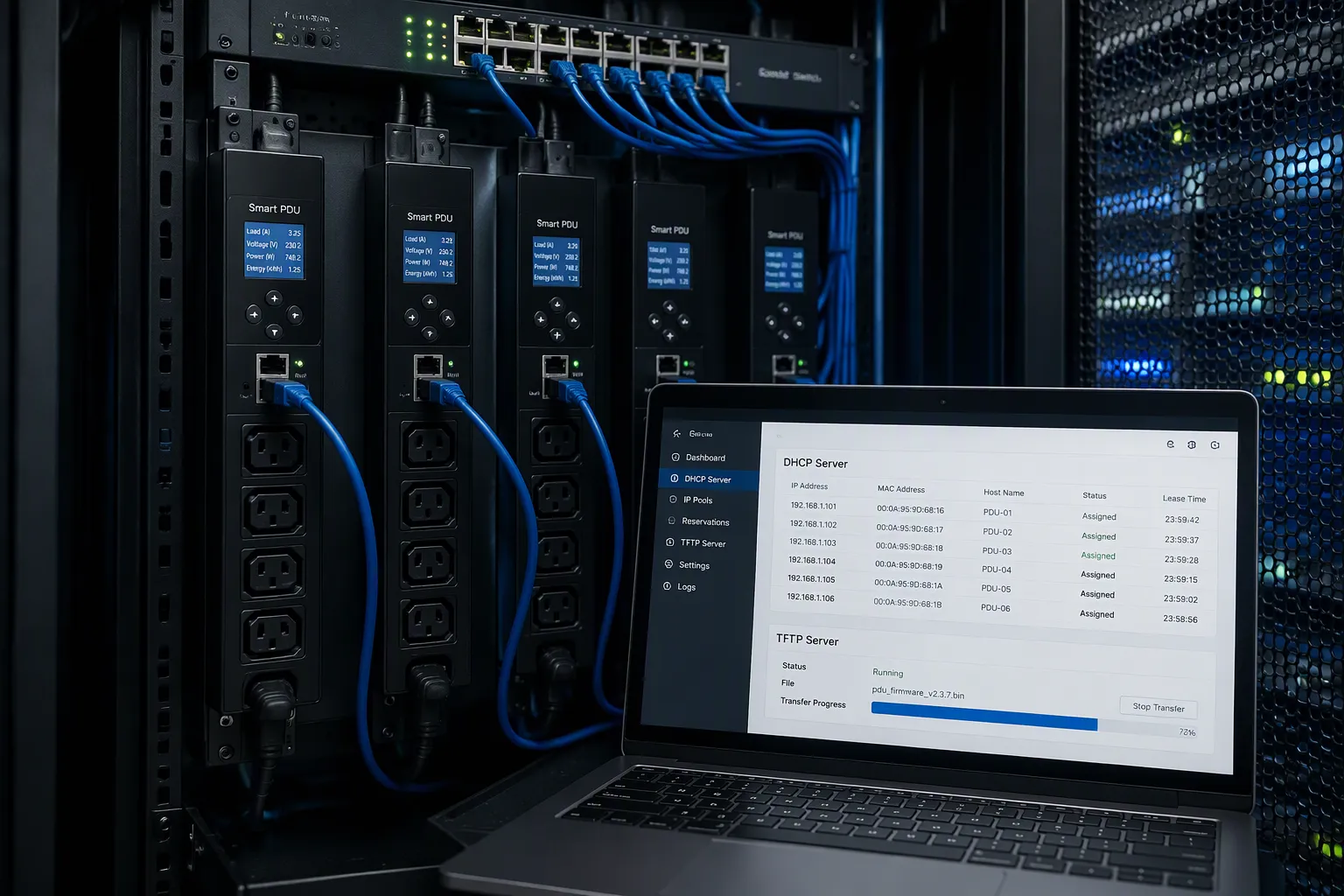
Network-based zero touch configuration removes manual setup from the rack. You connect each unit to the network, and the infrastructure delivers settings automatically. This network based deployment option scales from a single row to an entire data center.
DHCP/TFTP Auto-Push
A tftp and dhcp server pair drives this workflow. DHCP assigns an address to each unit automatically. TFTP then pushes a settings file to each unit on boot. The result is true zero touch configuration: no keyboard, no console cable, no per-unit entry.
Your DHCP scope needs a deliberate allocation method. The table below shows the three choices.
Allocation method | Description |
|---|---|
Manual/static | Client receives a specifically chosen IP address (or keeps its first assigned address until release). |
Dynamic | Server assigns an address from an available pool/scope; the address may change over time based on network dynamics. |
Automatic | Server assigns from its scope but remembers the client-to-address mapping and re-assigns the same address on subsequent requests. |
The setup sequence is short. Power on all the smart pdu devices. Let DHCP assign an IP address to each device automatically. Run a script or use management software to push mass configuration to the devices.
Preparation carries the real weight. You must deploy a DHCP server, deploy and route power strip subnets and VLANs, place and test every Ethernet patch cable, and provision every Ethernet port on the out-of-band network switch. The DHCP/PXE service safely recognizes and boots the PDU, identifies its address, and the TFTP server pushes the desired settings. This method lets you configure hundreds or even thousands of pdus nearly all at once. It also demands the most upfront network work of the three paths. Verify each unit after the push. Check that the settings match your template and that telemetry reaches your management platform.
Configure PDUs Remotely with SSH
SSH gives you a second network path. You can configure pdus remotely through the command line, and you can script bulk parameter changes across many units. SSH is embedded by default on many platforms, so you can save and restore known-good settings individually or in bulk. Backups, firmware upgrades, and system restores also travel over the network.
Start with a single connection before you scale. Connect an Ethernet cable between the NET MGT port and the host. Configure the SSH application with the unit's IP address. Log in as an admin or user when prompted. Familiarize yourself with the CLI command options before issuing commands.
Automation goes further with an open api. JSON RPC binds languages such as Python, Perl, and JavaScript to device features, so scripts can automate outlet switching, power data access, alarms, and thresholds. Vendor SDKs with pre-integrated bindings let you customize scripts rather than build from scratch. One case study showed CLI-based per-device setup cost $1,600 for a 200-unit fleet, while USB mass deployment cost $200. Bulk methods beat per-device scripting on large fleets. ESTEL's Smart Power Distribution Unit includes remote management capability, so it fits this workflow. Teams that rapidly configure intelligent rack pdus through SSH still gain from a tested script library and a validated configuration template. The same discipline helps administrators who configure their pdus in mixed fleets of intelligent pdus, where one script must handle several models.
USB Configuration Cloning

USB cloning moves the settings file by hand. You upload a configuration file to a USB flash drive, then plug the drive into each PDU. The unit reads the file and applies it automatically. No network path is required at any point. This makes USB cloning a practical choice for air-gapped racks and small batches where a network push is not available.
Preparing the Configuration File
Build the file from a known-good unit. Configure one smart pdu exactly as you want it, then export that profile to the drive. Name the file clearly and keep a master copy off the drive. Test the profile on a spare unit before you touch production hardware. A single wrong outlet state copied across a batch multiplies fast.
The PDU Linking feature speeds this work further. You configure a single Primary PDU, then link multiple link units to it. The link units inherit the setup with the exact settings desired, so you clone once and propagate many times. This cuts the per-unit effort well below a full manual entry pass.
Security deserves attention here. An air gap blocks outside access, but it does not remove internal risk. Manual transfers through USB drives open a channel for malware to enter the isolated network. One careless action can compromise the whole environment. The isolated system also lacks easy access to external threat intelligence, so it may not recognize new internal attacks or vulnerabilities.
The Stuxnet malware incident, disclosed in 2010, demonstrated that air-gapping is not a guaranteed defense. A single USB stick delivered malware into an air-gapped Windows network at Iran's Natanz uranium enrichment facility. The takeaway is that air-gap security requires multiple safeguards — the air gap alone should not be assumed sufficient.
Scan every drive before use and keep a dedicated, controlled set of cloning drives.
When USB Cloning Fits Best
USB cloning suits three situations. The first is an isolated rack with no management network. The second is a small batch where a DHCP and TFTP build-out costs more than the job is worth. The third is a field replacement, where a technician swaps a failed unit and restores the desired configuration on the spot.
ESTEL's Smart Power Distribution Unit shows how this works in practice. The LCD display confirms each applied setting at the rack, so the technician verifies the result without a laptop. One profile can serve every unit of the same model. Teams that manage mixed fleets of intelligent pdus should keep one validated profile per model. Label each drive with its target model and firmware version. That habit prevents a pre-determined configuration from landing on the wrong hardware.
Batch Firmware Upgrades
Remote Network Upgrades
A remote batch upgrade starts with preparation. Download the latest firmware ZIP file to a network-accessible directory. Confirm the file matches your PDU model and hardware revision. Then point your management tool at that directory and let it update many units at once. This approach lets you push firmware upgrades in bulk across your data center without visiting each rack.
Stage the change before you commit the fleet. Apply the update to one unit first and confirm it succeeds before rolling it out to the remaining PDUs.
When updating firmware across multiple PDUs, the recommended best practice is to first apply the update to one unit and confirm it succeeds before rolling it out to the remaining PDUs.
After the upgrade, verify three things: power state, communications, and records. Check that outlets return to their expected states, that each unit answers on the network, and that your asset records show the new version. The table below pairs common risks with mitigations worth planning for.
Risk | Description | Mitigation Strategy |
|---|---|---|
Operational Disruption | Attackers can remotely power down servers, causing outages and data loss | Firmware Management: regularly update PDU firmware to patch known vulnerabilities |
Physical Damage | Repeated power cycling can degrade or destroy sensitive hardware | Network Segmentation: isolate PDUs from public networks and restrict access to authorized personnel |
Network Infiltration | Compromised PDUs can act as entry points into the broader IT environment | Access Controls: enforce strong authentication and role-based access to PDU interfaces |
USB Updates for Isolated Racks
Some racks have no network path at all. For those, USB firmware updates are the practical option. Copy the firmware file to a USB drive, plug the drive into the intelligent PDU, and let the unit apply the update locally. This keeps isolated racks current without opening a network route.
Treat each drive as a controlled tool. Label it with the target model and firmware version, and scan it before use. Keep one validated configuration profile per model so a replacement unit returns to service quickly. Teams running mixed fleets of intelligent pdus should document which drive serves which hardware. That habit keeps upgrades predictable across every isolated rack.
Cascading Controllers and Cost Comparison
Reducing IP Drops with Daisy Chains
Every networked PDU needs an address, a switch port, and a cable run. Cascading controllers changes that math. You designate one Primary unit and connect the remaining Link units to it. The chain shares a single primary IP address, so the whole group consumes one drop instead of many.
Daisy-chaining connects the primary network ports of up to 32 units in a redundant ring configuration through the standard IP cascading interface, which minimizes physical switch port usage.
Under the standard TCP/IP stack, up to 32 units can be cascaded safely using a single primary IP address via standard Ethernet looping.
Multi-Unit Linking & Cascading: Daisy chain up to 16 PDUs from a primary PDU using a USB or Ethernet connection through a single IP address.
Vendor limits vary, so confirm the supported count for your model. Raritan NX1 models support daisy-chaining up to 31 Smart Ready PDUs via RS485 to a single Smart Node controller. ServerTech states that up to 16 PDUs can be daisy-chained from a primary PDU using a USB or Ethernet connection through a single IP address. Cascading also simplifies management. You reach every link unit through the primary, so routine checks happen without an on-site visit.
Calculating Savings per Rack
Picture a 100-unit rollout. With a network push, you build DHCP and TFTP services once, then let each unit pull its settings on boot. The upfront engineering is heavy, and the per-unit effort is near zero. With USB cloning, you skip the network build entirely and spend time at each rack instead. Cascading sits between them: one address per chain, one configuration pass per primary, and far fewer switch ports to provision.
No single mass deployment method wins everywhere. Network zero touch configuration fits large connected sites. USB cloning fits isolated racks and small batches. Cascading controllers fit dense racks where IP space and switch ports are scarce. Weigh your address budget, your site access, and your batch size before you commit. That comparison turns a vague preference into a defensible plan for your next mass deployment and configuration cycle. Teams running many intelligent rack pdus often combine all three, and the mix keeps each pdu deployment predictable from the first rack to the last.
Match the method to your site. Choose network-based zero-touch configuration for large, connected rollouts. Use USB cloning for isolated racks or small batches. Add cascading controllers to cut IP overhead and simplify management of your intelligent pdus.
Run this checklist before your next batch deployment:
Confirm the firmware baseline for every model.
Validate the configuration template on a spare unit.
Back up settings before any upgrade.
Write and test the rollback plan.
Your smart pdu deployment then stays predictable from the first rack to the last. Review ESTEL's Smart Power Distribution Unit documentation at outdoortelecomcabinet.com, or contact the team to schedule a deployment planning session.
FAQ
Which method should you choose for a large, connected rollout?
Use network-based zero-touch configuration. DHCP assigns each address, and TFTP pushes the settings file on boot. You build the services once, then each unit configures itself. This path demands the most upfront network work, yet it delivers near-zero per-unit effort at scale.
When does USB cloning make more sense?
Choose USB cloning for air-gapped racks, small batches, or field replacements. You export a known-good profile to a drive, then plug it into each unit. No network path is required. Label every drive with its target model and firmware version to prevent mismatches.
How do cascading controllers reduce IP overhead?
You designate one Primary unit and connect the Link units to it. The chain shares a single primary IP address, so a group consumes one drop instead of many. Confirm the supported unit count for your model, since vendor limits vary.
What should you verify after a batch firmware upgrade?
Check three things: power state, communications, and records. Confirm each pdu returns outlets to their expected states, answers on the network, and shows the new version in your asset records. Apply the update to one unit first before rolling it out to the fleet.
What belongs on your pre-deployment checklist?
Confirm the firmware baseline for every model, validate the configuration template on a spare unit, back up settings before any upgrade, and write and test the rollback plan. These four steps keep each batch predictable from the first rack to the last.
See Also
Understanding ESTEL PDUs And Their Function In Data Center Cabinets
Simple Guide To Organizing Cables In Data Center Cabinets
How To Optimize Outdoor Cabinets With Power Cooling And Monitoring
Ensuring Reliable Power Supply For Telecom Cabinets Explained
Smart And Sustainable Outdoor Communication Cabinets For 2025
CALL US DIRECTLY
86-13752765943
3A-8, SHUIWAN 1979 SQUARE (PHASE II), NO.111, TAIZI ROAD,SHUIWAN COMMUNITY, ZHAOSHANG STREET, NANSHAN DISTRICT, SHENZHEN, GUANGDONG, CHINA
